Restrict a payment gateway to selected currencies #
To restrict a payment gateway to selected currencies in Payment Gateway Currency for WooCommerce, go to WPFactory > Payment Gateway Currency > Restrict Currency, tick Restrict currency, fill in Allowed currencies, Denied currencies, or both for each gateway, and save. This mode shows or hides gateways by store currency without converting prices.
Where to find it #
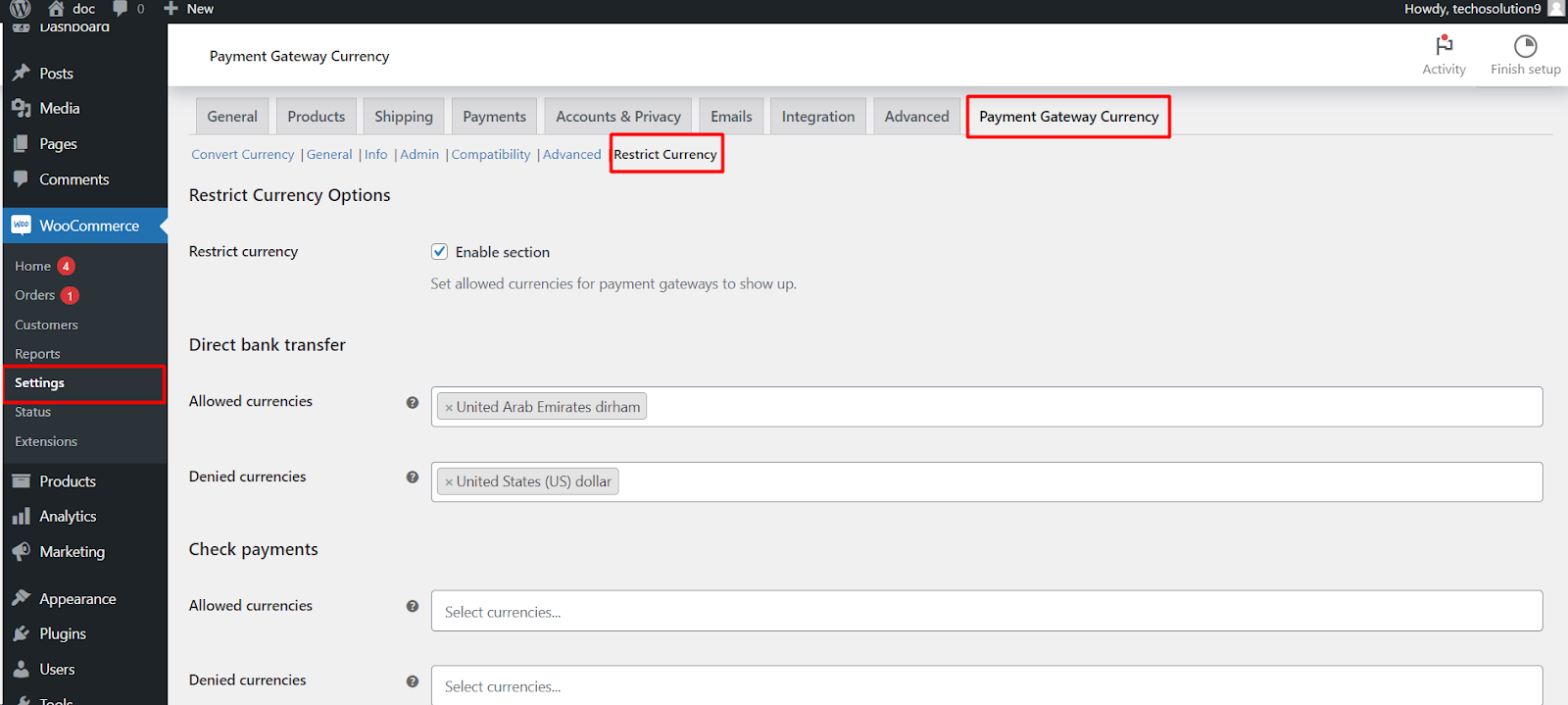
Go to WPFactory > Payment Gateway Currency (also reachable at WooCommerce > Settings > Payment Gateway Currency), then open the Restrict Currency tab.
Set it up #
- Tick Restrict currency (the “Enable section” checkbox, stored as
alg_wc_payment_gateways_by_currency_plugin_enabled, defaultNo). - For each gateway, fill in Allowed currencies, Denied currencies, or both.
- Save changes.
Allowed vs Denied #
| Field | Stored key | Behavior |
|---|---|---|
| Allowed currencies | alg_wc_payment_gateways_by_currency_incl[{gateway}] |
The gateway shows ONLY for the selected currencies. Empty means the field is ignored. |
| Denied currencies | alg_wc_payment_gateways_by_currency_excl[{gateway}] |
The gateway is hidden for the selected currencies. Empty means the field is ignored. |
Note: these fields store legacy option keys (alg_wc_payment_gateways_by_currency_*) rather than the alg_wc_pgbc_* prefix used elsewhere. The labels in the admin read “Allowed currencies” and “Denied currencies”.
Example #
To accept Direct bank transfer and Cash on delivery only in USD and EUR, set both gateways’ Allowed currencies to USD and EUR. When the store currency is anything else, those gateways disappear at checkout.
Before you start #
- The available currency choices come from WooCommerce (WooCommerce > Settings > General > Currency) and your currency switcher, not from this plugin.
- The free version restricts the five standard gateways (Direct bank transfer, Check payments, Cash on delivery, PayPal, WooCommerce PayPal Payments). Other gateways need Pro.
Get more control #
Restricting the standard gateways is free. Payment Gateway Currency for WooCommerce Pro lets you set allowed and denied currencies for any gateway on your store. See what Pro unlocks.