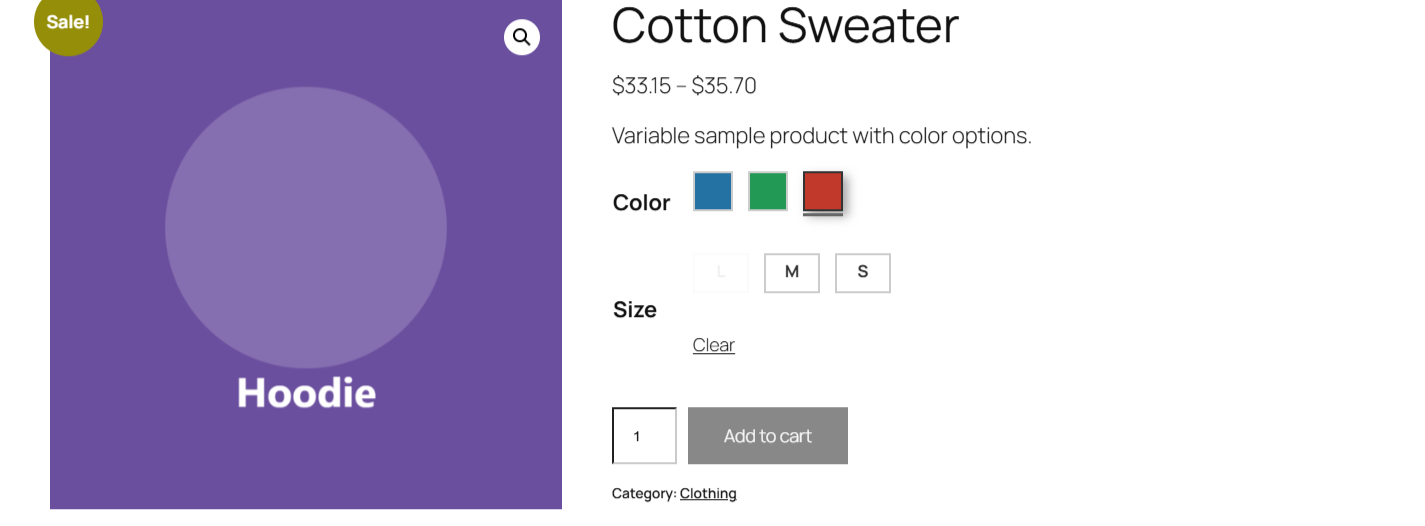
To show only valid variation combinations with Variation Swatches for WooCommerce – Color & Image Swatches Pro, go to WooCommerce > Settings > Variation swatches, tick Only valid combinations, and save. After a shopper picks one swatch, swatches that would lead to a variation you do not sell are greyed out. This Pro option is on by default.
Before you start #
- WooCommerce, active.
- Variation Swatches Pro (this is a Pro feature).
- A variable product with two or more swatch attributes, where not every combination exists.
How it works #
When a customer selects a swatch for one attribute, the plugin checks which options remain possible for the other attributes and disables the swatches that would lead to a non-existent variation. Disabled swatches get the disabled CSS class so they appear dimmed and cannot be chosen. This runs on top of WooCommerce’s own variation matching, so it always reflects the variations you have actually created.
Turn it on #
- Go to WooCommerce > Settings > Variation swatches.
- Tick Only valid combinations.
- Save changes.
| Label | Option ID | Type | Default | Free/Pro |
|---|---|---|---|---|
| Only valid combinations | alg_wc_civs_possible_combinations |
Checkbox | Yes | Pro |
This option is on by default in Pro. If you would rather let shoppers click any swatch and see WooCommerce’s standard “not available” message, untick it.
Troubleshooting #
- No swatches are greyed out: confirm the option is ticked, and that the product genuinely has missing combinations. If every combination exists, nothing is disabled.
- Everything stays clickable: the disabling runs in the browser. Clear any page or JavaScript cache after enabling the option, and check that your theme is not blocking the plugin’s script.
Ready to set this up? #
Only valid combinations is a Pro feature of Variation Swatches. If you are still on the free version, upgrading takes a couple of minutes and unlocks this along with the rest of the Pro toolkit. Get Variation Swatches Pro.