To calculate the WooCommerce cart total for order limits from specific products only, use Order Minimum/Maximum Amount Limits for WooCommerce Pro. Go to WPFactory > Order Min/Max > Cart Total, tick Products in cart total, then choose the products, categories or tags to include or exclude, and save.
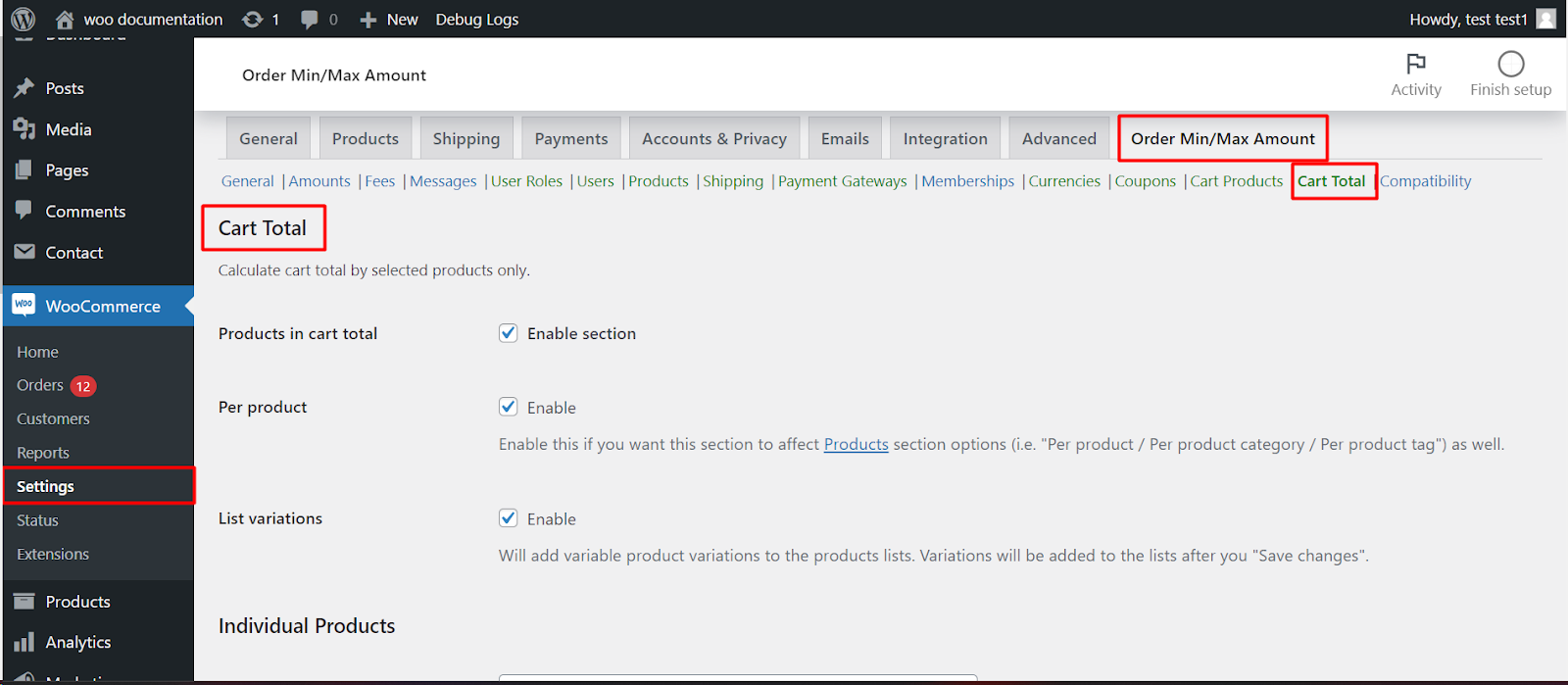
Before you start #
- WooCommerce, active.
- Order Minimum/Maximum Amount Limits for WooCommerce Pro: the Cart Total section is a Pro feature.
Step-by-step #
- Go to WPFactory > Order Min/Max (also reachable at WooCommerce > Settings > Order Min/Max Amount) and open the Cart Total sub-tab.
- Tick Products in cart total (
alg_wc_oma_products_cart_total_enabled) and click Save changes. - In the Individual Products, Product Categories and Product Tags blocks, use Require (include in cart total) to count only the selected items, or Exclude (exclude from cart total) to leave them out.
- Optionally turn on Per product to also apply your per-product, category, and tag limits here, then save.
Options in this section #
| Label | Option ID | Default |
|---|---|---|
| Products in cart total (enable section) | alg_wc_oma_products_cart_total_enabled |
No |
| Per product | alg_wc_oma_products_cart_total_per_product_enabled |
No |
| List variations | alg_wc_oma_products_cart_total_list_variations |
No |
| Individual Products: Require / Exclude | alg_wc_oma_product_include_cart_total, alg_wc_oma_product_exclude_cart_total |
None |
| Product Categories: Require / Exclude | alg_wc_oma_product_cat_include_cart_total, alg_wc_oma_product_cat_exclude_cart_total |
None |
| Product Tags: Require / Exclude | alg_wc_oma_product_tag_include_cart_total, alg_wc_oma_product_tag_exclude_cart_total |
None |
Note: when you limit by Sum, the final value is still affected by the “Sum” Amount Type options (order total vs subtotal, exclusions) on the General tab. With Order sum set to Order total, shipping and fees are added on top of the counted products unless you tick Exclude shipping and Exclude fees.
How the calculated cart total works #
For every cart item, Order Min/Max Amount decides whether it counts. An item is left out when a Require list has entries and the item is not in it, or when the item is in an Exclude list. For categories and tags, a variation is judged by its parent product. The remaining items are then added up for each amount type you use: sum, quantity, weight, dimensions, number of products, categories or tags.
Example: your minimum order is 50 and you set Product Categories > Require to “Wine”. A cart with 30 in wine and 40 in snacks is measured as 30, so the customer sees the minimum message until the wine reaches 50.
Common uses #
- Minimum for one brand or range: Require the category or tag, so other items do not help reach the minimum.
- Leave gift cards or samples out: Exclude those products so they never count toward the limit.
- Maximum on a restricted line: Require the restricted category with a maximum quantity, while the rest of the cart is unlimited.
If it does not work #
- The section checkbox Products in cart total is off, or you are on the free version.
- A variation does not appear in the product list. Tick List variations and save; the variations are added to the lists after saving.
- Your per-product, category or tag limits ignore the selection. They only use it when Per product is on.
- The sum still looks too high. Check the Sum options on the General tab: shipping, fees and taxes can be included.
FAQ #
Is this the same as excluding products from the limits? #
No. Cart Total changes how the total is measured, but the limit still applies. To switch the limits off completely when certain products are in the cart, use Cart Products.
Can I combine products, categories and tags? #
Yes. All three blocks are checked, and an item must pass every list you filled in to be counted.
Does the customer see the reduced total? #
The cart and order totals do not change. Only the value used for your min/max check changes, and message placeholders such as %total% show that value. See choose what counts toward the order total for the Sum options.
Ready to set this up? #
Selective cart-total calculation is part of Order Min/Max Amount Pro. Get Order Min/Max Amount Pro.
Need a hand? Our team answers every ticket on the Order Min/Max Amount support forum.