Table of Contents
To stop customers adding more once they reach a maximum, Order Minimum/Maximum Amount Limits for WooCommerce can validate the maximum the moment an item is added, and even hide the add to cart button on shop and product pages. These maximum-amount controls are free and live on the General tab.
Before you start #
- WooCommerce, active, with Order Minimum/Maximum Amount Limits for WooCommerce installed.
- A maximum limit set in the Amounts sub-tab (otherwise there is nothing to enforce).
Step-by-step #
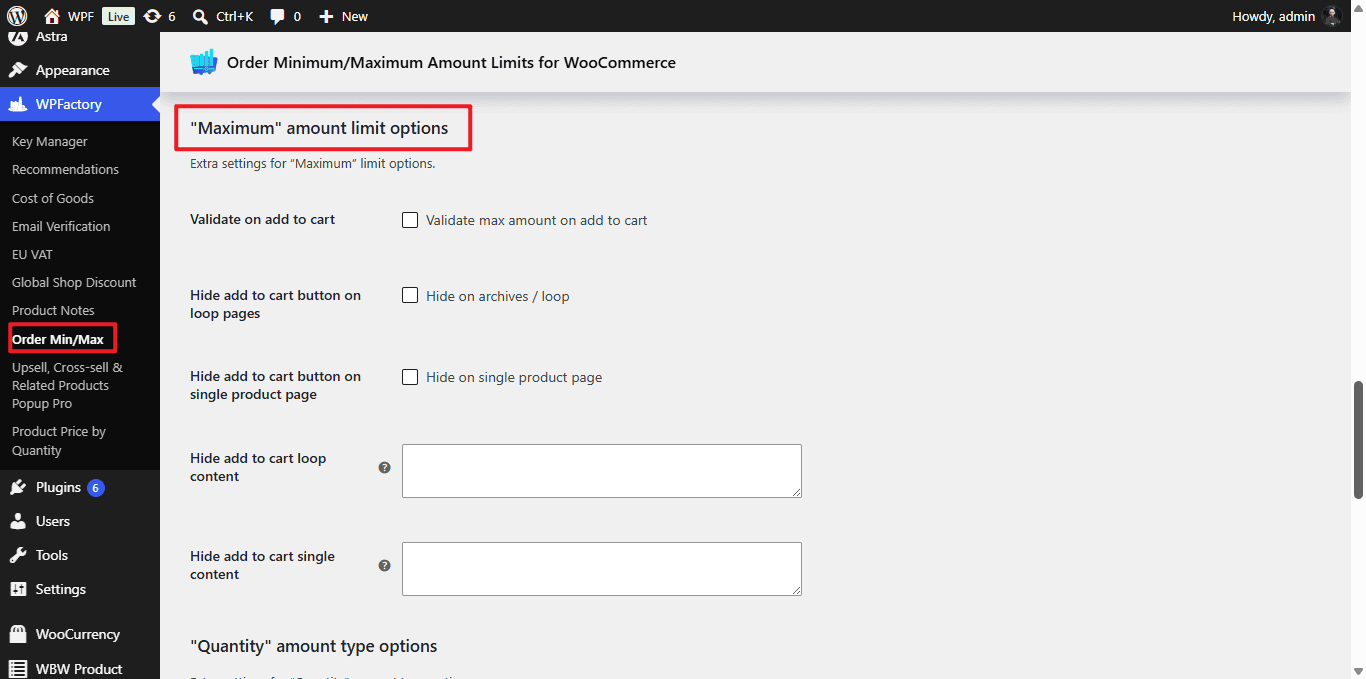
- Go to WPFactory > Order Min/Max (also reachable at WooCommerce > Settings > Order Min/Max Amount) and open the General tab.
- Scroll to “Maximum” amount limit options.
- Turn on the controls you want (see the table), then click Save changes.
Options #
| Label | Option ID | Default | What it does |
|---|---|---|---|
| Validate on add to cart | alg_wc_oma_max_validate_on_add_to_cart |
No | Checks the maximum as soon as the customer clicks add to cart. |
| Hide add to cart button on loop pages | alg_wc_oma_max_hide_add_to_cart_loop |
No | Hides the button on shop and archive (loop) pages. |
| Hide add to cart button on single product page | alg_wc_oma_max_hide_add_to_cart_single |
No | Hides the button on the single product page. |
| Hide add to cart loop content | alg_wc_oma_max_hide_add_to_cart_loop_content |
(empty) | Text or HTML shown in place of the button on loop pages. |
| Hide add to cart single content | alg_wc_oma_max_hide_add_to_cart_single_content |
(empty) | Text or HTML shown in place of the button on the product page. |
Use cases #
- Cap a wholesale-only product at a maximum quantity and replace the button with “Contact us for larger orders”.
- Block adding an item to cart the moment the cart would exceed a maximum weight.
Get more control #
These maximum controls are free. Order Minimum/Maximum Amount Limits for WooCommerce Pro adds limits per product, category, user role, shipping method, and more. See what Pro unlocks.