To offer economy and express shipping priced by weight, add Weight-Based Shipping for WooCommerce twice to the same zone. Go to WPFactory > Weight-Based Shipping (also reachable at WooCommerce > Settings > Shipping), open the zone, add the method twice, and give each a different title and tier table.
How two options in one zone work #
Each time you add Weight-Based Shipping to a zone, WooCommerce creates a separate instance with its own settings. Two instances in the same zone both quote a rate, and the customer chooses between them at checkout. This works in every install; there is no Pro-only step.
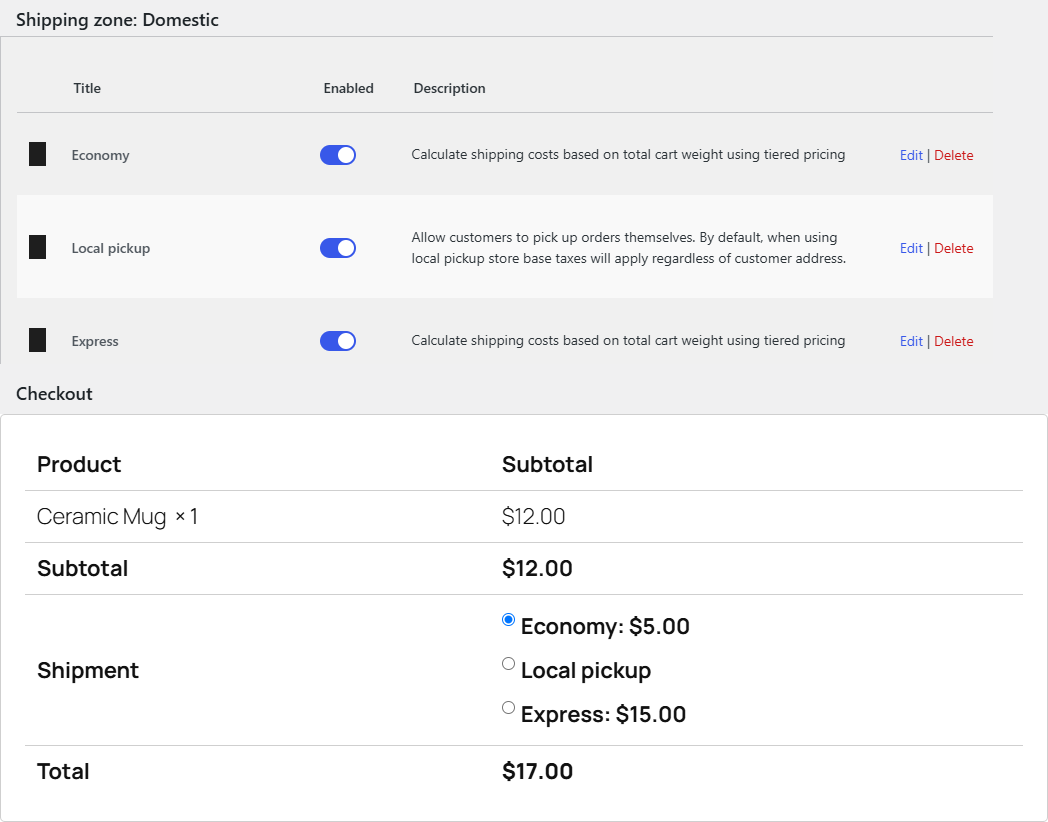
Set up economy and express #
- Go to WPFactory > Weight-Based Shipping (also reachable at WooCommerce > Settings > Shipping) and open the zone.
- Click Add shipping method, choose Weight-Based Shipping and confirm.
- Edit the new method, set Method Title to Economy, enter the economy tiers and save.
- Click Add shipping method again and add a second Weight-Based Shipping method.
- Edit it, set Method Title to Express, enter the express tiers and save.
Example tables #
| Weight range | Economy cost | Express cost |
|---|---|---|
| 0 to 2 | 4.00 | 9.00 |
| 2 to 10 | 7.00 | 15.00 |
| 10 and up | 12.00 | 28.00 |
Useful per-option settings #
| Label | Option ID | Idea |
|---|---|---|
| Method Title | title |
Name each option clearly, for example Economy (5 to 7 days) and Express (1 to 2 days). |
| Free Shipping Cart Total Threshold | free_shipping_amount |
Set it on Economy only, so large orders get free economy delivery while Express stays paid. |
| Maximum Weight Limit | max_weight |
Set it on Express only if your express courier has a lower parcel weight cap. Heavy carts then see only Economy. |
| Handling Fee | handling_fee_enabled |
Add a fixed or percentage fee to one option only. |
Use cases #
- Standard and next-day delivery with two courier price lists.
- A cheap untracked option and a tracked option priced by weight.
- A Freight option with no weight limit alongside a capped parcel option.
Troubleshooting #
- Only one option shows. Check both methods are enabled, and that neither is hidden by its Maximum Weight Limit or by Handle Zero Weight set to Hide shipping method.
- Both options show the same title. The default title is Weight-Based Shipping. Set a different Method Title on each.
- The customer sees a message about maximum weight while Economy is still offered. Expected: the message comes from the instance that withdrew (for example Express). Word it so it makes sense next to the remaining option.
Get Weight-Based Shipping #
Every setting covered here is included in Weight-Based Shipping for WooCommerce, with no locked Pro options. Get Weight-Based Shipping.
Need a hand? Our team answers every ticket on the Weight-Based Shipping support forum.