To set different weight-based shipping rates per zone or country, use Weight-Based Shipping for WooCommerce: go to WPFactory > Weight-Based Shipping (also reachable at WooCommerce > Settings > Shipping), create a zone per region, add the Weight-Based Shipping method to each zone, and give each instance its own tiers.
Why each zone gets its own rates #
Weight-Based Shipping is a zone-based WooCommerce shipping method. Every time you add it to a zone, WooCommerce creates a separate instance with its own settings. Tiers, handling fee, free shipping thresholds and maximum weight are all stored per instance, so a domestic zone and an international zone share nothing. This works in every install; there is no Pro-only step.
Step 1: Create one zone per region #
- Go to WPFactory > Weight-Based Shipping (also reachable at WooCommerce > Settings > Shipping).
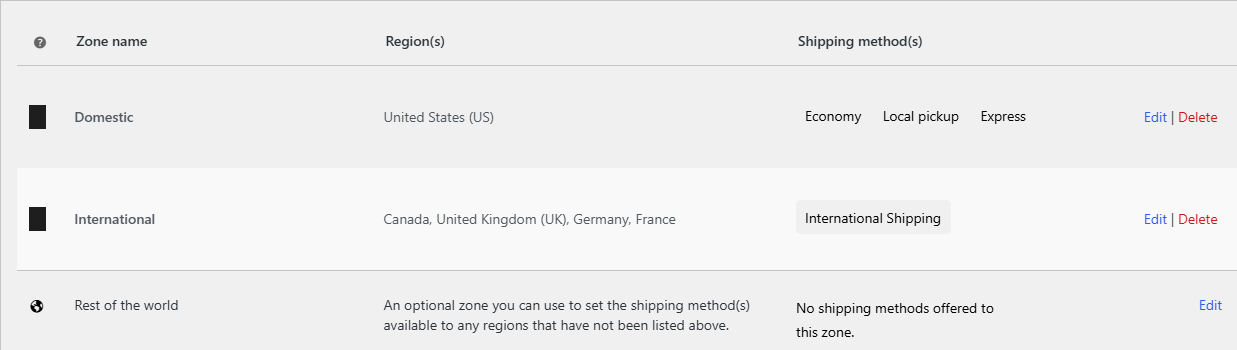
- Add a zone for each region that needs its own prices, for example Domestic, Europe and Rest of world.
- Set each zone’s regions (countries, states or postcodes).
WooCommerce matches each customer address to one zone, checking zones from the top of the list down. Put the most specific zones first.
Step 2: Add Weight-Based Shipping to each zone #
- Open a zone and click Add shipping method.
- Choose Weight-Based Shipping and confirm.
- Click to edit the method, set a Method Title (for example International Shipping) and enter that zone’s tiers.
- Save, then repeat for the next zone.
Example: domestic and international tables #
| Weight range | Domestic zone cost | International zone cost |
|---|---|---|
| 0 to 2 | 4.00 | 12.00 |
| 2 to 10 | 8.00 | 25.00 |
| 10 and up | 15.00 | 45.00 |
You can also combine per-zone differences, for example a free shipping threshold on the domestic zone only, and a Maximum Weight Limit of 30 on the international zone only.
What can differ between zones #
| Label | Option ID | Per zone instance |
|---|---|---|
| Method Title | title |
Yes |
| Weight Tiers | tiers |
Yes |
| Handling Fee, Handling Fee Type, Handling Fee Amount | handling_fee_enabled, handling_fee_type, handling_fee_amount |
Yes |
| Free Shipping Weight Threshold, Free Shipping Cart Total Threshold | free_shipping_weight, free_shipping_amount |
Yes |
| Maximum Weight Limit, Maximum Weight Exceeded Message | max_weight, max_weight_message |
Yes |
| Weight unit | woocommerce_weight_unit (WooCommerce setting) |
No, one unit for the whole store |
Use cases #
- Cheaper domestic rates and higher international rates from the same weight brackets.
- A remote-area zone (by postcode) with a higher table or a fixed handling fee.
- A weight ceiling only on zones where your courier caps parcel weight.
Troubleshooting #
- A customer sees the wrong zone’s price. The address matched a different zone. WooCommerce uses the first matching zone in the list, so move specific zones above broad ones.
- No rate at all for some countries. Those countries are not covered by any zone that has the method. Add them to a zone, or add the method to the Locations not covered by your other zones zone.
- Edited the wrong instance. Each zone’s method is separate. Reopen the zone you are testing and check its tiers.
Tip: to offer two weight-based choices in one zone, see how to offer economy and express weight-based options.
Get Weight-Based Shipping #
Every setting covered here is included in Weight-Based Shipping for WooCommerce, with no locked Pro options. Get Weight-Based Shipping.
Need a hand? Our team answers every ticket on the Weight-Based Shipping support forum.