To offer free shipping over an order amount while charging by weight below it, open Weight-Based Shipping for WooCommerce at WPFactory > Weight-Based Shipping (also reachable at WooCommerce > Settings > Shipping), edit the method in your zone, and enter the amount in Free Shipping Cart Total Threshold.
How the free shipping threshold works #
When the package’s goods total is at or above the Free Shipping Cart Total Threshold, Weight-Based Shipping skips the tier table, charges 0.00 and appends (Free) to the method title at checkout. Below the threshold, the normal weight-based tier cost (plus any handling fee) applies. The threshold is included in every install; it is not a Pro feature.
The goods total is the value of the products in the shipping package, before tax and after coupon discounts. Shipping and taxes are not included.
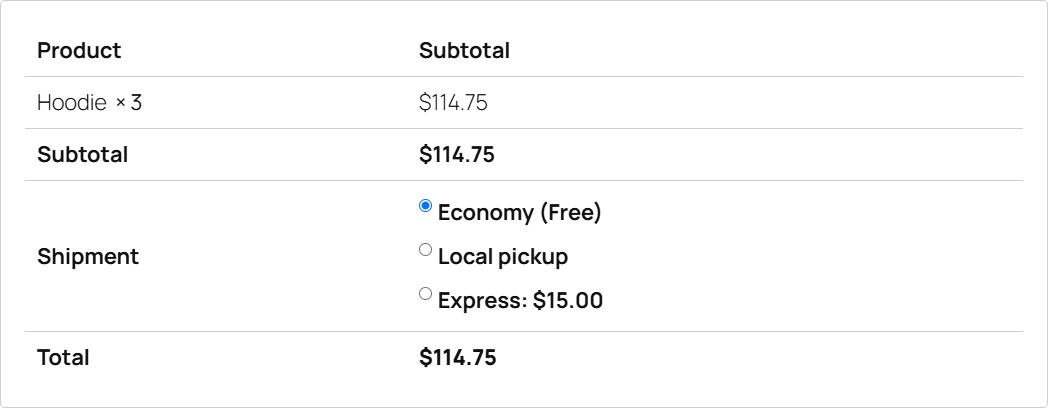
Set up free shipping over an amount #
- Go to WPFactory > Weight-Based Shipping (also reachable at WooCommerce > Settings > Shipping).
- Open the zone and click to edit the Weight-Based Shipping method.
- Make sure your weight tiers are set; they still price every order below the threshold.
- In Free Shipping Cart Total Threshold, enter the amount, for example
100. - Save the method, then test with a cart just below and just above the amount.
Options #
| Label | Option ID | Default | Behavior |
|---|---|---|---|
| Free Shipping Cart Total Threshold | free_shipping_amount |
Empty (off) | Free when the goods total is at or above this amount. |
| Free Shipping Weight Threshold | free_shipping_weight |
Empty (off) | Free when the cart weight is at or above this weight. |
If you set both, either one is enough to make shipping free. There is no way to require both.
Worked example #
Tiers: 0 to 5 costs 8.00, 5 and up costs 15.00. Free Shipping Cart Total Threshold: 100. Handling fee: fixed 2.
- Cart of 60.00, weighing 3 kg: 8.00 tier cost plus 2.00 fee, so shipping is 10.00.
- Cart of 120.00, weighing 7 kg: over the threshold, so shipping is 0.00, labeled
(Free). The handling fee is not added to a free rate.
Other free shipping patterns #
- Free for heavy orders. Use Free Shipping Weight Threshold. Note the direction: it makes carts at or above the weight free.
- Free for light orders. Add a first tier with a cost of 0, for example 0 to 1 at 0.00. See set up your weight tiers.
- Free only in one zone. Set the threshold on that zone’s instance only. See how to set different weight-based rates per zone or country.
Use cases #
- Raise the average order value with a “free shipping over 100” offer.
- Keep weight-based pricing for small orders so heavy, low-value carts still cover their cost.
Troubleshooting #
- The cart total is over the amount but shipping is not free. The threshold compares the goods total before tax and after coupons, not the order total. A 105.00 order total can be under 100 once tax is removed.
- A heavy cart is over the threshold but gets no rate. The Maximum Weight Limit is checked first. An over-limit cart gets no rate from this method, even if it would ship free.
- A free shipping coupon does not make this method free. In WooCommerce, free shipping coupons unlock the built-in Free Shipping method. Use the thresholds here for this method.
Get Weight-Based Shipping #
Every setting covered here is included in Weight-Based Shipping for WooCommerce, with no locked Pro options. Get Weight-Based Shipping.
Need a hand? Our team answers every ticket on the Weight-Based Shipping support forum.