Configuring the filename structure #
Rename Media Files: Improve Your WordPress SEO lets you define a custom filename structure so every uploaded file gets a clear, descriptive, search-friendly name. This guide covers the three Filename structure settings on the General Settings tab and how they work together.
Where the settings live #
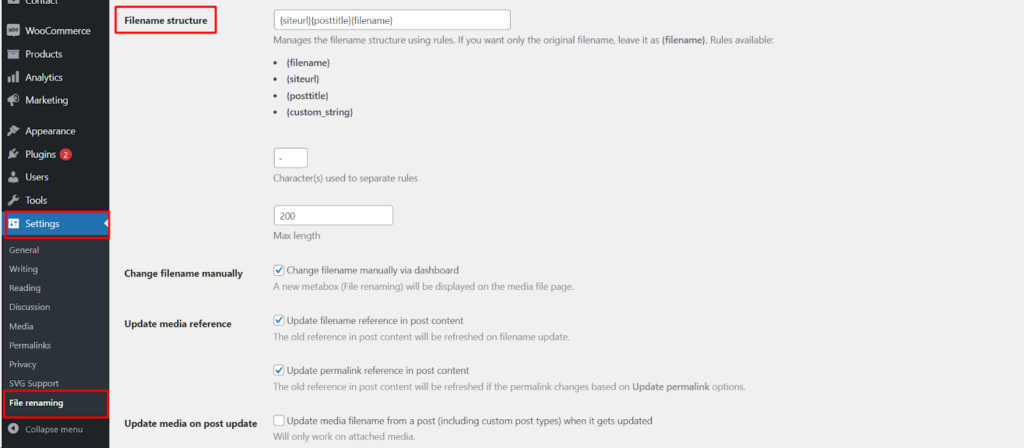
Go to WPFactory > File Renaming in your WordPress admin. The settings page is titled File Renaming on Upload and is split into tabs. The filename structure settings are on the General Settings tab.
The three filename structure settings #
Rename Media Files builds each new filename from a pattern you define in the Filename structure field. Two supporting fields control the separator character and the maximum length.
| Setting | Option ID | Default | Free/Pro |
|---|---|---|---|
| Filename structure | filename_structure |
{siteurl}{posttitle}{filename} |
Free |
| Character(s) used to separate rules | filename_structure_chars_between |
- |
Free |
| Max length | filename_structure_max_length |
200 |
Free |
Filename structure #
The filename_structure field holds the pattern used to build every new filename. You compose it from tokens wrapped in curly braces. The default is {siteurl}{posttitle}{filename}, which produces a name made of your site URL, the parent post title, and the original filename.
Common tokens include {filename} (the original uploaded filename), {siteurl} (your site URL), and {posttitle} (the title of the post the file is attached to). Each token has to be enabled on the Rules tab before it takes effect in the structure. For the full list of available tokens, see the placeholders reference.
Character(s) used to separate rules #
The filename_structure_chars_between field sets the character placed between the parts of the filename. The default is a hyphen (-). You can change it to an underscore or any other separator you prefer.
Max length #
The filename_structure_max_length field caps the number of characters in the generated filename, preventing excessively long names. The default is 200.
Get more control #
The core renaming rules are free. Rename Media Files: Improve Your WordPress SEO Pro adds manual filename and permalink editing, bulk renaming of existing media, automatic ALT text and titles, custom field, taxonomy and SKU rules, and more. See what Pro unlocks.