Table of Contents
Rename Media Files: Improve Your WordPress SEO includes a Compatibility tab that keeps renaming from interfering with a few plugins that handle their own file uploads. The Compatibility tab is a Pro-only feature. This guide covers each option and what it does.
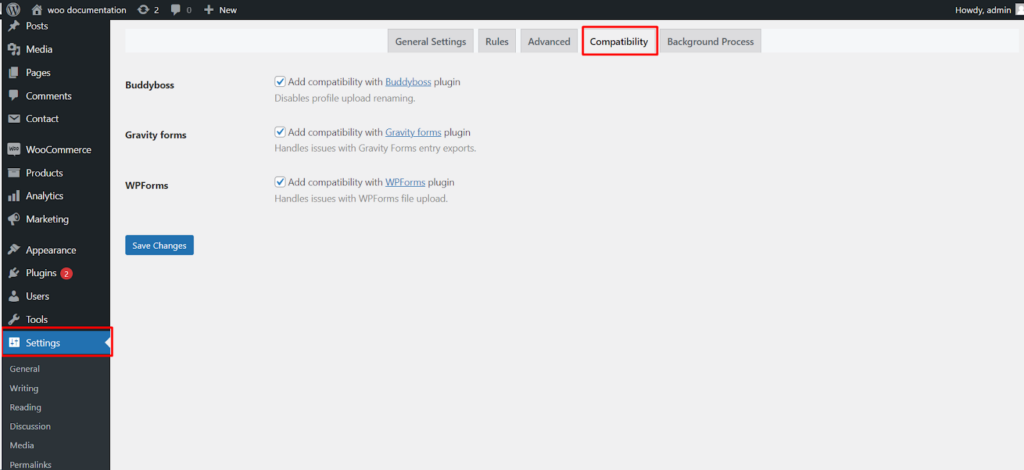
Where the settings live #
Go to WPFactory > File Renaming in your WordPress admin. The settings page is titled File Renaming on Upload. Open the Compatibility tab, which is added by Pro.
Compatibility options #
Each option targets one plugin and is off by default. Turn on the ones that match the plugins you run.
- Buddyboss:
buddybossdisables renaming for BuddyBoss profile uploads, preventing conflicts with profile and cover images. - Gravity forms:
gravityformsfixes Gravity Forms entry exports so file upload fields continue to work correctly. - WPForms:
wpformsfixes WPForms file uploads so submitted files are handled correctly.
Options reference #
| Setting | Option ID | Default | Free/Pro |
|---|---|---|---|
| Buddyboss | buddyboss |
Off | Pro |
| Gravity forms | gravityforms |
Off | Pro |
| WPForms | wpforms |
Off | Pro |
Ready to set this up? #
This is a Pro feature of Rename Media Files. If you are still on the free version, upgrading unlocks this along with the rest of the Pro toolkit. Get Rename Media Files Pro.