To control your download ZIP, go to WPFactory > Download plugins and Themes and use the Directory and Version sections. Add plugin directory and Add theme directory keep or drop the main folder, and Append plugin version and Append theme version add the version to the filename. These settings are free in Download Plugins and Themes in ZIP from Dashboard.
Where the settings are #
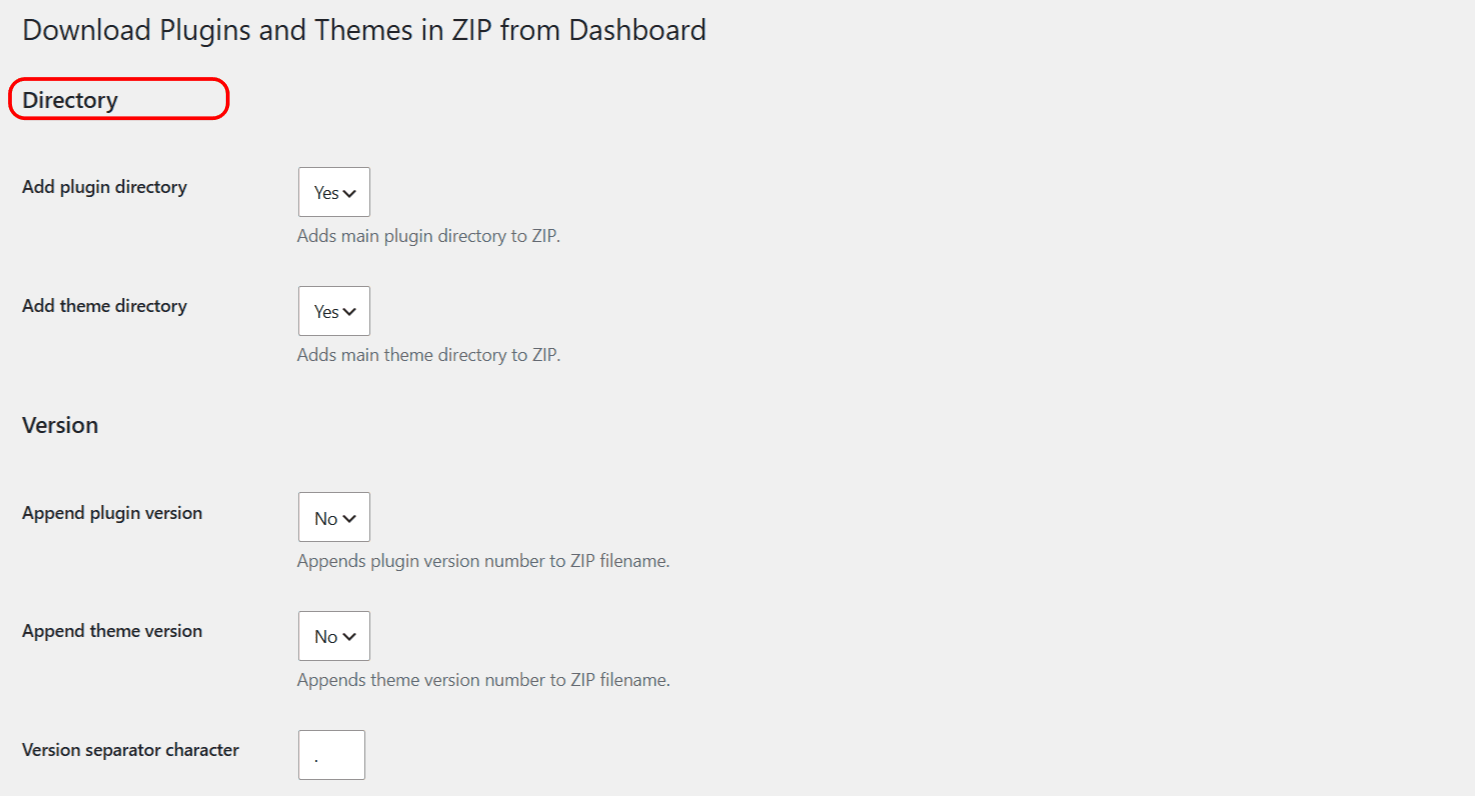
Go to WPFactory > Download plugins and Themes in your WordPress admin. The options below are in the Directory and Version sections at the top of the page.
Directory options #
Add plugin directory and Add theme directory decide whether the top-level folder is kept inside the ZIP.
- Set to Yes (the default) to include the main folder, so the ZIP unzips to
my-plugin/..., ready to re-install. - Set to No to store the inner files only, without the wrapping folder.
Version options #
Append plugin version and Append theme version add the version number to the ZIP filename, which is handy for keeping track of releases.
- With Append plugin version set to Yes, a download becomes
my-plugin.2.1.0.zipinstead ofmy-plugin.zip. - Version separator character sets the single character placed between the name and the version. The default is a dot (
.), somy-pluginat version2.1.0becomesmy-plugin.2.1.0.zip.
Options reference #
| Label | Option key | Type | Default | Free/Pro |
|---|---|---|---|---|
| Add plugin directory | alg_download_plugins_dashboard_plugins_add_main_dir |
Yes / No | Yes | Free |
| Add theme directory | alg_download_plugins_dashboard_themes_add_main_dir |
Yes / No | Yes | Free |
| Append plugin version | alg_download_plugins_dashboard_plugins_append_version |
Yes / No | No | Free |
| Append theme version | alg_download_plugins_dashboard_themes_append_version |
Yes / No | No | Free |
| Version separator character | alg_download_plugins_dashboard_version_separator_char |
Text (1 character) | . |
Free |
Click Save settings after changing anything. Settings apply to future downloads only.
Get more from Download Plugins and Themes #
These packaging options are free. Download Plugins and Themes in ZIP from Dashboard Pro adds scheduled downloads, date and time in the filename, and bulk selected downloads. See what Pro unlocks.