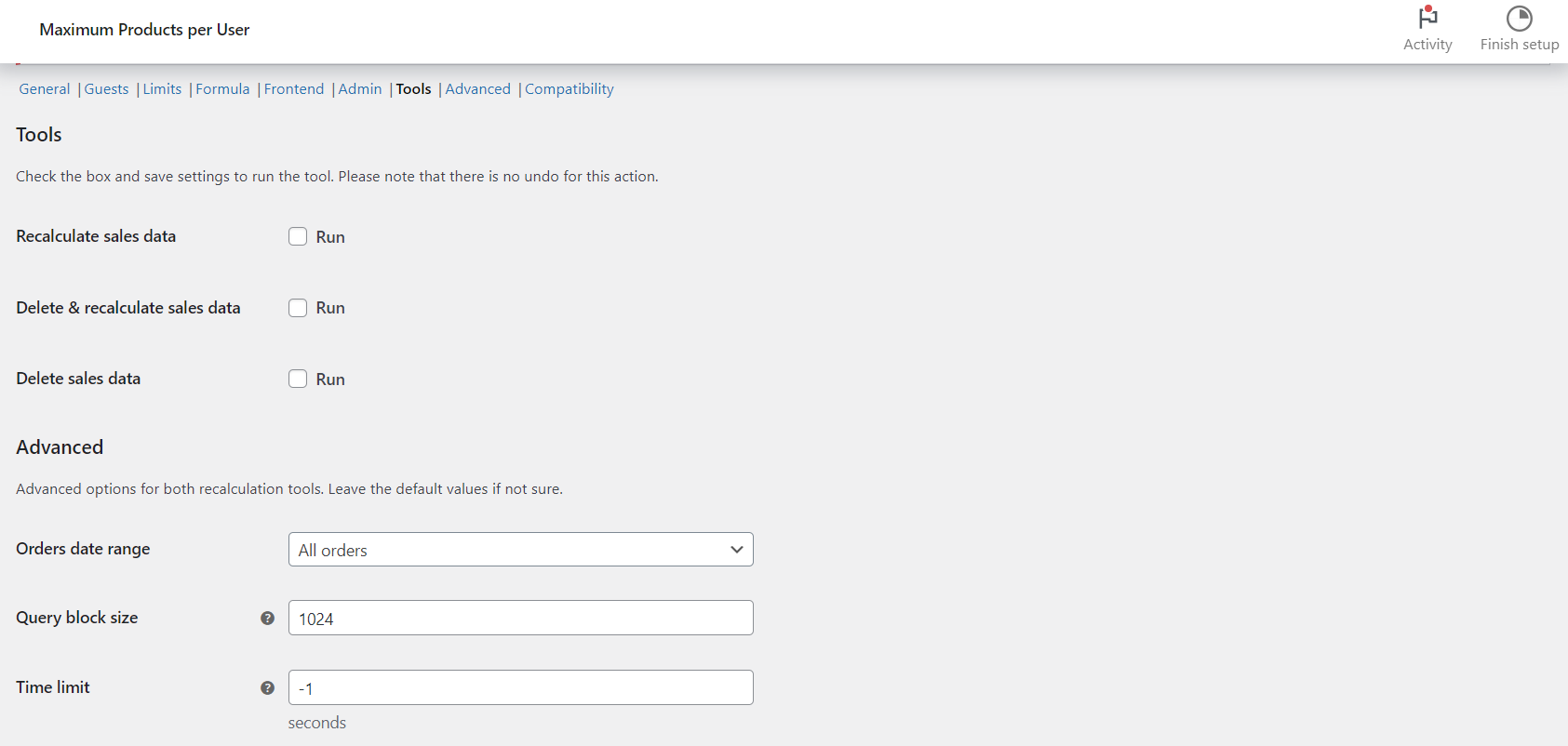
To recalculate or reset the sales data behind your limits in Maximum Products per User for WooCommerce, go to WPFactory > Max Products per User > Tools, tick the tool you need and click Save changes. The plugin rebuilds each customer’s totals from past orders, or wipes them to start fresh. These tools are free.
When you need this #
- You installed the plugin on an existing store and want past orders to count.
- You changed Mode, Date range or Order statuses and need stored totals to match.
- You want to clear all calculated data and begin counting from now.
Where to find it #
Go to WPFactory > Max Products per User (also reachable at WooCommerce > Settings > Maximum Products per User), then open the Tools section.
The three tools #
| Tool | Option ID | What it does |
|---|---|---|
| Recalculate sales data | alg_wc_mppu_tool_recalculate |
Rebuilds totals from existing orders. |
| Delete & recalculate sales data | alg_wc_mppu_tool_delete_recalculate |
Clears stored data, then rebuilds it. |
| Delete sales data | alg_wc_mppu_tool_delete |
Clears the plugin’s calculated data (not your orders). |
Step by step #
- Tick the tool you want to run.
- Click Save changes. The tool runs on save; there is no undo.
- For large stores, use the Advanced tool options: set Query block size, Time limit and Loop function, or limit to orders within your date range. Large jobs run as a background process and can email you when done.
Note: “Delete sales data” removes only the figures the plugin calculated for limits. Your WooCommerce orders are never touched.
If the tool times out or shows an error 500 #
On stores with many orders, the recalculation can take longer than your server allows for one request, which ends in a timeout or an error 500. Try these steps in order, running the tool again after each one. All options are in the Advanced block of the Tools section.
- Set Orders date range to Only orders in “General > Date range” so orders outside your limit period are skipped. The default is All orders.
- Lower Query block size (default 1024 orders per query), for example to 256.
- Set Time limit to
0for no time limit. The default-1keeps your server’s own limit, which the option shows next to it. - Try the other Loop function: WooCommerce specific (wc_get_orders) is the default, WordPress standard (WP_Query) is the alternative.
- If Delete sales data is the step that times out, tick Sales deletion options > Delete sales using Async request so the removal runs in the background.
When a query finds more orders than Advanced > Minimum amount (default 50), the recalculation is handed to a background process that keeps running after the page reloads. Send email in the same section (on by default) emails you when it finishes, so wait for that email before testing your limits. If the error 500 continues, ask your host for the PHP error log entry at the time you ran the tool.
Get more control #
The recalculation tools are free in Maximum Products per User for WooCommerce. Pro adds per-product, per-category and formula limits. See what Pro unlocks.