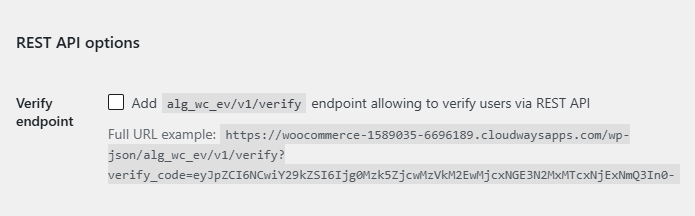
To verify users through the REST API, go to WPFactory > Email Verification (also reachable at WooCommerce > Settings > Email Verification), open the Advanced sub-tab, and tick Verify endpoint. Then send a GET request to /wp-json/alg_wc_ev/v1/verify with the verify_code parameter. This is a Pro feature of Customer Email Verification for WooCommerce.
Before you start #
- WooCommerce, active.
- Customer Email Verification for WooCommerce Pro.
- A verification code for the account you want to verify. This is the same
verify_codethe plugin puts in its activation links.
Turn on the endpoint #
- Go to WPFactory > Email Verification (also reachable at WooCommerce > Settings > Email Verification) and open the Advanced sub-tab.
- In the REST API options group, tick Verify endpoint (option
alg_wc_ev_rest_api_verify_endpoint). - Click Save changes.
Call the endpoint #
The endpoint is registered under the alg_wc_ev/v1 namespace and accepts a GET request:
GET https://your-store.com/wp-json/alg_wc_ev/v1/verify?verify_code=THE_CODE| Detail | Value |
|---|---|
| Method | GET |
| Route | /wp-json/alg_wc_ev/v1/verify |
| Required parameter | verify_code |
Responses #
- 200:
{ "message": "Account verified successfully." } - 400 (
no_verify_code): theverify_codeparameter was missing or empty. - 500 (
error): verification failed, for example the code was invalid or already used.
Note: the endpoint is public (no authentication) because the verify_code itself is the secret. Treat the code like a one-time token and send it over HTTPS.
Ready to set this up? #
The REST API endpoint is a Pro feature of Email Verification. If you are still on the free version, upgrading unlocks it along with the rest of the Pro toolkit. Get Email Verification Pro.