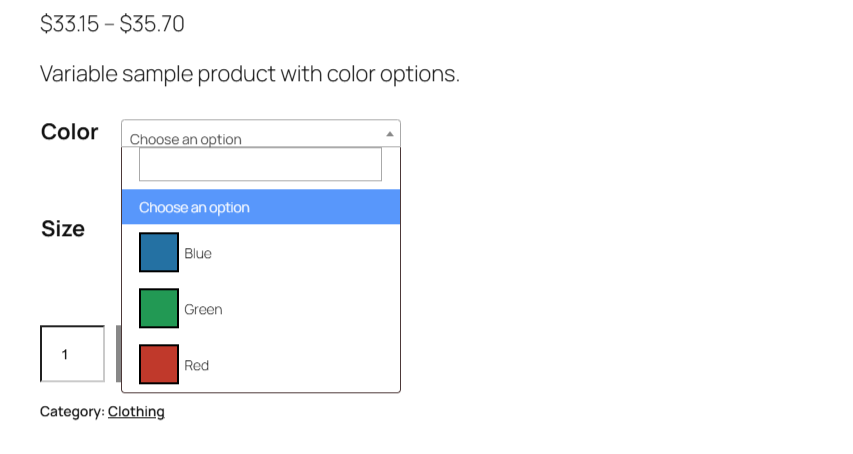
To use Select2 dropdowns for WooCommerce variations, go to WooCommerce > Settings > Variation swatches in Variation Swatches for WooCommerce – Color & Image Swatches Pro, tick Use Select2, keep Load Select2 ticked, and save. Attribute selectors on variable product pages become searchable menus showing each swatch next to its name.
Before you start #
- WooCommerce, active.
- Variation Swatches Pro (this is a Pro feature).
- A variable product. Select2 is applied on the single product page for variable products only.
Turn it on #
- Go to WooCommerce > Settings > Variation swatches.
- In the Select2 section, tick Use Select2.
- Leave Load Select2 ticked (the default).
- Click Save changes.
| Label | Option ID | Type | Default | Free/Pro |
|---|---|---|---|---|
| Use Select2 | alg_wc_civs_use_select_2 |
Checkbox | No | Pro |
| Load Select2 | alg_wc_civs_enqueue_select_2 |
Checkbox | Yes | Pro |
How the two options work together #
Use Select2 is the switch that replaces the attribute selectors with a Select2 menu on variable product pages. Load Select2 loads the Select2 library (script and stylesheet) that the menu needs, from the cdnjs content delivery network.
Keep both options on. Variation Swatches only switches to Select2 when it has loaded the library itself, so if you untick Load Select2, the Select2 menu is not applied, even if your theme or another plugin already loads Select2, and shoppers see the normal swatches again.
Note: Select2 applies on the single product page and only for variable products. It does not change shop or category pages.
Troubleshooting #
- Nothing changes: confirm Use Select2 and Load Select2 are both ticked, and that you are viewing a variable product on its single product page.
- The dropdown appears and then breaks, or styling looks wrong: another copy of Select2 (for example from your theme) may be clashing with the one Variation Swatches loads. Test with other plugins disabled or a default theme to find the conflict, then contact support.
- Select2 stopped working after a privacy or security change: the library loads from cdnjs.cloudflare.com. If a content security policy, cookie tool or ad blocker blocks that domain, the Select2 menu cannot load.
Related guides #
Ready to set this up? #
Select2 dropdowns are a Pro feature of Variation Swatches. If you are still on the free version, upgrading takes a couple of minutes and unlocks this along with the rest of the Pro toolkit. Get Variation Swatches Pro.
Need a hand? Our team answers every ticket on the Variation Swatches support forum.