The Add stock feature works out a new average cost for a product each time you receive more stock, so your cost of goods stays accurate when you buy the same product at different prices. It is a free feature of Cost of Goods: Product Cost & Profit Calculator for WooCommerce.
What it does #
Instead of overwriting the cost when you restock, Add stock blends the old stock and cost with the new stock and cost to produce a weighted average. The calculation is:
( %stock_prev% * %cost_prev% + %stock% * %cost% ) / %stock_now%
So if you hold 10 units bought at 4.00 and receive 10 more at 6.00, the new average cost becomes 5.00. The product’s cost field is updated to that figure, and WooCommerce stock is increased by the amount you added.
Turn it on #
- Go to WPFactory > Cost of Goods (also reachable at WooCommerce > Settings > Cost of Goods).
- On the Products sub-tab, find the Add stock group and tick Enable “Add stock” feature.
- Click Save changes.
The feature relies on WooCommerce stock management, so enable Manage stock on the products where you want to use it.
Add stock on a product #
- Open a product for editing.
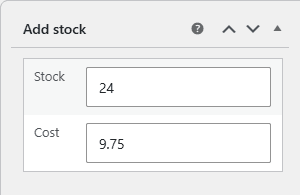
- In the Add stock meta box, enter the quantity you received in Stock and the price you paid per unit in Cost.
- Update the product. The cost field is recalculated to the new weighted average and the stock is increased.
Options reference #
| Label | Option ID | Default | Free/Pro |
|---|---|---|---|
| Add stock | alg_wc_cog_products_add_stock |
No | Free |
| Format decimals | alg_wc_cog_products_add_stock_format_decimals |
No | Free |
| Cost calculation expression | alg_wc_cog_products_add_stock_cost_calculation |
( %stock_prev% * %cost_prev% + %stock% * %cost% ) / %stock_now% |
Pro |
| Empty cost field | alg_wc_cog_products_add_stock_empty_cost_action |
Do nothing | Pro |
| History date format | alg_wc_cog_products_add_stock_history_date_format |
Y-m-d |
Free |
| History date order | alg_wc_cog_products_add_stock_history_date_order |
Descending | Free |
| Negative stock | alg_wc_cog_products_add_stock_negative_stock |
No | Free |
Free and Pro #
The Add stock meta box and its average-cost calculation are free. The Pro version adds two controls: Cost calculation expression, which lets you rewrite the averaging formula using the %stock_prev%, %cost_prev%, %stock% and %stock_now% placeholders, and Empty cost field, which decides what happens when the cost you enter is blank (for example, keep the current cost or treat it as zero).
Get more from Cost of Goods #
Add stock with automatic average cost is free. Cost of Goods: Product Cost & Profit Calculator for WooCommerce Pro adds a custom cost expression and empty-cost handling here, plus cost and profit in WooCommerce Analytics and order emails. See what Pro unlocks.