Table of Contents
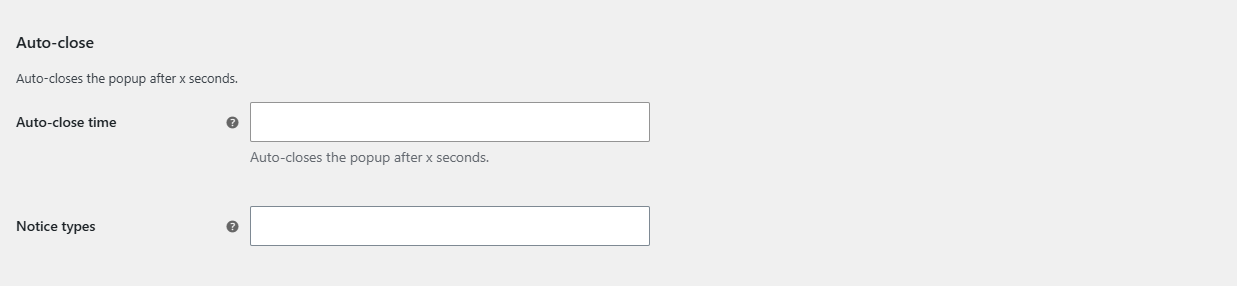
To auto-close pop-ups in Popups for WooCommerce: Add to Cart, Checkout & More Pro, go to WPFactory > Popups, find the Auto-close group in the General section, and enter the Auto-close time in seconds. Optionally set Notice types so only pop-ups with those types close automatically. Leave the time empty to disable it. This is a Pro feature.
Before you start #
- WooCommerce, active.
- Popups for WooCommerce: Add to Cart, Checkout & More Pro.
Step-by-step #
- Go to WPFactory > Popups (also reachable at WooCommerce > Settings > Pop-up Notices).
- In the General section, find the Auto-close group.
- Enter a value in Auto-close time (in seconds). Leave it empty to disable auto-close.
- Optionally set Notice types so only pop-ups containing the selected types (error, success, info) auto-close. Leave it empty to auto-close every pop-up.
- Save changes.
Options reference #
| Setting | Option ID | Default |
|---|---|---|
| Auto-close time (seconds) | ttt_pnwc_opt_auto_close_time |
Empty (disabled) |
| Notice types to auto-close | ttt_pnwc_opt_auto_close_types |
Empty (all types) |
Tip: avoid auto-close for checkout and coupon pop-ups. Customers may need time to read an error, so leaving those to close manually is usually better.
Ready to set this up? #
Auto-close is a Pro feature of Popup Notices. Get Popup Notices Pro.