To hide a shipping method when an order is too heavy, open Weight-Based Shipping for WooCommerce at WPFactory > Weight-Based Shipping (also reachable at WooCommerce > Settings > Shipping), edit the method in your zone, and set Maximum Weight Limit. Heavier carts no longer see the method and get your custom message instead.
How the maximum weight limit works #
When the package weight is more than the Maximum Weight Limit, Weight-Based Shipping removes itself from the available methods and adds your Maximum Weight Exceeded Message as an error notice. A package weighing exactly the limit is still allowed. Leave the field empty and there is no limit. This setting is included in every install; it is not a Pro feature.
The limit is checked before the free shipping thresholds and the tier table, so an over-limit cart gets no rate from this method even if it would otherwise ship free.
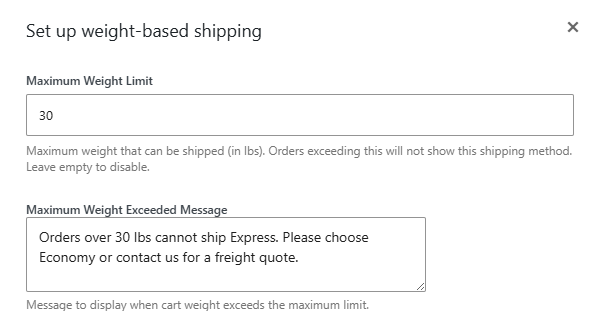
Set a maximum weight #
- Go to WPFactory > Weight-Based Shipping (also reachable at WooCommerce > Settings > Shipping).
- Open the zone and click to edit the Weight-Based Shipping method.
- In Maximum Weight Limit, enter the heaviest package you will ship, in your store’s weight unit (for example
30). - In Maximum Weight Exceeded Message, write what the customer should do next, for example “Orders over 30 kg ship by freight. Contact us for a quote.”
- Save the method.
Options #
| Label | Option ID | Type | Default | Free/Pro |
|---|---|---|---|---|
| Maximum Weight Limit | max_weight |
Number | Empty (no limit) | Included |
| Maximum Weight Exceeded Message | max_weight_message |
Textarea | Sorry, your order exceeds our maximum shipping weight. Please contact us for a custom shipping quote. | Included |
Decide what heavy carts should see #
- No shipping at all. If Weight-Based Shipping is the only method in the zone, an over-limit cart has no shipping option and cannot complete checkout until it is lighter.
- An alternative. Add another method to the same zone, for example Local Pickup, or a second Weight-Based Shipping instance titled Freight with its own tiers and no limit. The customer still sees your message, and can pick the alternative.
Maximum weight vs a capped top tier #
Putting a maximum on your last tier does not hide the method. A weight above every tier falls back to the last tier’s cost, so heavy carts are still quoted. To refuse heavy carts, use Maximum Weight Limit and leave the last tier’s Max Weight blank.
Use cases #
- Match a courier’s parcel weight cap so you never quote a parcel rate for a pallet.
- Send heavy orders to a quote request instead of an underpriced checkout.
- Apply a ceiling only on international zones, and none domestically.
Troubleshooting #
- The message shows but other methods still appear. That is expected: the limit only removes this method. Other methods in the zone are unaffected.
- Heavy carts still get a rate. Check the field is not empty, that you edited the instance in the zone you are testing, and that your products have weights (a product with no weight adds nothing).
- A cart at exactly the limit is still allowed. Correct: only weights above the limit are refused. Enter a slightly lower number if you need the limit itself excluded.
Get Weight-Based Shipping #
Every setting covered here is included in Weight-Based Shipping for WooCommerce, with no locked Pro options. Get Weight-Based Shipping.
Need a hand? Our team answers every ticket on the Weight-Based Shipping support forum.