In Weight-Based Shipping for WooCommerce, the Handling Fee adds a fixed amount or percentage to the tier cost, either free shipping threshold makes the rate free, and the Maximum Weight Limit hides the method for heavier packages. Set them per zone at WPFactory > Weight-Based Shipping (also reachable at WooCommerce > Settings > Shipping).
Open the zone, click to edit the Weight-Based Shipping method, and the settings below sit under the tier table.
Handling fee #
Packaging, pick-and-pack time, fuel surcharges, the courier’s own admin fee: anything you would rather not bury in the tier costs themselves.
| Setting | What it does |
|---|---|
| Handling Fee | The on/off switch. Off by default. |
| Handling Fee Type | Fixed Amount or Percentage. |
| Handling Fee Amount | The number. 5 means 5.00 when fixed, or 5% when percentage. |
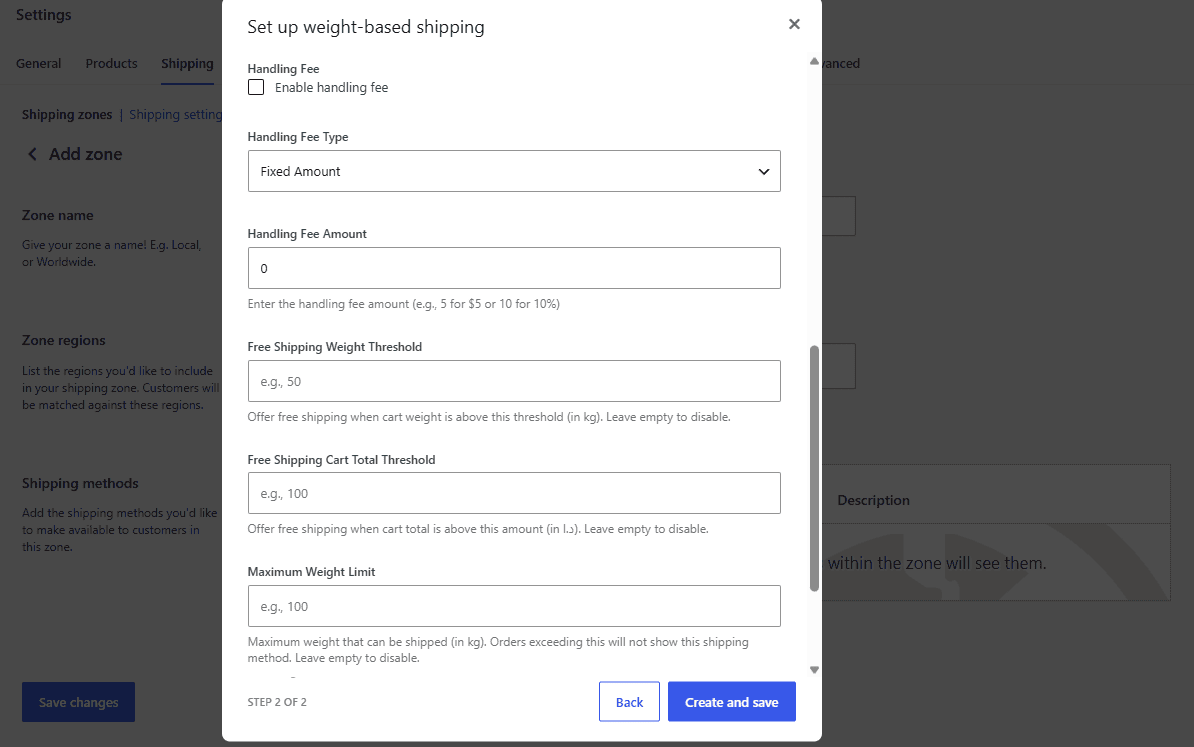
Fixed adds the amount to the tier cost:
Tier cost 20.00 + fixed fee 5 = 25.00
Percentage adds that percentage of the tier cost:
Tier cost 20.00 + 10% = 22.00
The percentage is of the shipping cost, never of the cart total. A 10% fee on a 20.00 shipping charge is 2.00, whether the customer is spending 50 or 5,000.
Two rules worth remembering:
- A fee amount of 0 adds nothing, even with the fee enabled.
- The fee is not applied when a free-shipping threshold has fired. A free rate is 0.00, not 0.00-plus-handling.
Keeping the fee out of the tier table #
You could bake the fee into every tier cost instead. Using the fee field has one practical advantage: when the fee changes you edit one number instead of every row, in every zone. The trade-off is that the customer sees a single combined figure either way: the fee is not itemized at checkout.
Free shipping thresholds #
Two independent thresholds, and either one firing makes the rate free. The method’s label gets (Free) appended so the customer can see why.
Free Shipping Cart Total Threshold #
The familiar one: spend X or more and shipping is free. For a full walkthrough, see how to offer free shipping over an order amount.
The figure compared is the value of the goods in the package, before tax and after any coupon discount. Shipping, fees and taxes are not part of it. That means a customer looking at a 152.00 order total may still be below a 150 threshold, because the goods themselves came to 138.00 and the rest was tax.
Leave the field empty to switch the threshold off.
Free Shipping Weight Threshold #
This one runs in the direction people do not expect: shipping becomes free when the cart weight is at or above the number you set. Heavier carts ship free; light ones pay.
It suits stores that switch to pallet, freight or account-collected delivery past a certain weight, where the tier table should stop quoting a parcel rate and the real arrangement is handled offline.
If what you actually want is light orders ship free, this is the wrong setting. Add a bottom tier with a cost of 0 instead. See set up your weight tiers.
Leave the field empty to switch the threshold off.
When both are set #
They are tested independently and the first to qualify wins; there is no way to require both. A cart that is heavy enough or expensive enough ships free.
Maximum Weight Limit #
The hard ceiling. When the package weighs more than the limit, the method removes itself from checkout and adds your Maximum Weight Exceeded Message to the cart as an error notice.
| Setting | What it does |
|---|---|
| Maximum Weight Limit | The ceiling, in your store’s weight unit. Empty disables it. |
| Maximum Weight Exceeded Message | The text shown to the customer. Defaults to a message asking them to get in touch for a custom quote. |
A package weighing exactly the limit is allowed. Only weights above it are refused.
Three things to think about before you set one:
- Write a message that tells the customer what to do. “Sorry, your order exceeds our maximum shipping weight” leaves them stuck. A phone number, an email address or a link to a quote form turns a dead end into an inquiry.
- Check what else the zone offers. If Weight-Based Shipping is the only method in the zone, an over-limit cart has no shipping options at all and cannot check out. That may be exactly what you want. If it is not, add a Local Pickup or a “contact us for freight” flat rate alongside it.
- It is per zone. A 30 kg ceiling on the international zone and no ceiling domestically is a normal, sensible configuration.
- The message shows even when other methods remain. It is a cart notice explaining why this method withdrew; other methods in the zone are still offered.
The limit is checked before anything else, so it beats the free shipping thresholds: a cart heavy enough to qualify for free shipping by weight and heavy enough to break the ceiling gets no rate at all. For a step-by-step setup, see how to hide shipping above a maximum weight.
How they interact #
| Scenario | Outcome |
|---|---|
| Over the weight limit | No rate. Thresholds and fee never run. |
| Free by threshold | 0.00, (Free) label, no handling fee. |
| Not free, fee enabled | Tier cost + fee. |
| Not free, fee enabled, amount 0 | Tier cost. |
| Zero-weight cart, set to hide | No rate, regardless of every other setting. |
The full sequence, including where the tier lookup sits, is in how the shipping cost is calculated.
Where to go next #
Get Weight-Based Shipping #
Every setting covered here is included in Weight-Based Shipping for WooCommerce, with no locked Pro options. Get Weight-Based Shipping.
Need a hand? Our team answers every ticket on the Weight-Based Shipping support forum.