To show payment methods based on the shipping method in WooCommerce, install Payment Gateways by Shipping Method for WooCommerce and go to WPFactory > Payment Gateways by Shipping (also reachable at WooCommerce > Settings > Payment Gateways by Shipping). In each gateway’s field, select the shipping methods that allow it and save. The gateway then appears only for those methods.
Common setups #
- Offer Direct bank transfer only for freight or pallet delivery.
- Allow card gateways for all methods, but PayPal only for standard shipping.
- Offer an “invoice” or custom gateway only for a courier method used by business customers.
- Hide Cash on delivery for pickup, see disabling Cash on Delivery for local pickup.
Steps #
- Go to WPFactory > Payment Gateways by Shipping (also reachable at WooCommerce > Settings > Payment Gateways by Shipping).
- In General Options, leave Use shipping instances unchecked to work with shipping method types, which apply across all zones. Check it and click Save changes if you need a rule for a specific method inside a specific zone.
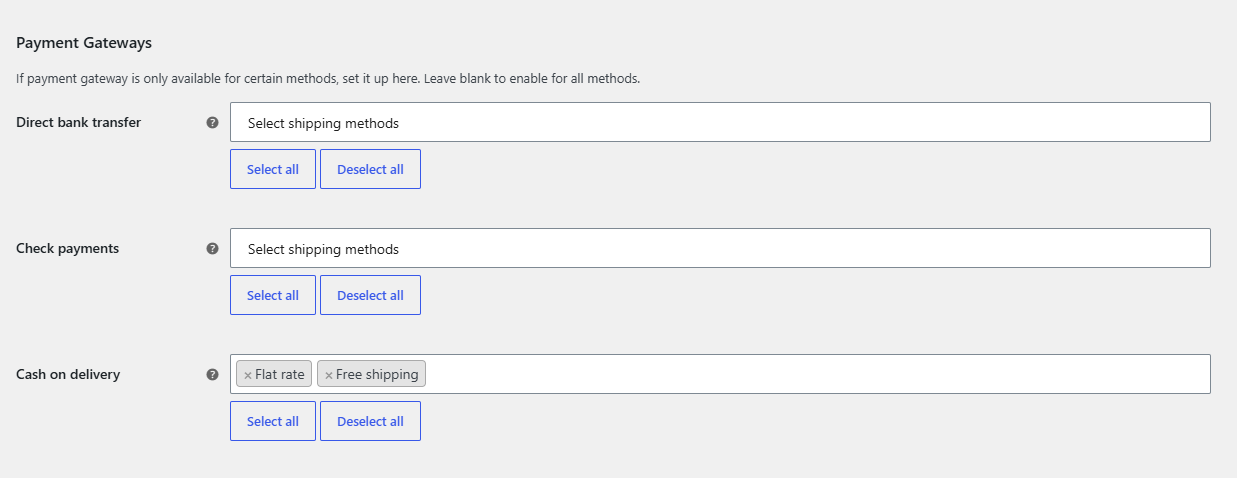
- In the Payment Gateways section, each gateway registered in WooCommerce is listed by its title, including gateways from other plugins.
- For each gateway you want to limit, click its field and choose the allowed shipping methods. Select all and Deselect all help with long lists.
- Leave gateways that should always be available empty.
- Click Save changes, then test checkout with each shipping method.
How a gateway is checked at checkout #
For each gateway with a non-empty field, Payment Gateways by Shipping checks the order in this order:
- If the cart does not need shipping (for example only virtual products), the gateway stays available.
- If no shipping method has been chosen yet, or the packages in the cart use more than one shipping method, the gateway is hidden.
- If the chosen shipping method is in the gateway’s field, the gateway stays. Otherwise it is hidden.
With method types, a selection such as Flat rate matches every Flat rate method in every shipping zone. With shipping instances, only the exact method instance you selected matches.
Options used #
| Label | Option ID | Default |
|---|---|---|
| Use shipping instances | alg_wc_pgbsm_use_shipping_instance |
No |
| (gateway title), method types | alg_wc_pgbsm_enable_{gateway_id} |
Empty (all methods) |
| (gateway title), shipping instances | alg_wc_pgbsm_enable_instance_{gateway_id} |
Empty (all methods) |
The full list is in the settings reference.
FAQ #
Does it work with payment gateways from other plugins? #
Yes. The settings list every gateway registered in WooCommerce, so gateways added by other plugins appear with their own field.
Can I hide a payment method for one shipping method instead of choosing the allowed ones? #
Each field is an allow list. Select all shipping methods, remove the one you want to block, and save.
Does the restriction apply to virtual products? #
No. When the cart does not need shipping, gateways are not filtered by shipping method.
Do I need to save again after turning on shipping instances? #
Yes. The field option says to save changes after enabling it. The page then reloads with zone based methods, and those rules are stored separately from the method type rules.
Get Payment Gateways by Shipping #
Every feature described here is included in Payment Gateways by Shipping. Set a rule once and WooCommerce checkout hides the wrong payment methods on its own.
Need a hand? Our team answers every ticket on the Payment Gateways by Shipping support forum.