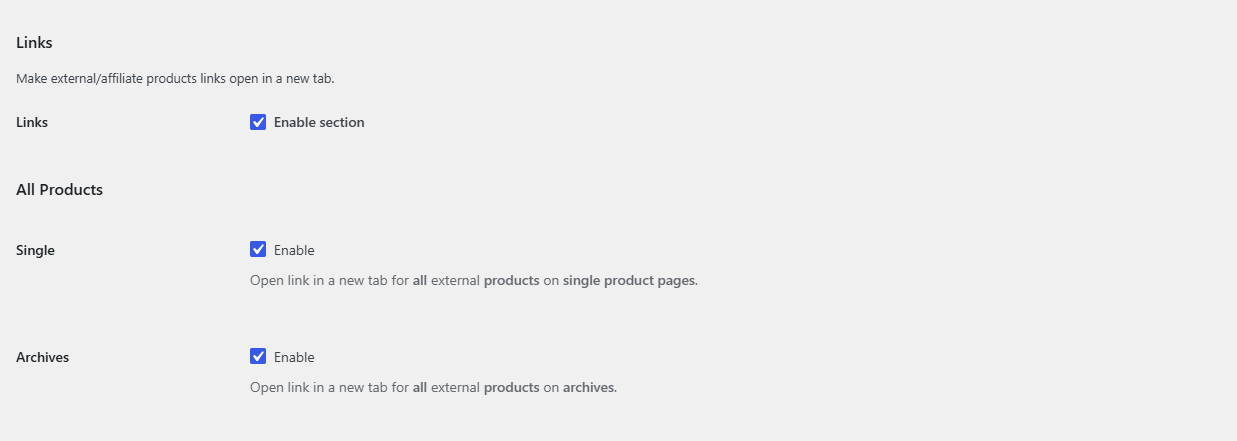
To open external product links in a new tab in WooCommerce, use Multiple External Products URLs & Currencies for WooCommerce: go to WPFactory > Advanced External Products > Links (also reachable at WooCommerce > Settings > Advanced External Products > Links), and under All Products check Single (product pages) and Archives (shop and category pages), then save.
Open all external links in a new tab (free) #
- Go to WPFactory > Advanced External Products > Links (also reachable at WooCommerce > Settings > Advanced External Products > Links).
- Make sure Links (Enable section) is checked. It is on by default.
- Under All Products, check Single to open the buy button in a new tab on single product pages.
- Check Archives to do the same on the shop page, category pages and other product lists.
- Click Save changes.
Choose product by product (Pro) #
- Go to WPFactory > Advanced External Products > Links (also reachable at WooCommerce > Settings > Advanced External Products > Links).
- Under Per Product, check Single, Archives or both, and click Save changes.
- Edit an external product. On the General tab you now see Link in a new tab and Link in a new tab on archives, each with Default, Yes and No.
- Set Yes for the products whose links should open in a new tab and click Update.
Note: the per-product setting adds new tab links on top of the All Products options. When an All Products option is on, every external product opens in a new tab in that location, and a per-product No does not switch it off. To have only some products open in a new tab, keep the All Products option off and set Yes on those products.
What changes on the page #
- On single product pages, the buy button form gets
target="_blank". - On archives, the buy button link gets
target="_blank". - Extra buy buttons added with Multiple URLs follow the same settings.
FAQ #
Does this affect simple or variable products? #
No. Only products of the External/Affiliate product type are changed.
My theme’s buttons still open in the same tab. Why? #
The plugin changes the standard WooCommerce button output. Themes or page builders that print their own buy buttons, without the standard WooCommerce templates and hooks, are not affected.
Can I open links in a new tab on archives but not on product pages? #
Yes. The Single and Archives options are separate. Check only Archives.
Is this free? #
The All Products options are free. The per-product fields require Pro.
Get more control #
This feature is free. External Products URLs & Currencies Pro adds per-product new tab fields, so you can choose which affiliate links leave the page. See what Pro unlocks.
Need a hand? Our team answers every ticket on the External Products URLs & Currencies support forum.