WooCommerce Price per Unit: Sell by Weight, Length or Volume

Quick Answer: WooCommerce Price per Unit
A WooCommerce price per unit setup lets you sell one product by weight, length, or volume instead of building a separate variation for every size.
You set the product price to the cost of a single unit, turn on decimal quantities so customers can order amounts like 1.5 kg or 3.25 m, and add a unit label so the price reads clearly as “per kg” or “per meter”.
The step that trips most stores up is not the price display. It is that without decimal quantities enabled, the price label says “per kg” while the cart still forces whole numbers, and the maths quietly stops matching what the customer expects.
- Price Unit: Adds a label like “per kg” or “per meter” next to the price for clarity.
- Decimal Quantity: Lets customers order fractional amounts such as 0.5 or 2.75.
- Total Price by Quantity: Shows the running total as the customer changes the amount.
The free unit price calculator further down works out any total from a per-unit price and a quantity, so you can preview exactly what customers will pay before you configure a thing.
Here is a scene that plays out in a lot of WooCommerce stores.
A shop sells coffee beans. The owner wants to offer 250g, 500g, 750g, 1kg, and 2kg. So they build five variations. Then a customer asks for 1.5kg. Now it is six variations. Another wants 300g. Seven.
Within a month the product page is a cluttered dropdown of sizes nobody can scan, the inventory is a nightmare to keep straight, and the owner is still fielding emails asking for amounts that are not listed.
The whole mess comes from one wrong assumption.. that WooCommerce needs a separate product or variation for every quantity. It does not. You can price a single product per unit and let the customer name their own amount.
That is what this guide is about. Setting a WooCommerce price per unit, turning on the pieces that make it work end to end, and avoiding the one gap that makes the setup look broken.
What “Price per Unit” Actually Means in WooCommerce
The phrase gets used loosely, so it helps to pin it down.
A price per unit means the product price you enter is the cost of exactly one unit of measure. One kilogram, one meter, one liter. The customer then chooses how many of that unit they want, including fractions, and WooCommerce multiplies.
Compare that to the default model, where price is per item and quantity is a whole number. For a bag of coffee, per-item works fine. For loose beans sold by weight, it falls apart, because “one item” has no fixed meaning.
Three things have to line up for a price per unit to work properly in WooCommerce:
The price has to represent a single unit. The quantity field has to accept decimals. And the customer has to see, without guessing, that the number they are looking at is per kg and not per bag.
Miss any one of those and the setup either confuses customers or charges them the wrong amount.
The Plugin That Handles It
The WooCommerce Quantity Manager plugin covers all three requirements from a single settings area. It runs on 10,000+ stores and the features involved here.
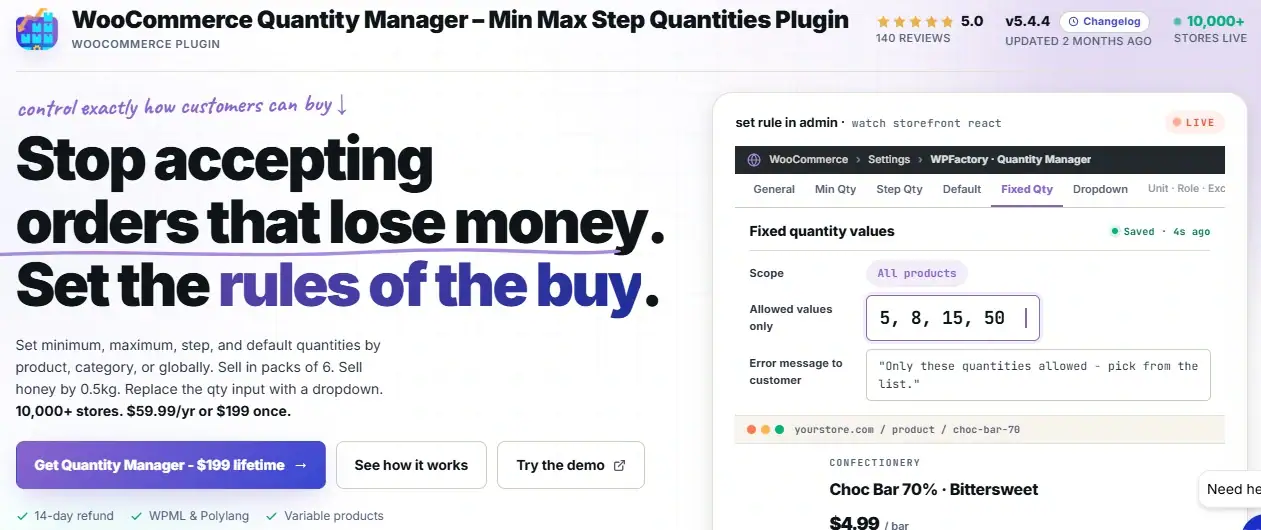
Three features do the work. Price Unit adds the label. Decimal Quantity unlocks fractional amounts. Total Price by Quantity shows the live total as the amount changes.
Sell by Weight, Length, or Volume From One Product Page
The WooCommerce Quantity Manager bundles Price Unit, Decimal Quantity, and live total pricing so you can retire your pile of size variations. Active on 10,000+ stores, rated 5.0. For tiered per-unit rates, pair it with Dynamic Pricing and Bulk Quantity Discounts.
A Worked Example: Selling Coffee by Weight
Back to the coffee store, done the right way this time.
The owner sets one product: “House Blend Beans”. The price is $12, and that $12 represents one kilogram. Decimal quantity is on. The unit label reads “per kg”. The step is 0.25, so customers order in quarter-kilo increments.
Here is what different orders come to:
| Customer Wants | Quantity Entered | Calculation | Total |
|---|---|---|---|
| A small bag | 0.25 kg | $12 × 0.25 | $3.00 |
| Half a kilo | 0.5 kg | $12 × 0.5 | $6.00 |
| Enough for a week | 1.5 kg | $12 × 1.5 | $18.00 |
| A monthly supply | 3 kg | $12 × 3 | $36.00 |
One product. No variations. Every amount the customer could reasonably want, priced correctly and automatically.
The same structure works for fabric at a price per meter, olive oil at a price per liter, or rope at a price per foot. Swap the unit label and the step, and the model holds.
Setting It Up: The Three Pieces
The setup runs in three short stages. None of them needs code.
Piece 1: Set the Price to One Unit
This part happens in the normal WooCommerce product editor, no plugin needed yet.
Open your product. In the General tab of Product Data, set the Regular Price to the cost of a single unit. If beans are $12 a kilo, the price is 12. That is the anchor the whole setup depends on, so get it right before moving on.
Piece 2: Turn On Decimal Quantities
Go to the WPFactory menu, then Quantity Manager. Find the Decimal Quantities option and enable it.
With decimals on, you can now set a decimal step. A step of 0.25 lets customers order 0.25, 0.5, 0.75, and so on. A step of 0.1 gives finer control for things like spices. Set the minimum too, so nobody orders 0.01 kg of anything.
This is the piece stores forget. Without it, the price label promises per-kilo pricing but the quantity box still demands whole numbers, and the experience breaks.
Piece 3: Add the Unit Label
In the Quantity Manager settings, open the Price Unit tab. Enter the unit text you want shown next to the price, such as “per kg”, “per meter”, or “per litre”.
Now the product page reads “$12 per kg” instead of a bare “$12”. Small change, big difference. The customer knows immediately what they are paying for and what entering “1.5” will cost them.
Optional: Show the Running Total
If you want the total to update live as the customer adjusts the amount, enable Total Price by Quantity in the same settings area. The page then shows something like “$18.00 for 1.5 kg”, updating on every change. It removes the last bit of guesswork before the customer commits.
Free Tool: Unit Price Calculator
Enter a price per unit and a quantity to see the total a customer would pay. Useful for sanity-checking your pricing before you set it live.
Comparison: Price per Unit vs Size Variations
The old way of handling this was to build a variation for every size. It works, technically, but it costs you in ways that add up.
Look down the “Variations” column before you decide. Each row on its own seems manageable. Together they are why so many stores end up with unmaintainable product pages.
| Factor | Price per Unit | Size Variations |
|---|---|---|
| Products to manage | One product, one price | One variation per size, each priced separately |
| Custom amounts | Any amount the step allows | Only the sizes you pre-built |
| Adding a new size | Nothing to do, already supported | Build and price a new variation |
| Product page | Clean, one price with a unit label | Long dropdown that grows over time |
| Pricing consistency | One rate, always proportional | Easy to mis-price a single size by hand |
| Best when | Product is genuinely divisible | Sizes are distinct SKUs with different packaging |
Which Unit Fits Which Store?
The mechanics are identical across unit types. What changes is the label, the step, and the sensible minimum. Here is how it lands for the most common cases.
Selling by Weight
Groceries, coffee, spices, meat, sweets, bulk grains. The unit is usually the kilogram or the pound, and the price is the cost of one of those.
Set a step that matches how customers actually buy. Quarter-kilo (0.25) suits coffee and cheese. Finer steps like 0.05 suit expensive spices where a little goes a long way. Set a minimum so you are not processing a two-cent order for a pinch of saffron.
Selling by Length
Fabric, rope, cable, ribbon, chain, timber trim. The unit is the meter, yard, or foot.
Length pricing leans on the step more than most. A fabric shop cutting to order might use a 0.1 m step for precision, while a rope seller might stick to 0.5 m.
The unit label matters here too, because “per meter” versus “per yard” is a real source of customer confusion if left unstated.
Selling by Volume
Oils, cleaning liquids, paint, syrups, refillable goods. The unit is the liter or the milliliter.
Volume often pairs well with the live total display, because customers buying liquids tend to think in budget (“about $20 of oil”) rather than exact volume. Showing the running total as they adjust helps them land where they want.
When Whole Units Still Win
Not everything should be sold per unit. If your product ships in sealed, fixed packaging, or each unit is a distinct SKU with its own barcode, variations or simple products are the honest fit.
Price per unit is for goods that are genuinely divisible, not for forcing divisibility onto things that come in a box.
Where Setups Go Wrong
A handful of mistakes account for most of the “it is not calculating right” complaints.
- Pricing the package, not the unit
If you enter $30 as the price but mean “$30 for a 3 kg bag”, every calculation will be triple what it should be. The price field must hold the cost of one unit, full stop.
- Adding the unit label but skipping decimals
The page says “per kg” but the quantity box only accepts 1, 2, 3. Customers who want 1.5 kg cannot get it, and the label now looks like a lie. Decimals and the label are a pair.
- No minimum on a decimal product
Without a floor, someone can order 0.01 of something and you are packing and shipping an order worth pennies. Always set a minimum that makes the order worth fulfilling.
- A step that does not match reality
Letting customers order 1.37 meters of fabric when your machine cuts to 0.1 m creates fulfillment friction. Set the step to what you can actually deliver.
Related Resources
- WooCommerce Quantity Rules: The Complete Guide
- How to Set Quantity Step Increments in WooCommerce
- WooCommerce Hide Add to Cart Button for Minimum Quantity
- WooCommerce Restaurant Ordering: Quantity Rules for Food Stores
- How to Limit Order Minimum and Maximum Amounts in WooCommerce
Start Selling by the Unit Instead of by the Variation
The WooCommerce Quantity Manager gives you Price Unit labels, decimal quantities, and live totals to sell by weight, length, or volume from a single product. Core features are free. Pro adds per-category units and rules at $59.99 per year or $199 for a lifetime license on unlimited sites.
Every purchase is backed by a 14-day money-back guarantee.
FAQs About WooCommerce Price per Unit
How do I set a price per unit in WooCommerce?
Set the product’s regular price to the cost of a single unit, then use the WooCommerce Quantity Manager plugin to enable decimal quantities and add a unit label like “per kg”.
WooCommerce then multiplies the per-unit price by the quantity the customer enters, including fractional amounts. No separate variation per size is needed.
Can WooCommerce sell products by weight?
Yes, with the right plugin. WooCommerce does not sell by weight out of the box, but the Quantity Manager plugin adds decimal quantities and a price unit label so you can price a product per kilogram or per pound and let customers order amounts like 0.5 kg or 1.75 kg. The total is calculated automatically.
What is the difference between price per unit and using variations?
A price per unit uses one product with one price and lets the customer choose any quantity the step allows, including decimals.
Variations require you to build and price a separate option for every size you offer. Price per unit suits divisible goods like fabric or loose food. Variations suit distinct pre-packaged sizes.
Can customers order decimal quantities like 1.5 kg in WooCommerce?
Yes, once decimal quantities are enabled in the Quantity Manager plugin.
You can set a decimal step, such as 0.25, so customers order in sensible increments, and a decimal minimum so orders stay worth fulfilling. Without this feature enabled, WooCommerce only accepts whole-number quantities.
How do I show “per kg” or “per meter” next to the price in WooCommerce?
Use the Price Unit feature in the WooCommerce Quantity Manager plugin. Open the Price Unit tab, enter your label text such as “per kg” or “per meter”, and it appears next to the product price.
This tells customers exactly what the displayed price refers to before they choose a quantity.
Is selling by unit in WooCommerce a free feature?
The core features needed for a price per unit setup, decimal quantities, the price unit label, and total price by quantity, are all in the free version of the WooCommerce Quantity Manager plugin.
Per-category units and more advanced rules are available in the Pro version.