Customizing the cost field label lets you rename the WooCommerce cost input to match your own terminology, and move it to the part of the product editor that suits your workflow. Cost of Goods: Product Cost & Profit Calculator for WooCommerce gives you both controls in one place, and both are free.
Step-by-step #
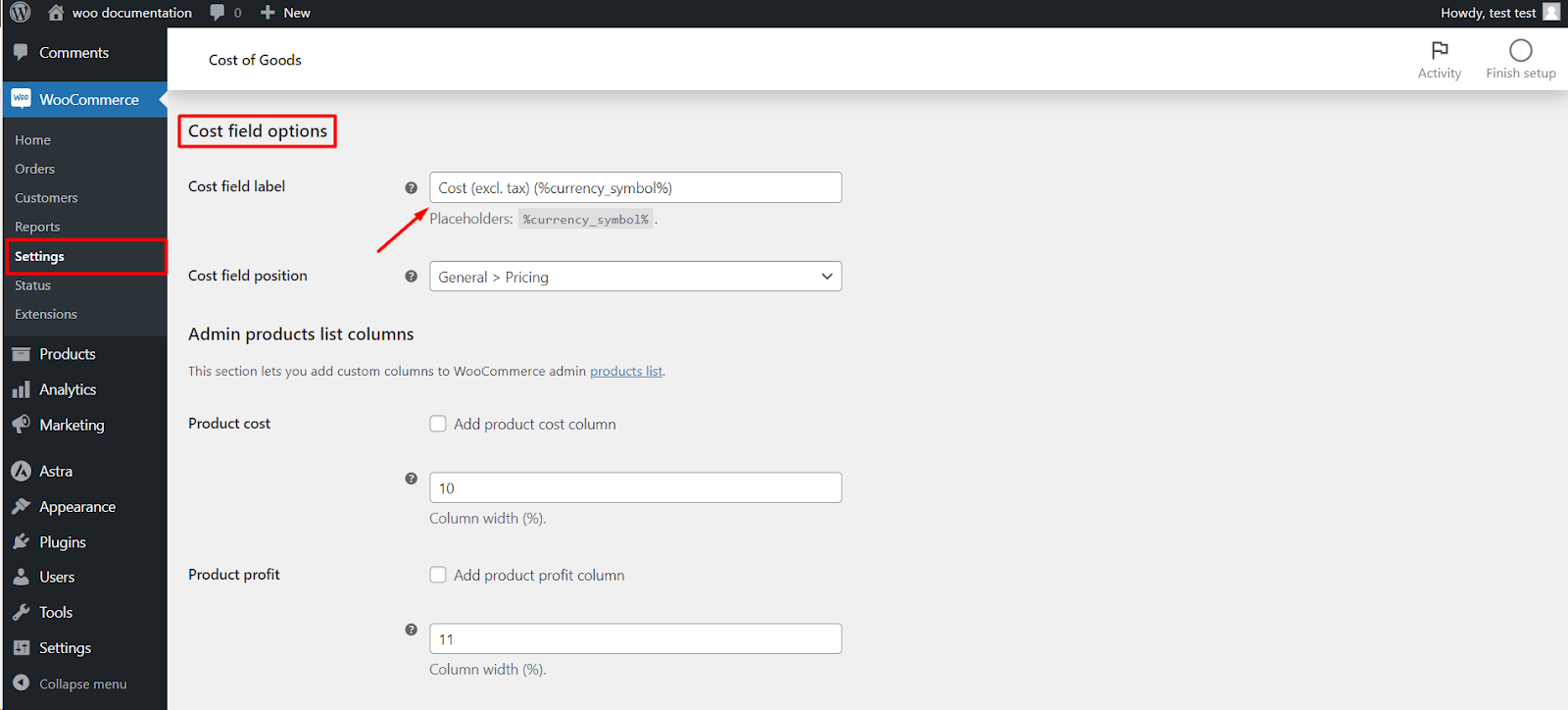
- Go to WPFactory > Cost of Goods (also reachable at WooCommerce > Settings > Cost of Goods).
- Stay on the Products sub-tab (it is the one open by default).
- Find the Cost field options group.
- Edit Cost field label to change the text shown next to the cost input on the product edit page.
- Set Cost field position to choose where the field appears on the product editor.
- Click Save changes.
Options reference #
| Label | Option ID | Type | Default |
|---|---|---|---|
| Cost field label | alg_wc_cog_product_cost_field_template |
Text | Cost (excl. tax) (%currency_symbol%) |
| Cost field position | alg_wc_cog_product_cost_field_position |
Select | General > Pricing |
The label placeholder #
The Cost field label supports the placeholder %currency_symbol%, which prints your shop currency symbol. For example, Cost (excl. tax) (%currency_symbol%) renders as “Cost (excl. tax) ($)” on a USD store.
Where the field can appear #
Cost field position offers five placements inside the Product data box:
- General > Pricing (default), next to the price fields.
- General.
- Inventory.
- Inventory > SKU.
- Advanced.
Troubleshooting #
- No cost field on the product. Confirm the plugin is active and that you are editing a supported product type. The field is added automatically; there is no separate “display” toggle to enable.
- Label change not showing. Re-check you saved changes on the Products sub-tab, then reload the product editor.
Get more from Cost of Goods #
This feature is free. Cost of Goods: Product Cost & Profit Calculator for WooCommerce Pro adds cost and profit in WooCommerce Analytics, order-email cost and profit, and multicurrency support. See what Pro unlocks.