Table of Contents
Each field in Custom Checkout Fields for WooCommerce has its own tab where you set its type, label, default value, and behavior. This guide covers the Field (general) options that apply to every field type.
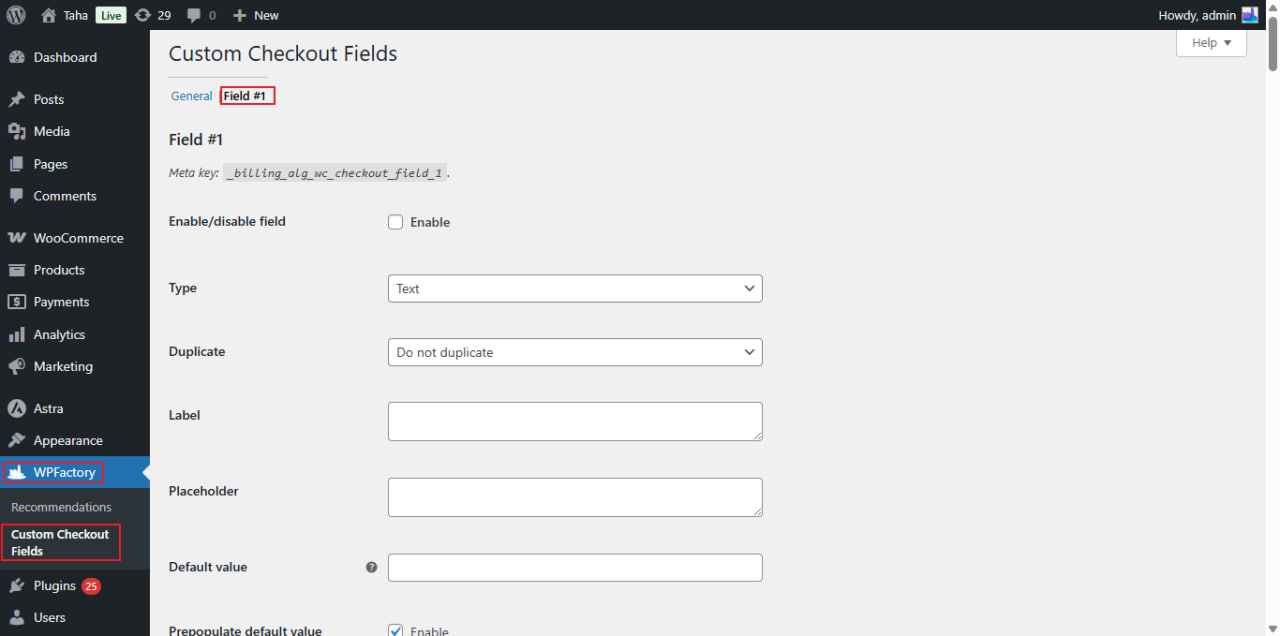
Open the field tab #
- Go to WPFactory > Custom Checkout Fields (also reachable at WooCommerce > Settings > Custom Checkout Fields).
- On the General tab, set Custom fields number and save if you need more than one field (the free version is limited to one).
- Open the Field #1 tab (or Field #2, and so on). The meta key for the field is shown at the top of the section.
General options reference #
| Label | Option ID | Type | Default |
|---|---|---|---|
| Enable/disable field | alg_wc_ccf_enabled_1 |
Checkbox | No |
| Type | alg_wc_ccf_type_1 |
Select | Text |
| Duplicate | alg_wc_ccf_duplicate_1 |
Select | Do not duplicate |
| Label | alg_wc_ccf_label_1 |
Textarea | Empty |
| Placeholder | alg_wc_ccf_placeholder_1 |
Textarea | Empty |
| Default value | alg_wc_ccf_default_1 |
Text | Empty |
| Prepopulate default value | alg_wc_ccf_default_prepopulate_1 |
Checkbox | Yes |
| Description | alg_wc_ccf_description_1 |
Text | Empty |
| Required | alg_wc_ccf_required_1 |
Checkbox | No |
| User profile | alg_wc_ccf_customer_meta_fields_1 |
Checkbox | Yes |
Notes on the key options #
- Type decides which type-specific option group applies. Select, Multiselect, Radio, Checkbox, Datepicker, Weekpicker, and Timepicker each add their own settings section lower down the tab.
- Default value accepts shortcodes. For example, set it to
[alg_wc_ccf_datetime format="Y-m-d"]to pre-fill today’s date. - Prepopulate default value, when enabled, pulls the value from a logged-in customer’s saved account data instead of the default. It is ignored for the Multiselect type.
- User profile adds the field to the WordPress user profile and account pages, so returning customers keep their value. Ignored for Multiselect.
- Duplicate repeats the field once per product (or per product item) in the cart. See Duplicate a checkout field for each product.
Related #
- Checkout field types reference
- Where to position your custom fields
- Set input limits: max length, min, max, step
Get more fields #
Every option above is available in the free version for your single field. Custom Checkout Fields for WooCommerce Pro lets you configure the same options across up to 100 fields. Get Custom Checkout Fields Pro.