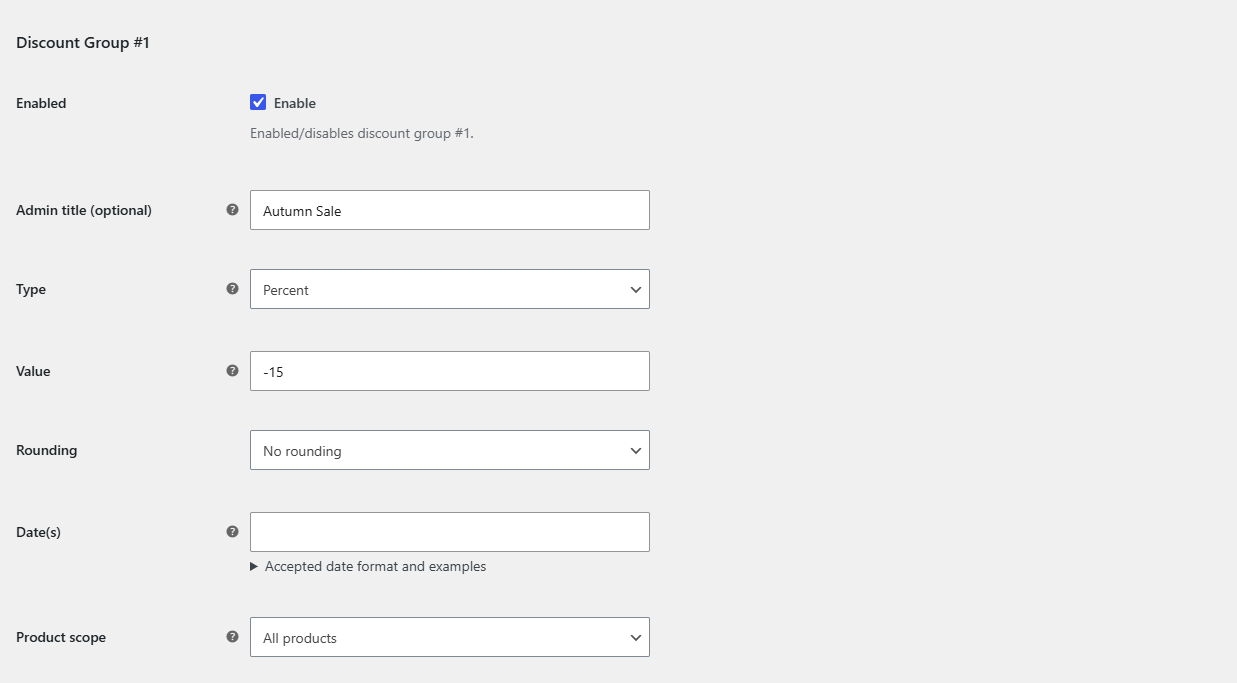
To apply a discount to all products in WooCommerce, go to WPFactory > Global Shop Discount > Discount Group #1 in Sitewide Discount for WooCommerce, choose Percent or Fixed, enter a negative Value such as -20, leave the filters empty and click Save changes. Every product then shows the lower price.
Before you start #
- WooCommerce is active and your products have regular prices.
- On the General section, Global Shop Discount (Enable plugin) is ticked. It is on by default.
- This works in both the free and Pro versions.
Steps #
- Go to WPFactory > Global Shop Discount (also reachable at WooCommerce > Settings > Global Shop Discount) and click Discount Group #1.
- Make sure Enabled is ticked.
- Optional: type an Admin title such as “Store-wide 20% off”. Only admins see it, and it replaces the section name in the settings menu.
- Choose the Type:
- Percent takes a percentage off each price.
- Fixed subtracts the same amount, in your store currency, from each product’s price.
- Enter the Value as a negative number:
-20means 20% off (Percent) or 20 off (Fixed). Decimals such as-12.5are allowed. - Optional: pick a Rounding method: Round, Round up or Round down. These round to a whole number. The default is No rounding.
- Choose the Product scope:
- All products (default).
- Only products that are already on sale.
- Only products that are not on sale.
- Leave Date(s) and all Include and Exclude fields empty so the discount applies everywhere, all the time.
- Click Save changes, then check a product page in a private browser window.
How the discounted price is calculated #
- Percent: new price = price + price × (Value / 100). With a price of 50 and a Value of
-20, the new price is 40. - Fixed: new price = price + Value. With a price of 50 and a Value of
-5, the new price is 45. - A price never goes below 0. If a fixed discount is larger than the price, the product costs 0.
- Products with no price set are left alone.
- Simple products, variations and grouped products are all covered.
The discount is shown as a sale: the regular price is crossed out and the discounted price appears next to it. If a product already has its own sale price and the scope is All products, the discount is taken off the existing sale price, so the two stack.
Turning the discount off #
Untick Enabled in the group, or untick Global Shop Discount on the General section to stop all groups at once. Your stored product prices were never changed, so prices return to normal as soon as you save.
Frequently asked questions #
Why does the Value have to be negative? #
The Value field only accepts numbers of 0 or less, because the plugin adds the Value to the price. A Value of 0 (the default) means no discount, so the group is skipped.
Do the discounted prices show in the admin Products list? #
Not by default. The discount runs on the storefront only. To see discounted prices in the admin area too, tick Apply discounts in backend under General > Advanced Options.
Does the discount apply to shipping costs? #
No. Sitewide Discount changes product prices only. Shipping rates are not changed.
Can I exclude products that are already on sale? #
Yes. Set Product scope to Only products that are not on sale. Products with their own sale price then keep that price and get no extra discount.
Related guides #
- How to Schedule a Sitewide Sale in WooCommerce
- How to Discount Specific Categories or Products in WooCommerce
- Sitewide Discount troubleshooting
Get Sitewide Discount #
Store-wide discounts are included in the free version of Sitewide Discount for WooCommerce. See the plugin page for plans and updates.
Need a hand? Our team answers every ticket on the Sitewide Discount support forum.