To display related categories in a widget area with Related Categories for WooCommerce, go to WPFactory > Related Categories, tick Widget under Position Options on the Single or Archives sub-tab, and save. Then add the Related Categories: Single Product Page or Related Categories: Archives widget in Appearance > Widgets. Both widgets are free.
Before you start #
- The section you want must be enabled: Single for the product-page widget, Archives for the archives widget.
- The Widget option must be turned on for that section.
Enable the widget #
- Go to WPFactory > Related Categories (also reachable at WooCommerce > Settings > Related Categories).
- On the Single or Archives sub-tab, under Position Options, tick Widget (
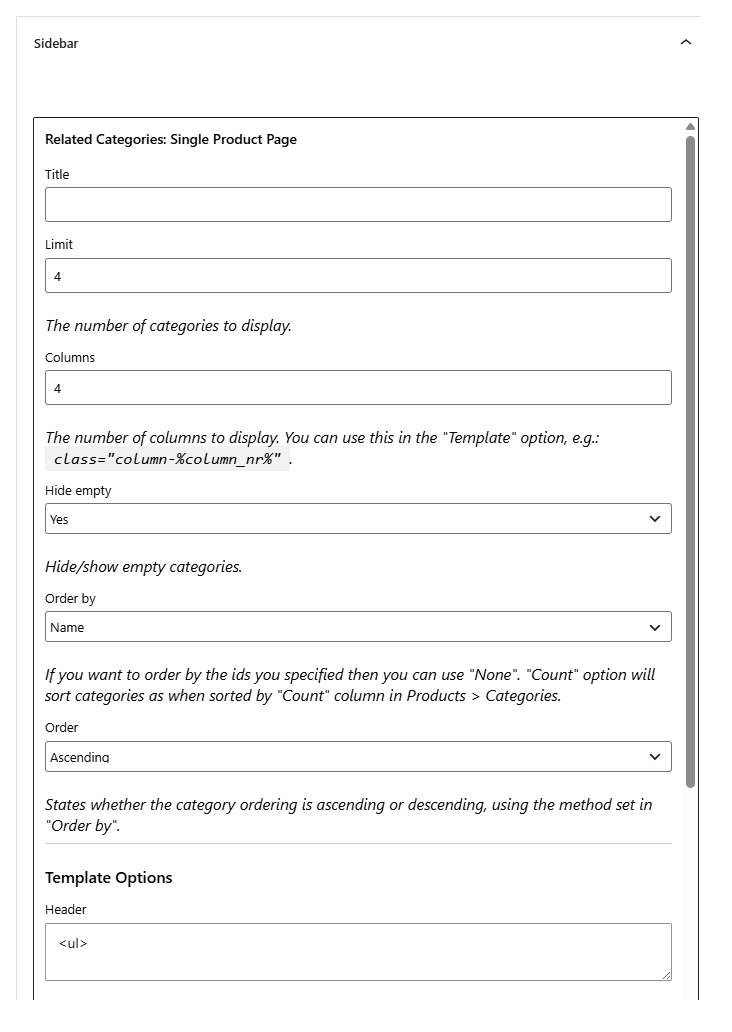
widget) and save. - Go to Appearance > Widgets and add the widget. The single-page widget is named Related Categories: Single Product Page and the archives widget is named Related Categories: Archives.
Widget options #
Each widget has its own fields, so a widget can show a different list from the one hooked into the page:
- Title: an optional heading above the list.
- Limit and Columns: how many categories, and the column count.
- Hide empty, Order by and Order: the same display and sorting choices as the main settings.
- Visibility (archives widget only): show for all categories, categories with children only, or categories with no children only.
- Template Options: Header, Footer, Template and Glue. The widget renders with a custom template, so the default markup is an unordered list (
<ul>/<li>). Use the same placeholders as any Custom template, for example%category_name%and%category_link%.
Widget-level relate options #
By default, a widget uses the Relate Options saved in the plugin settings. To give a widget its own relate rules, turn on Override “Relate Options” in widget settings (widget_override_relate_options) under Position Options for that section. The widget form then shows its own Relate Options (Siblings, Parents, Children, Current and, where enabled, the Pro per-category, per-tag, per-taxonomy and per-product options).
Get more control #
The widget is free. Related Categories for WooCommerce Pro adds hand-picked related categories per product, category, tag and custom taxonomy. See what Pro unlocks.