To set the reject and accept emails in Name Your Price: Make Your Own Offer for WooCommerce, go to WPFactory > Price Offers and open the Actions section. There you write the default subject, heading, and content for rejection and acceptance emails. The accept content can include %add_to_cart_url%. These options are free.
Go to WPFactory > Price Offers (also reachable at WooCommerce > Settings > Price Offers) and open the Actions section.
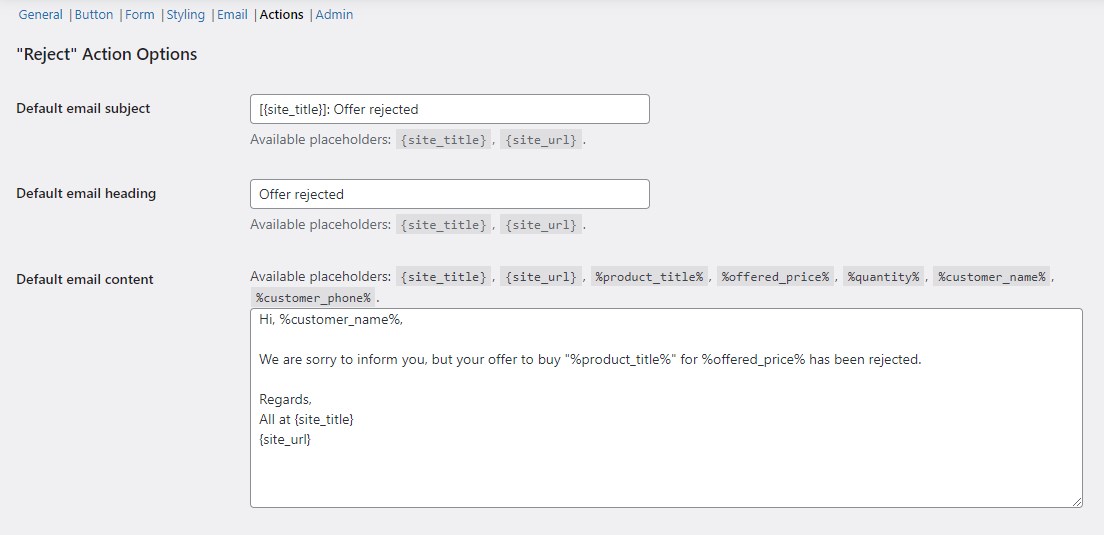
Reject action options (free) #
- Default email subject (
alg_wc_po_actions[reject_default_email_subject]): default “[{site_title}]: Offer rejected”. - Default email heading (
alg_wc_po_actions[reject_default_email_heading]): default “Offer rejected”. - Default email content (
alg_wc_po_actions[reject_default_email_content]): the rejection message body.
Accept action options (free) #
- Default email subject (
alg_wc_po_actions[accept_default_email_subject]): default “[{site_title}]: Offer accepted”. - Default email heading (
alg_wc_po_actions[accept_default_email_heading]): default “Offer accepted”. - Default email content (
alg_wc_po_actions[accept_default_email_content]): the acceptance message body, which by default includes a link built from%add_to_cart_url%.
Correction to an earlier version of this article: %add_to_cart_url% is a free placeholder. It is included in the default acceptance email content in the free version and lets the customer add the product to their cart at the agreed price.
Placeholders #
Both the reject and accept content fields accept: {site_title}, {site_url}, %product_title%, %product_url%, %offered_price%, %currency_code%, %quantity%, %customer_name%, and %customer_phone%. The accept content additionally supports %add_to_cart_url%. The full list is in the Email placeholders reference.
Where to respond #
Open the Offers dashboard, click an offer, choose Reject, Accept, or Counter, then update. The matching email is sent using the templates above.
Get more control #
Manual accept and reject with these email templates is free. Name Your Price: Make Your Own Offer for WooCommerce Pro can accept or reject offers automatically based on price thresholds. See Auto-accept and auto-reject offers, or get Name Your Price Pro.