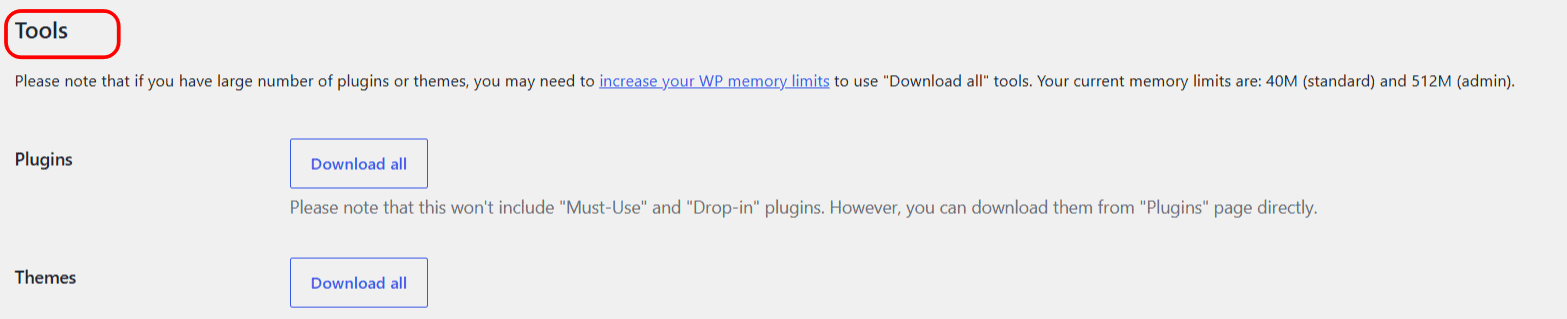
To download every installed plugin or every theme in one ZIP, use the free Download all tools in Download Plugins and Themes in ZIP from Dashboard. Go to WPFactory > Download plugins and Themes, scroll to Tools and click Download all next to Plugins or Themes. It is handy for a quick backup or a migration.
Where the tools are #
Open WPFactory > Download plugins and Themes and scroll to the Tools section. There is one Download all button for Plugins and one for Themes.
Download all plugins #
- Under Tools, next to Plugins, click Download all.
- Your browser downloads
plugins.zip, which contains the contents of your regular plugins folder.
Note: the plugins archive does not include Must-Use or Drop-in plugins, because those live outside the regular plugins folder. Download them one by one from the Plugins screen: switch to the Must-Use or Drop-in filter, then use each item’s Download ZIP link.
Download all themes #
Next to Themes, click Download all. Your browser downloads themes.zip with everything in your themes folder, including default themes.
Watch your memory limit on large sites #
Building one archive of every plugin or theme uses server memory. The Tools section shows your current limits (standard and admin). On a site with many plugins or themes, you may need to increase your WordPress memory limit before Download all can finish. If a download fails or the ZIP is empty, see fix Download all failing or timing out on large sites.
Requirements #
- Plugin downloads need the
activate_pluginscapability; theme downloads needswitch_themes. Both are part of the Administrator role. - Your server needs the
RecursiveIteratorIteratorclass and thezlibextension. The plugin checks these when you click a download and shows a notice if either is missing.
FAQ #
Is Download all a Pro feature? #
No. Both Download all buttons are free.
Can I download only some plugins instead of all? #
Yes, with Pro. Tick the plugins on the Plugins screen and pick Download ZIP from the bulk actions menu. See how to bulk download selected plugins. In the free version, use the Download ZIP link on each plugin.
Can this run automatically? #
Yes, with Pro. Periodical plugins downloads and Periodical themes downloads save archives to a folder on your server on a schedule. See how to schedule automatic plugin and theme downloads.
Do the Directory and Version settings apply to Download all? #
No. Those settings shape single plugin and theme ZIPs. Download all always produces plugins.zip or themes.zip with the folders inside.
New to the plugin? Start with Getting Started with Download Plugins and Themes.
Get more from Download Plugins and Themes #
The Download all tools are free. Download Plugins and Themes in ZIP from Dashboard Pro can run these downloads on a schedule and lets you bulk download only the plugins you select. See what Pro unlocks.
Need a hand? Our team answers every ticket on the Download Plugins and Themes support forum.