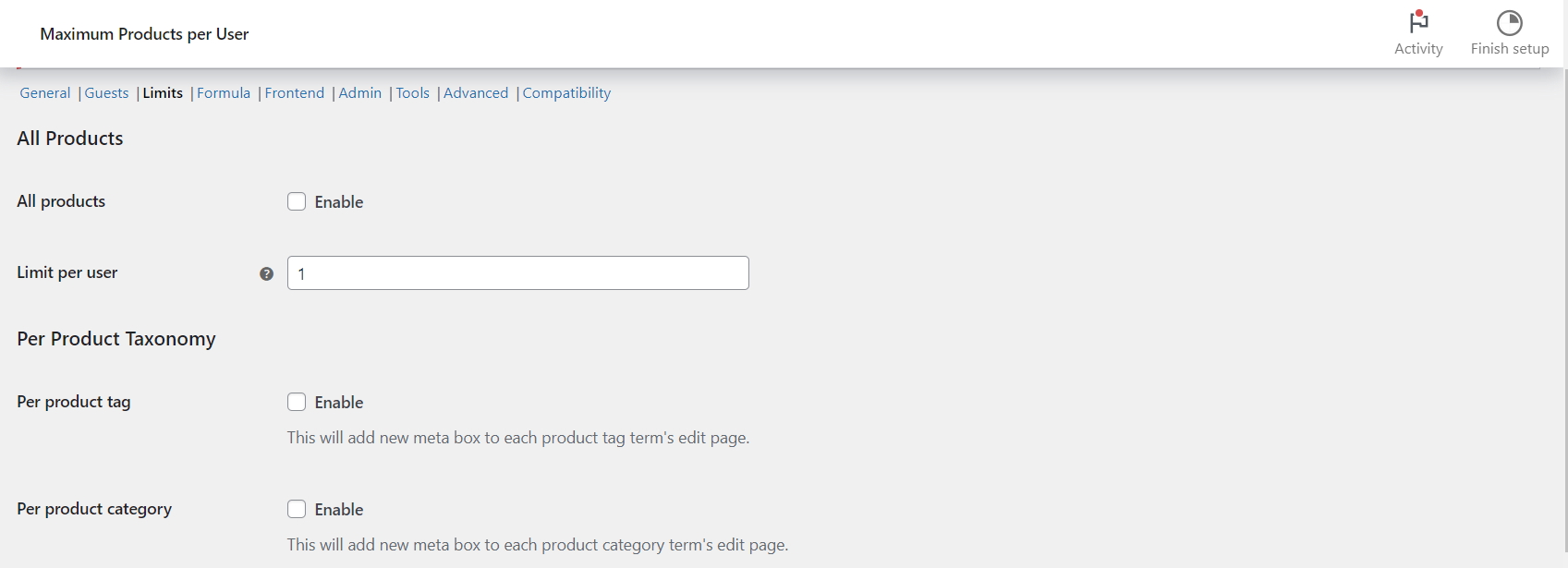
To limit what each customer buys from a product category or tag, enable Per product category or Per product tag at WPFactory > Max Products per User > Limits in Maximum Products per User for WooCommerce, then set Limit per user on the term’s edit page. All products in the term share the limit. This is Pro.
Before you start #
- Maximum Products per User Pro (these levels are Pro-only).
- The plugin enabled in General, where Mode decides what the limit counts (quantities by default; orders, prices, weights or volumes are also available) and Date range decides the period.
Step by step #
- Go to WPFactory > Max Products per User (also reachable at WooCommerce > Settings > Maximum Products per User) and open Limits.
- Under Per Product Taxonomy, tick Per product category, Per product tag, or both. Save changes.
- Go to Products > Categories (or Products > Tags) and click Edit on an existing term. The fields are on the edit screen, not the Add new form.
- Enter Limit per user, for example
3. - Optional: tick Block guests to stop logged-out visitors buying anything in this term (needs Guests > Block method set to “According to limit options”).
- Click Update.
Options #
| Label | Where | Option ID or meta key | Default | Free/Pro |
|---|---|---|---|---|
| Per product category | Limits section | alg_wc_mppu_product_cat_enabled |
No | Pro |
| Per product tag | Limits section | alg_wc_mppu_product_tag_enabled |
No | Pro |
| Per product | Limits section | wpjup_wc_maximum_products_per_user_local_enabled |
No | Pro |
| Limit per user | Category or tag edit page | _alg_wc_mppu_qty |
0 (no term limit) | Pro |
| Limit per user: (role) | Term edit page, when General > User roles is on | _alg_wc_mppu_user_roles_max_qty |
0 (use Limit per user) | Pro |
| Block guests | Term edit page | _wpjup_wc_mppu_block_guests |
Off | Pro |
| Customer message for each category and tag | Frontend section | wpjup_wc_maximum_products_per_term_message |
You can only buy maximum %limit% of %term_name%… | Free |
What the values mean #
- A positive number caps the combined amount across all products in the term. With a limit of 3 on “Posters”, a customer can buy 3 posters in total, in any mix, within the date range.
- 0 means this term has no limit. Other limits, such as All Products or a per-product limit, still apply.
- -1 is treated as a limit of zero, so customers cannot buy products from this term. Use it on a role field to shut one role out of a category.
Tip: to cap several products together, put them in one category or tag and set the limit on that term instead of on each product.
What the customer sees #
When adding to cart, and again in the cart and checkout, would take the customer over the term limit, WooCommerce shows the Customer message for each category and tag, by default “You can only buy maximum 3 of Posters (you’ve already bought 1).” The cart counts every product in the term, including items already in the cart.
How the levels combine #
- Category and tag limits are checked together with any per-product limit: the customer must stay within both.
- If a product has any category with a limit, tag limits for that product are not checked.
- If a product sits in two limited categories, both limits apply.
- The All Products limit still applies alongside term limits, unless the product has its own per-product limit.
Combining with formulas #
Once Per product or Per taxonomy is enabled, you can also reference product_id or term_id in the Formula section for more advanced rules, including one shared limit across several terms with limit_type="grouped".
If it does not work #
- No Limit per user field on the category page: the Per product category box is not ticked, the Pro version is not active, or you are on the Add new category form instead of Edit.
- Earlier orders are not counted: sales are recorded against the terms a product had when it was ordered. After moving products into a category, run Tools > Recalculate sales data. See How to recalculate and reset sales data.
- Customers are blocked completely: the term limit is
-1, or a role field holds-1. - Guests are not limited: by default guest sales are not tracked. See How to handle guest purchase limits.
FAQ #
Is the limit per product or for the whole category? #
For the whole category. Every product in the term counts toward the same limit. Use a per-product limit when each item needs its own cap.
Can I set different category limits for different user roles? #
Yes. Turn on User roles in General, and a Limit per user field for each enabled role appears on the term edit page. A role value of 0 falls back to the term’s Limit per user.
Are category limits available in the free version? #
No. The free version has the All Products limit. Per category, per tag and per product limits are Pro.
Ready to set this up? #
Per-category, per-tag and per-product limits are Pro features of Maximum Products per User. Get Maximum Products per User Pro.
Need a hand? Our team answers every ticket on the Maximum Products per User support forum.