To show or hide WooCommerce payment methods by customer location, install Conditional Payment Methods by Location for WooCommerce, choose how location is detected at WPFactory > Payment Gateways by Customer Location > General, then add countries, states, cities or postcodes to include or exclude for each gateway and save.
Payment Methods by Location removes a gateway from the checkout when the customer’s country, state, city or postcode does not fit your rules. In the admin, the plugin and its menu item are labeled Payment Gateways by Customer Location.
Before you start #
- WooCommerce, installed and active.
- The payment methods you want to control enabled at WooCommerce > Settings > Payments.
- Rules work for every payment gateway registered with WooCommerce, including third-party and custom gateways. Since version 1.8.0 the free version handles any gateway too.
Install and find the settings #
- Go to Plugins > Add New Plugin, upload the plugin zip and click Activate. If you install Pro while the free version is active, the free copy stops loading and Pro uses the same settings.
- Go to WPFactory > Payment Gateways by Customer Location (also reachable at WooCommerce > Settings > Payment Gateways by Customer Location). The Settings link on the Plugins screen opens the same page.
- You will see five sections: General, Countries, States, Cities and Postcodes.
Set up your first location rule #
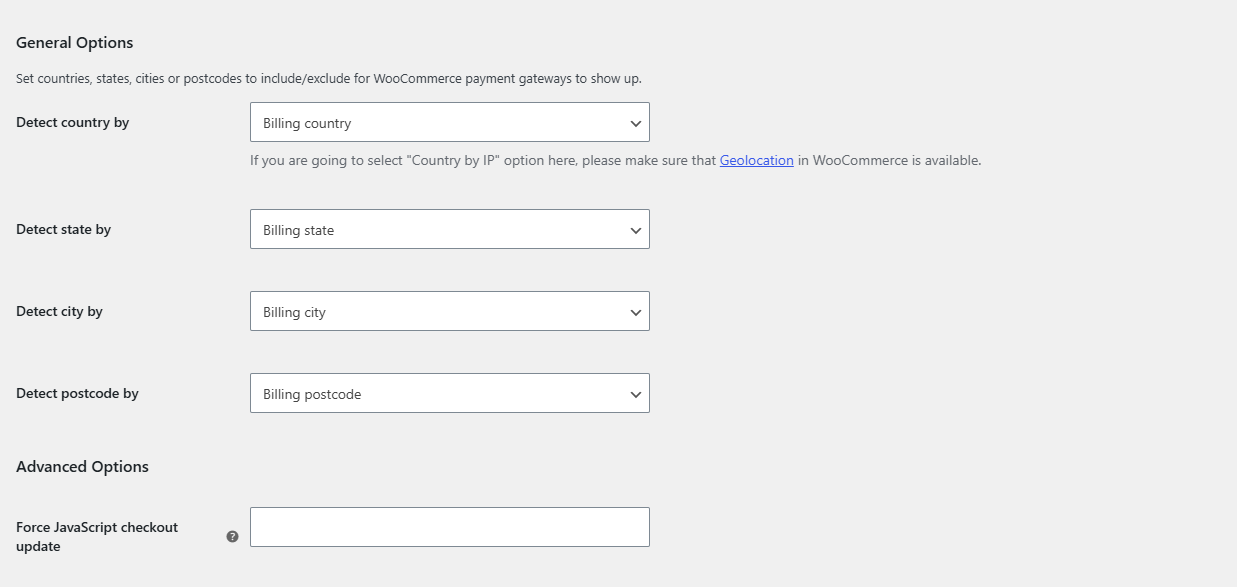
- In General, set Detect country by, Detect state by, Detect city by and Detect postcode by. All default to the billing address.
- Open the section for the location type you need, for example Countries.
- Check that the section’s Enable section box is ticked (on by default).
- Find the gateway by its admin name and fill in Include (gateway shows ONLY for these locations) or Exclude (gateway is hidden for these locations). Leave a field empty to ignore it.
- Click Save changes and test the checkout in a private browser window.
How rules combine #
- Include and Exclude are checked separately. A gateway is hidden if the customer is not in its Include list, or is in its Exclude list.
- Countries, states, cities and postcodes are all checked. The gateway must pass every section that has a value for it.
- If the customer’s location for a type is still empty (for example no state entered yet), that type is skipped.
Guides #
- Show or hide payment methods by country
- Restrict payment methods by state
- Restrict payment methods by city
- Restrict payment methods by postcode or ZIP code
- Settings reference and troubleshooting
Need rules by cart total, user role or date as well? Conditional Payment Methods for WooCommerce covers those, see its getting started guide. To choose gateways per product, see Payment Methods by Product & Country for WooCommerce.
Get Payment Methods by Location #
All location rules in this guide work with any payment gateway, including third-party and custom gateways. See Conditional Payment Methods by Location for WooCommerce.
Need a hand? Our team answers every ticket on the Payment Methods by Location support forum.