Disable a Payment Method for a Specific WooCommerce Product (or Category)

Quick Answer
WooCommerce does not let you restrict payment methods per product out of the box. You need a plugin. The fastest solution: install Payment Methods by Product & Country for WooCommerce by WPFactory, go to WooCommerce → Settings → Payment Gateways per Products, and set which gateways to show or hide per product category, tag, or individual product.
If you’ve ever needed to disable a payment method for a specific WooCommerce product, you already know the problem:
WooCommerce offers no built-in way to do it. You sell a $12 phone case and a $1,200 camera lens in the same store.. should both products offer the exact same payment options at checkout? Probably not.
For the low-margin phone case, PayPal’s 3.49% + $0.49 fee can wipe out your profit entirely. For the high-ticket lens, Cash on Delivery is a fraud risk you cannot afford. WooCommerce, however, treats every product the same at checkout.. one payment setup for everything.
This guide shows you exactly how to fix that: how to disable or restrict payment methods for specific products or categories in WooCommerce.. including how to hide a payment gateway for a specific product, restrict payment by product category, and set up woocommerce conditional payment methods without touching any code.
Why WooCommerce Doesn’t Handle This Natively?
WooCommerce’s payment settings are global. You can enable or disable a gateway for the entire store, but there is no built-in option to say “hide PayPal when Product X is in the cart” or “only show Bank Transfer for orders containing Category Y.”
Store owners who run into this limitation usually try one of three workarounds.. all of them flawed:
Custom code (PHP snippets): The woocommerce_available_payment_gateways filter can technically restrict gateways by cart contents. But it requires developer knowledge, breaks on WooCommerce updates, and has known issues with the block-based checkout page.
Duplicate product listings: Creating two versions of the same product with different checkout flows. This creates inventory management nightmares, confuses customers, and hurts your SEO with duplicate content.
Manual customer instructions: Telling customers on the product page which payment method to use. This puts the burden on the customer and increases cart abandonment.
The right solution is a plugin built specifically for this.. one that hooks into WooCommerce properly, requires no code, and stays compatible with updates.
How to Disable a Payment Method for a Specific WooCommerce Product?
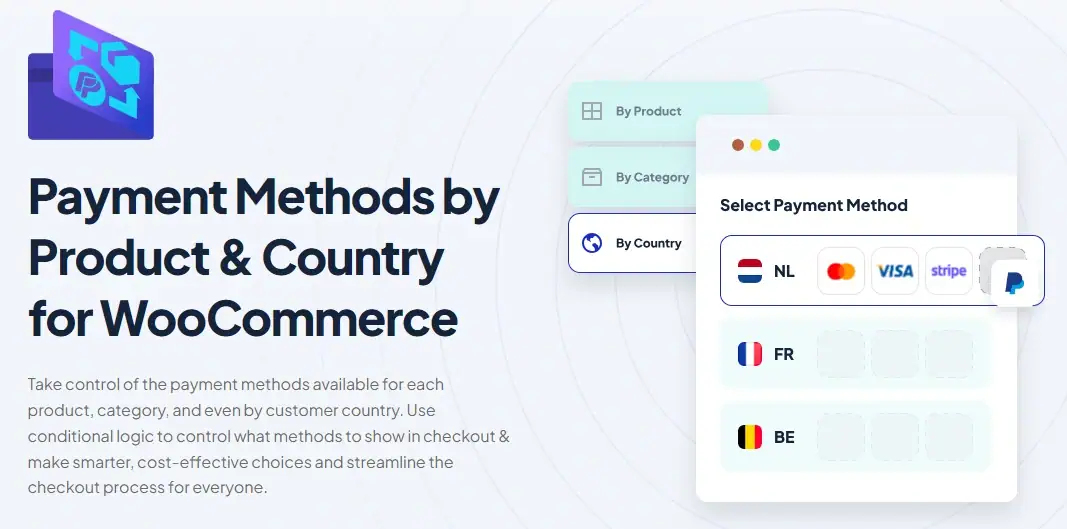
Payment Methods by Product & Country for WooCommerce by WPFactory is the most complete solution for controlling which payment gateways appear based on what’s in the cart. It works with any WooCommerce-compatible gateway.. PayPal, Stripe, Bank Transfer, Cash on Delivery, and others.
6,760 stores currently use it, and it carries a 4.6-star rating.
WooCommerce Restrict Payment by Product Category | What the Free Version Covers?
The free version lets you control payment methods at two levels:
Per Product Category: Show or hide any gateway when a product from a specific category is in the cart.
For example: hide Cash on Delivery for all products in your “Digital Downloads” category, or restrict PayPal to categories with healthy margins.
Per Product Tag: Apply the same logic using tags instead of categories. Useful when your products span multiple categories but share a common characteristic.. like “subscription” or “high-value” or “fragile.”
What the Pro Version Adds?
Per Individual Product: The most granular level of control. Assign or exclude specific gateways product by product.. including support for product variations. A camera body and its kit lens can have different payment rules.
Per Country: Show or hide gateways based on the customer’s billing country. Essential for international stores that need to offer local payment methods or comply with regional restrictions.
Fallback Gateway: When two rules conflict.. for example, a cart contains products from two categories with contradicting gateway rules.. the plugin can automatically display a fallback gateway instead of showing nothing at checkout. This prevents lost sales caused by conflicting logic.
Subscription Product Support: Products sold on a recurring basis (monthly, quarterly, annually) should only be purchasable through gateways that support automatic renewals.
The Pro version lets you restrict subscription products to compatible gateways like PayPal or Stripe, preventing customers from accidentally checking out with Cash on Delivery.
How to Set It Up (Step by Step)?
Step 1: Go to the plugin page on WPFactory, download the plugin file, then in your WordPress dashboard go to Plugins → Add New → Upload Plugin, choose the downloaded .zip file, click Install Now, and then Activate.
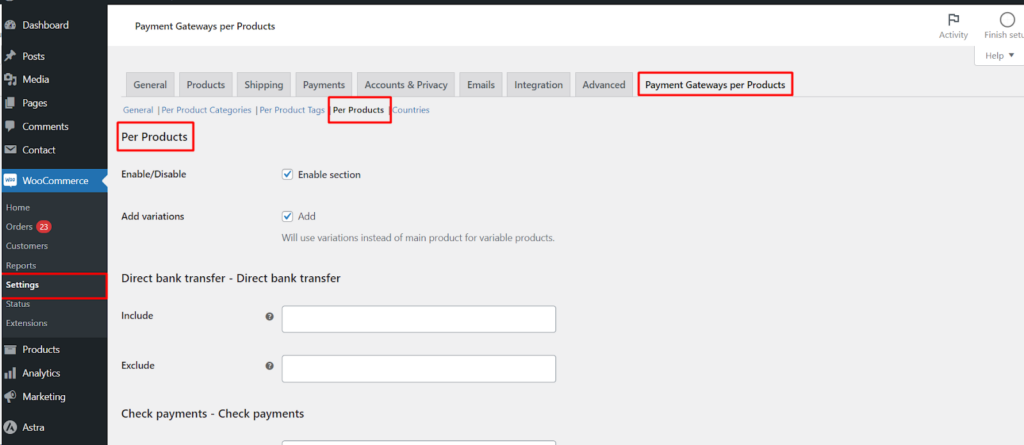
Step 2: Navigate to WooCommerce → Settings → Payment Gateways per Products.

Step 3: Choose your section. For the free version, select Per Product Categories or Per Product Tags. For Pro users, Per Products is also available.
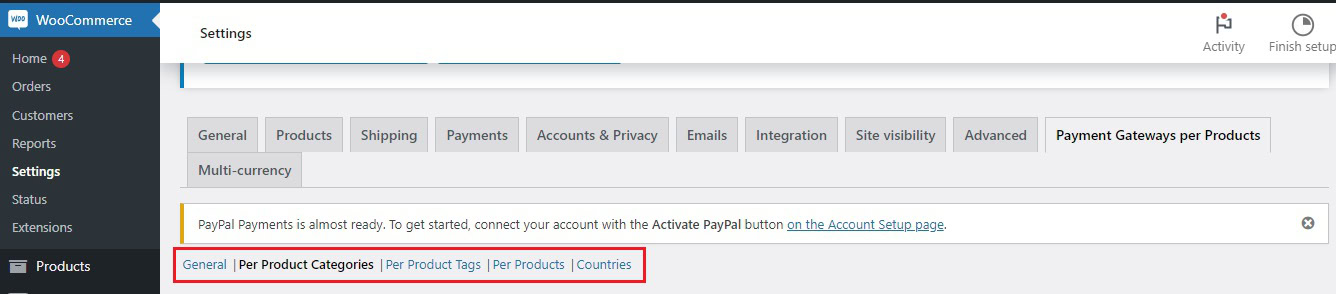
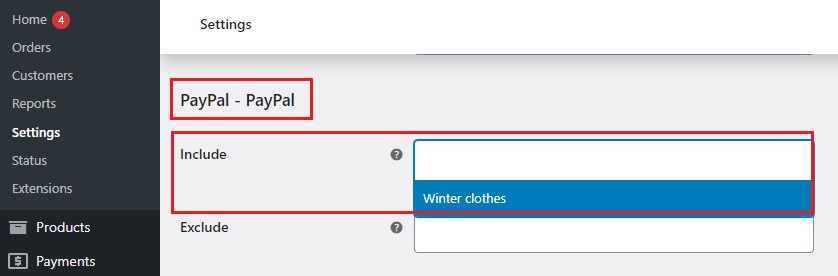
Step 4: For each payment gateway listed, use the Include and Exclude checkboxes to define which categories or tags should trigger or suppress that gateway.
For individual product control (Pro): edit any product, scroll to the Payment Gateways per Products section, enable or disable specific gateways for that product, and save.
Step 5: Click Save Changes. The rules apply immediately at checkout.
Here’s an example of what it would look like👇
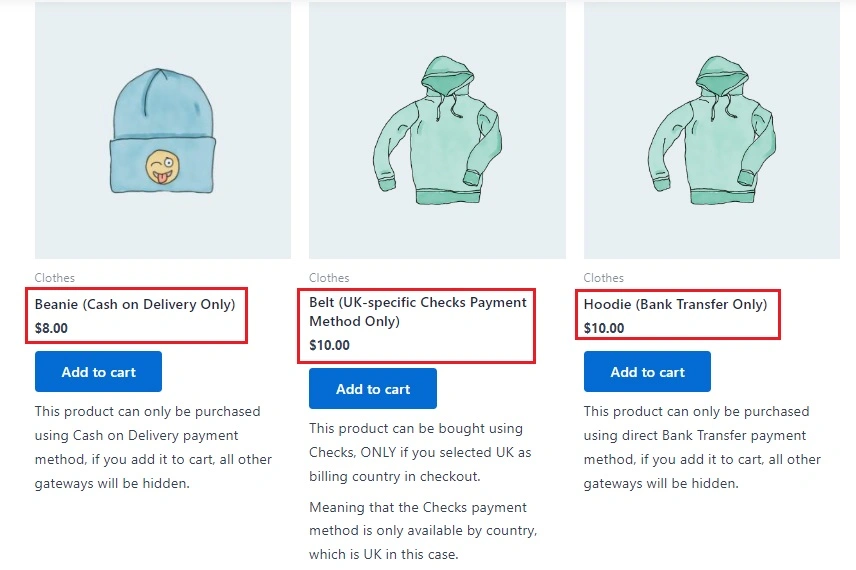
Stop Losing Profit to the Wrong Payment Gateway
6,760 WooCommerce stores already control exactly which payment methods appear per product. Free version available – Pro starts at $59.99/year with a 14-day money-back guarantee.
Real Use Cases: When This Matters Most?
-
High-Value Products
For products priced above $500, credit card chargebacks and PayPal disputes are a significant risk.
Restricting checkout to Bank Transfer only for high-ticket items reduces fraud exposure and eliminates percentage-based fees that hurt margins on large orders.
-
Digital Products
Digital goods are delivered instantly. Allowing Cash on Delivery for a software license or downloadable file makes no practical sense and opens you to fraud. Disabling COD for your entire “Digital” category takes 60 seconds with this plugin.
-
Subscription Products
WooCommerce Subscriptions requires a gateway that supports automatic renewals.
If a customer checks out a subscription product using a gateway that doesn’t support this, the renewal will fail. Restricting subscription products to Stripe or PayPal prevents this problem entirely.
-
Low-Margin Products
Competitive products with thin margins cannot absorb PayPal’s 3.49% + fixed fee.
Hiding expensive gateways for specific product categories steers customers toward direct bank transfer or lower-cost processors, protecting your margins without removing options entirely.
-
International Stores
Customers in Germany prefer SEPA bank transfers. Customers in the Netherlands expect iDEAL.
Customers in Brazil use Boleto. Showing all payment methods to all customers creates a confusing checkout. The Pro version’s country-based rules let you surface only the relevant options per region.
Free vs Pro: What You Actually Get?
| Feature | Free | Pro |
|---|---|---|
| Control by Product Category | ✓ | ✓ |
| Control by Product Tag | ✓ | ✓ |
| Control by Individual Product | – | ✓ |
| Control by Product Variation | – | ✓ |
| Control by Customer Country | – | ✓ |
| Fallback Gateway (conflict prevention) | – | ✓ |
| Subscription Product Support | ✓ | ✓ |
| Works with All WooCommerce Gateways | ✓ | ✓ |
| Price | Free | $59.99/year |
How It Compares to Other Plugins?
| Feature | WPFactory | PiWeb | Jose Vega |
|---|---|---|---|
| Control by Category (free) | ✓ | ✓ | Paid only |
| Control by Tag (free) | ✓ | ✓ | Paid only |
| Control by Individual Product | Pro | Pro | Pro |
| Control by Country | Pro | Pro | Pro |
| Fallback Gateway | ✓ Pro | ✗ | ✗ |
| Subscription Support | ✓ | Not confirmed | Not confirmed |
| Live Demo Site | ✓ | ✗ | ✗ |
| WPML Compatible | ✓ | Not confirmed | Not confirmed |
| Money-Back Guarantee | 14 days | Not confirmed | 14 days |
| Last Updated | 3 months ago | Not listed | 10+ months ago |
| Active Installs | 6,760 | Not listed | ~1,000 |
| Pro Price (1 site/year) | $59.99 | $19.00 | $29.00 |
WPFactory is not the cheapest option. It is, however, the only one among these three that offers a Fallback Gateway, confirmed subscription support, a live demo, and WPML compatibility, and the one with by far the largest install base among the three.
Common Mistakes to Avoid
Before you disable a payment method for a specific WooCommerce product or category, avoid these common mistakes:
- Setting conflicting rules without a fallback:
If a cart contains products from two categories with contradicting gateway rules, WooCommerce may display no payment methods at checkout.. causing the customer to see an error and abandon.
Always configure the Fallback Gateway option in Pro if you use complex rule sets.
- Disabling all gateways for a product type:
Hiding every payment option for a product category without a fallback will break checkout for those products. Always leave at least one gateway enabled, or configure a fallback.
Not testing after configuration:
After setting up rules, add a product from the affected category to a test cart and go through checkout. Verify the correct gateways appear.. and disappear as expected. Do this in an incognito window to avoid cached sessions.
- Using the free version for product-level rules:
Category and tag rules cover most use cases, but if your goal is to hide a payment gateway for a specific product or variation in WooCommerce, you need the Pro version.
Frequently Asked Questions
Can I disable PayPal for specific products only, not the whole store?
Yes. With the free version, you can disable PayPal for any product category or tag. With Pro, you can disable it for individual products or specific product variations. The rest of your store continues to offer PayPal normally.
Does this work with Stripe, Square, and other third-party gateways?
Yes. The plugin supports any payment gateway that is installed and enabled in WooCommerce. This includes Stripe, Square, Authorize.Net, Klarna, Mollie, and all other WooCommerce-compatible gateways.
What happens if a cart has products from two categories with different rules?
Without a fallback, WooCommerce may show no payment options if the rules conflict. The Pro version’s Fallback Gateway feature handles this automatically, it lets you define a default gateway to display whenever rules contradict each other, preventing abandoned checkouts. Shipping methods can conflict in much the same way, which is why WooCommerce conditional shipping rules need a clear order of priority.
Will this affect existing orders or subscriptions?
No. Rules only apply at checkout for new orders. Existing orders and active subscriptions are not affected by changes to payment gateway rules.
Does the free version work for most stores?
For most stores, yes. If your products are organized into categories or tagged consistently, category and tag-level rules cover the majority of use cases. You only need Pro if you require product-level control, country-based rules, or the Fallback Gateway feature.
Is there a way to test the plugin before buying the Pro version?
Yes. You can install the free version on your store immediately. WPFactory also provides a live demo site where you can test the plugin’s behavior before committing. The Pro version comes with a 14-day money-back guarantee, no questions asked.
Related Resources
Ready to Take Control of Your Checkout?
Start with the free version, no credit card required. Upgrade to Pro when you need product-level control, country rules, or the Fallback Gateway.