Add a custom tab that shows on all products #
The Custom Tabs: All Products section of Additional Custom Product Tabs for WooCommerce adds a global tab that appears on every product page. It is ideal for information you repeat across the catalog, such as shipping, warranty or a size guide. The free version includes one global tab; Product Tabs Pro removes the limit.
Where to find it #
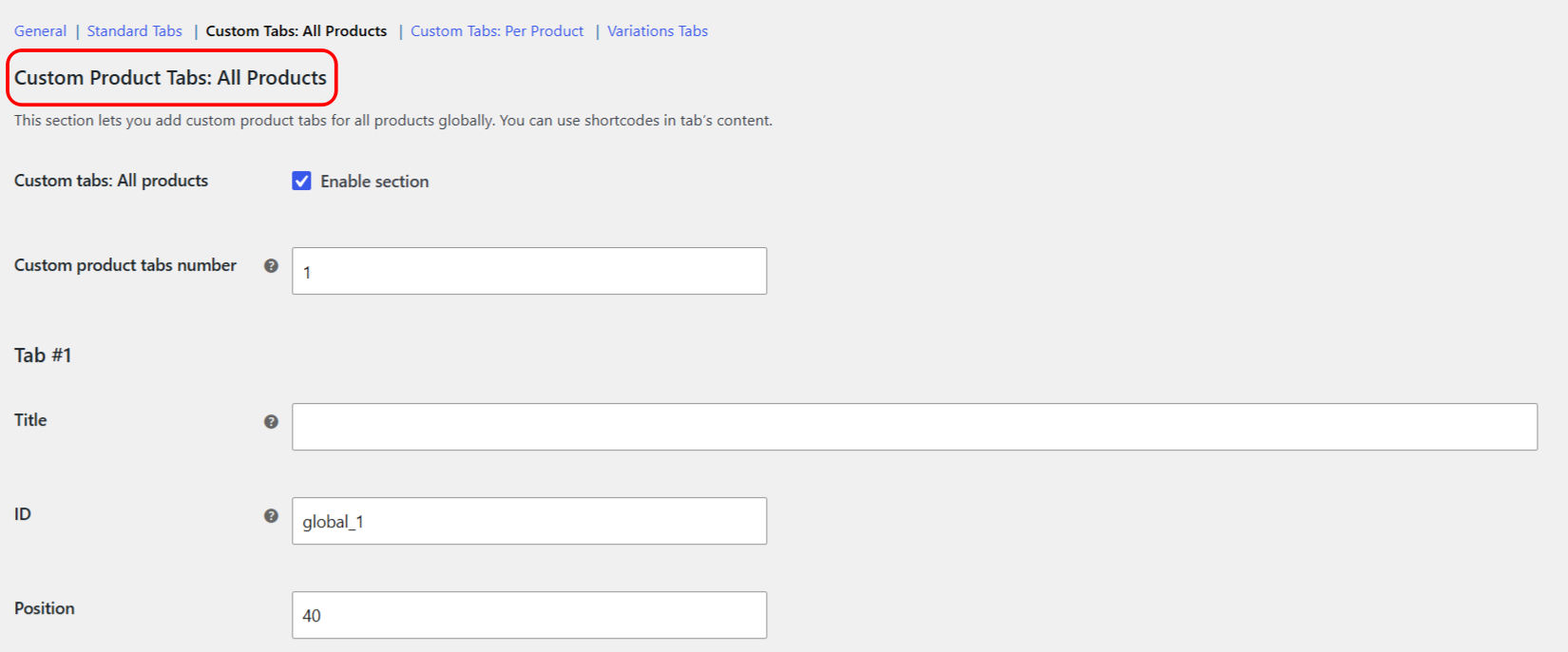
Go to WPFactory > Product Tabs (also reachable at WooCommerce > Settings > Product Tabs) and open the Custom Tabs: All Products section.
Set the number of tabs #
Custom product tabs number (alg_custom_product_tabs_global_total_number, default 1) sets how many global tabs you have. In the free version this field is read only and fixed at 1. In Product Tabs Pro it is editable: change the number, click Save changes, and a settings block appears for each tab.
Configure each tab #
| Setting | Option ID (tab 1) | Default | What it does |
|---|---|---|---|
| Title | alg_custom_product_tabs_title_global_1 |
(empty) | The tab heading. Shortcodes are allowed. A tab only appears when both Title and Content are filled in. |
| ID | alg_custom_product_tabs_id_global_1 |
global_1 | The internal tab key used in the page link. It must be unique and cannot be empty. It is sanitized to a slug. |
| Position | alg_custom_product_tabs_priority_global_1 |
40 | A number that orders this tab against the others. Lower numbers appear first. |
| Content | alg_custom_product_tabs_content_global_1 |
(empty) | The tab body. Accepts HTML and shortcodes. |
Note: a global tab is only rendered when its Title and its Content are both set. An empty tab does not show.
Show or hide the tab for specific products #
Each tab has four visibility fields: Products to hide this tab for, Categories to hide this tab for, Products to show this tab for and Categories to show this tab for. Leave them empty to show the tab everywhere. Targeting is done by product and by product category. For the full workflow, including choosing whether products are picked from a list or entered as IDs or SKUs, see show or hide a product tab by product or category.
Use shortcodes in the content #
Because a global tab shows on every product, shortcodes let you output values that differ per product. For example, [alg_wc_pt_product_meta key="my_custom_field"] prints a custom field, and [alg_wc_pt_product_function name="get_sku"] prints the SKU. See the product tabs shortcodes reference.
Troubleshooting #
- The tab does not appear: confirm both Title and Content are filled in, and that the ID is unique and not blank.
- You need more than one global tab: the number field is fixed at 1 in the free version. Upgrade to Pro to raise it.
Get more control #
One global tab is free. Additional Custom Product Tabs for WooCommerce Pro lets you add an unlimited number of global tabs. Get Product Tabs Pro.