Number of Products per Page – Pagination Manager for WooCommerce adds a selector to your shop and archive pages so shoppers choose how many products each page shows. Configure it at WPFactory > Products per Page (also reachable at WooCommerce > Settings > Products per Page). It works with a 10, 25, 50, 100 or All dropdown.
What it does #
- Sets the default number of products shown per page on your shop and archive pages.
- Offers a per-page selector as a dropdown or as radio buttons, so customers choose how many products they see at once.
- Remembers each shopper’s choice in a cookie and the WooCommerce session, so the preference sticks as they browse.
- Places the selector anywhere using built-in positions, custom action hooks, the
[alg_wc_products_per_page]shortcode, or (in Pro) a widget.
Install and activate #
Free version from the WordPress plugin directory #
- In your WordPress dashboard, open Plugins and select Add New.
- Search for Number of Products per Page – Pagination Manager for WooCommerce by WPFactory.
- Click Install Now, then Activate.
Pro version by uploading the ZIP #
- Download Number of Products per Page – Pagination Manager for WooCommerce Pro from your WPFactory account.
- Open Plugins, select Add New, then Upload Plugin, and choose the ZIP file.
- Click Install Now, then Activate. When Pro is active, the free version stops loading, so your settings carry over.
WooCommerce must be installed and active first.
First setup #
- Go to WPFactory > Products per Page. On the General section, confirm Products per Page > Enable plugin is ticked (on by default).
- Leave Position(s) at Before shop loop (the default), or add more positions such as After shop loop.
- Under Select Options, set Default option to the number of products shoppers see before they choose (default
10). Use-1for all products. - Click Save changes and open your shop page. The line “Products 1 – 10 from [total]. Products on page” appears with the dropdown next to it.
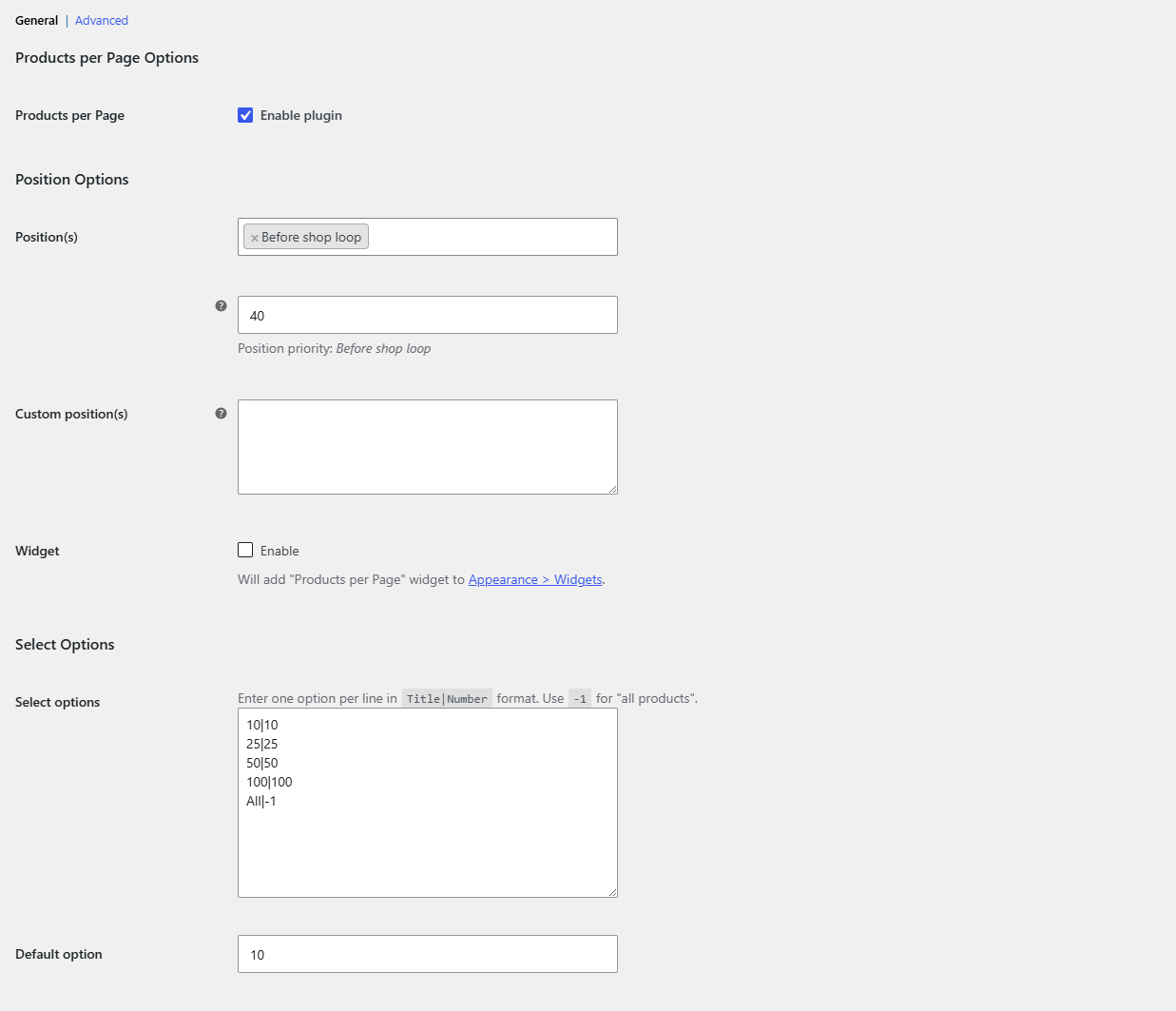
For every General option, see General settings: products per page, positions, template and select options.
Main features #
Positions and custom hooks (free) #
Position(s) offers seven spots: Before main content, In archive description, Before shop loop, After shop loop, After main content, Before pagination and After pagination. Custom position(s) takes WordPress action hook names, one per line, with an optional priority such as your_custom_action|40. See place the selector in a custom position.
Template, dropdown or radio buttons (free) #
The Template field controls the selector text with the placeholders %from%, %to%, %total%, %dropdown% and %radio%. Replace %dropdown% with %radio% to show radio buttons. See show the selector as radio buttons and the template placeholders and styling reference.
Custom per-page options (Pro) #
The Select options list defaults to 10, 25, 50, 100 and All, one per line in Title|Number format. It is read-only in the free version and editable in Pro. See customize the products per page options.
Remember the shopper’s choice (free) #
On the Advanced section, Save in cookie (on, 1209600 seconds or 14 days by default) and Save in session (on) keep the chosen number as the shopper browses. See remember a shopper’s products per page choice.
Scopes and form method (free) #
Scopes can require or exclude page types such as Shop, Product category or Product tag, and Form method switches between POST (default) and GET, which adds alg_wc_products_per_page to the URL. See limit the selector to specific pages and advanced settings.
Shortcodes and widget #
Use the free [alg_wc_products_per_page] shortcode to show the selector anywhere, and [alg_wc_ppp_translate] for multilingual text. The Widget option is Pro. See shortcodes, the Products per Page widget and translate the selector text.
Free vs Pro #
| Feature | Free | Pro |
|---|---|---|
| Selector with all 7 positions and custom hook positions | Yes | Yes |
| Template, dropdown or radio buttons, class, style and Custom CSS | Yes | Yes |
Default option, including All (-1) |
Yes | Yes |
| Cookie and session memory, scopes, form method | Yes | Yes |
| Shortcodes | Yes | Yes |
| Edit the Select options list | No (read-only) | Yes |
| Products per Page widget | No | Yes |
More detail: Products per Page free vs Pro.
FAQ #
The selector does not show on my shop page. What should I check? #
Confirm Enable plugin is on, that Position(s) is not empty, and that Scopes does not exclude the page. Some themes do not run every WooCommerce hook, so try another position or the shortcode. See selector not showing or not applying.
Can I show 12, 24 and 48 instead of 10, 25 and 50? #
Editing the options list needs Pro. In the free version you can still change Default option to any number, such as 12.
How do I offer an “all products” option? #
The default list already includes All|-1. The value -1 means all products on one page.
Does it work with the WooCommerce [products] shortcode? #
Yes. Apply in WooCommerce shortcodes on the Advanced section applies the selector to the [products] shortcode and is on by default.
Get more control #
The core selector is free. Number of Products per Page – Pagination Manager for WooCommerce Pro adds an editable list of per-page options and a Products per Page widget. See what Pro unlocks.
Need a hand? Our team answers every ticket on the Products per Page support forum.