To charge a small order or handling fee instead of blocking orders below your WooCommerce minimum, use Order Minimum/Maximum Amount Limits for WooCommerce Pro. Go to WPFactory > Order Min/Max > Fees, tick Fees, enter a fee per limit, and turn off Block checkout process in the General section.
Before you start #
- WooCommerce, active.
- Order Minimum/Maximum Amount Limits for WooCommerce Pro: the Fees section is a Pro feature.
Step-by-step #
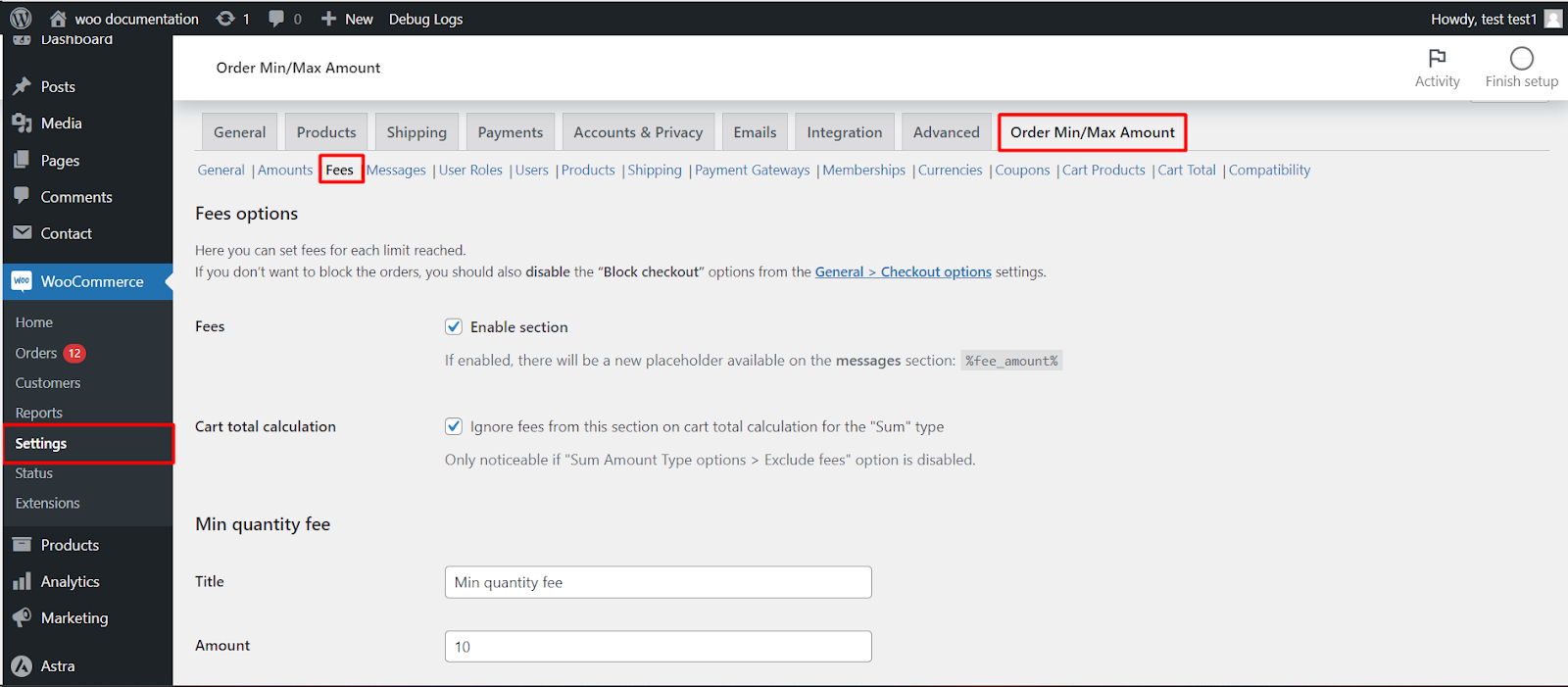
- Go to WPFactory > Order Min/Max (also reachable at WooCommerce > Settings > Order Min/Max Amount) and open the Fees sub-tab.
- Tick Fees (
alg_wc_oma_add_fee_for_each_limit) to enable the section, then click Save changes. - A Title and Amount field appears for each limit and amount type (for example Min sum fee). Enter the fixed fee you want to charge, and save.
- Because fees let orders through, turn off Block checkout process (and Block checkout page, if you turned it on) in General > Checkout options, or the order will still be blocked.
Options in this section #
| Label | Option ID | Default |
|---|---|---|
| Fees (enable section) | alg_wc_oma_add_fee_for_each_limit |
No |
| Ignore fees for sum calculation | alg_wc_oma_ignore_fees_for_sum_type |
Yes |
| Taxes (Apply tax) | alg_wc_oma_apply_tax_to_fee |
Follows store tax setting |
| Tax class | alg_wc_oma_fee_tax_class |
standard |
| Title (per limit and type) | alg_wc_oma_{min|max}_{type}_fee_label |
For example “Min sum fee” |
| Amount (per limit and type) | alg_wc_oma_{min|max}_{type}_fee |
0 (no fee) |
Good to know #
- Turning the section on adds the
%fee_amount%placeholder to the Messages sub-tab, so you can tell customers what the fee will be. - To disable a single fee, set its amount to 0 or leave it empty.
What the customer sees #
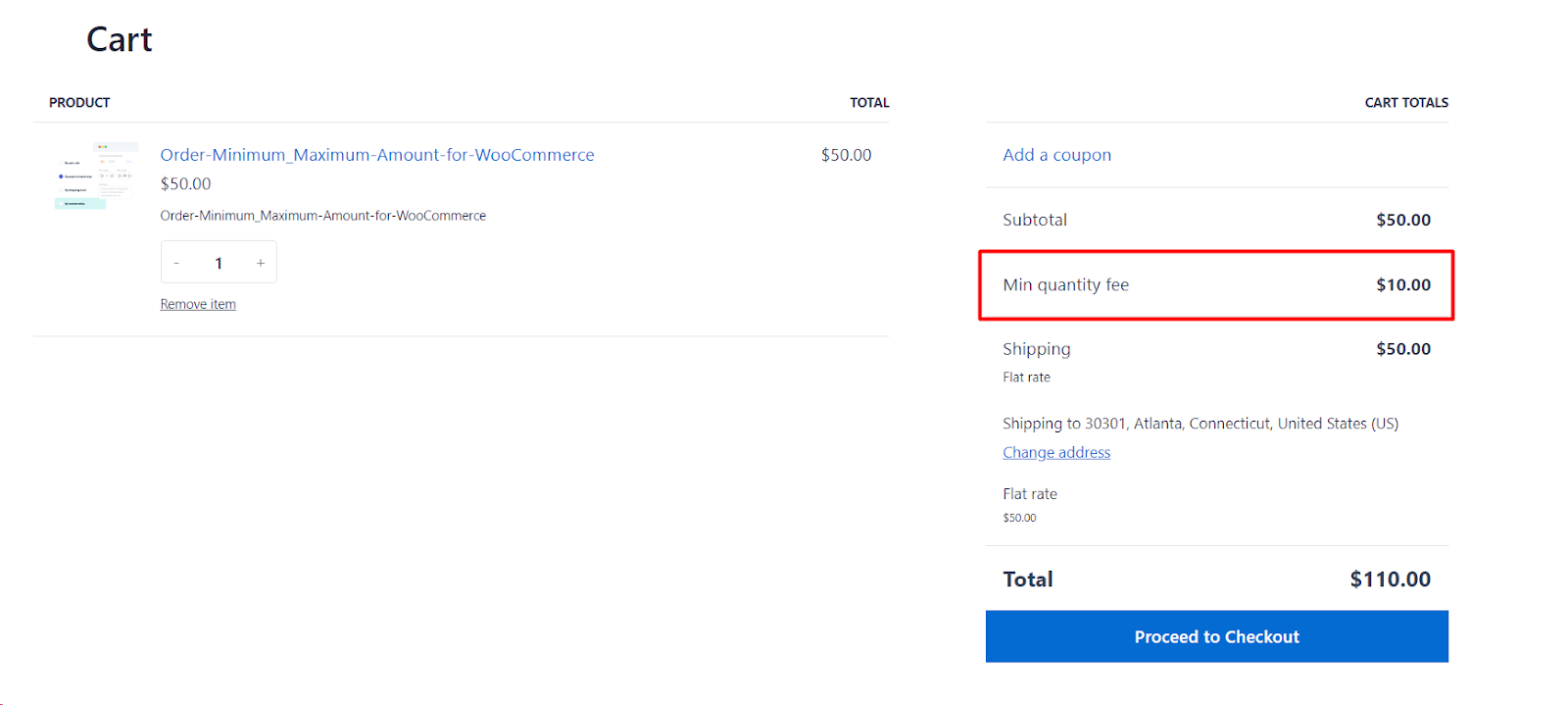
When the cart breaks a limit that has a fee, the fee is added to the cart and checkout totals under its Title, for example “Small order handling fee”. As soon as the cart meets the limit again, the fee disappears. If several limits are broken (for example the minimum sum and the minimum quantity), each one with a fee adds its own line.
Your min/max messages still show, so reword them to explain the charge, for example: Orders under %amount% carry a %fee_amount% handling fee. Add %diff% more to avoid it. %fee_amount% includes tax when Taxes is on.
Example: small order fee #
- In the General section, set Min sum to 30.
- In Fees, tick Fees, set the Min sum fee Title to “Small order fee” and Amount to 5.
- In General > Checkout options, turn off Block checkout process.
A 20 cart now shows a 5 fee and can be paid; a 30 cart has no fee.
If the fee does not appear #
- The Fees checkbox is off, or you are on the free version.
- The fee Amount for that limit and type is 0 or empty.
- The limit is actually met. Fees are only added for limits the cart currently breaks, so check your Sum options on the General tab.
- The order is still blocked. Turn off the Block checkout options; the fee does not unblock checkout by itself.
FAQ #
Can the fee be a percentage? #
No. Each fee is a fixed amount in your store currency.
Does the fee count toward reaching the minimum? #
No, by default. Ignore fees for sum calculation is on, so the added fee is not counted in the order sum and cannot satisfy the minimum by itself.
Can I charge a fee only for certain customers? #
The fee follows whichever limit applies to the customer. For example, if wholesale buyers have a role-based minimum, the fee is charged when they are below their own minimum. See amounts by user role.
Related: blocking checkout when order limits are not met and min/max messages and their placement.
Ready to set this up? #
Fees are part of Order Min/Max Amount Pro. Get Order Min/Max Amount Pro.
Need a hand? Our team answers every ticket on the Order Min/Max Amount support forum.