Customize the messages shown in WooCommerce pop-ups #
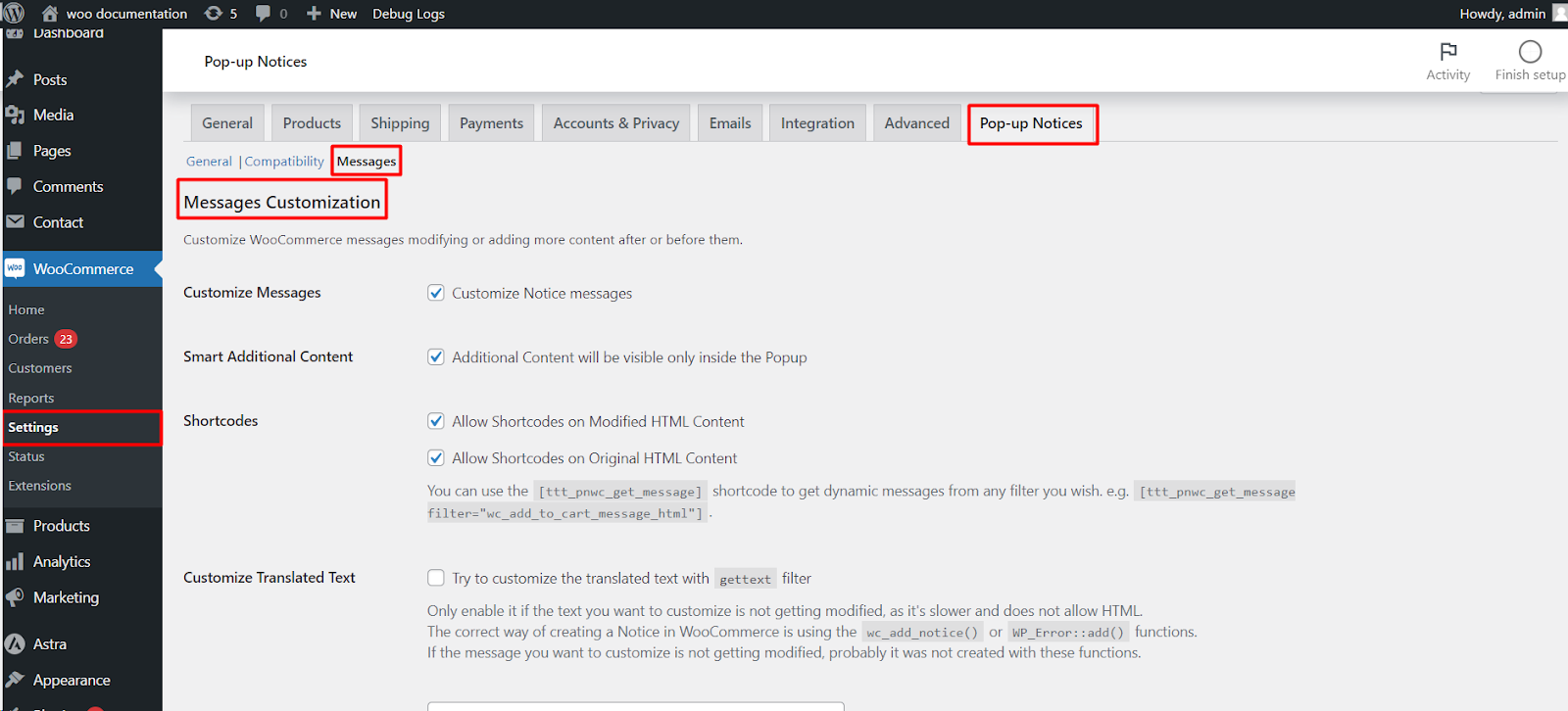
To customize WooCommerce pop-up messages in Popups for WooCommerce: Add to Cart, Checkout & More Pro, go to WPFactory > Popups, open the Messages section, and enable Customize Messages. You can then rewrite a notice, add content before or after it, or remove it from the pop-up. This is a Pro feature.
Before you start #
- WooCommerce, active.
- Popups for WooCommerce: Add to Cart, Checkout & More Pro.
Open the Messages section #
Go to WPFactory > Popups (also reachable at WooCommerce > Settings > Pop-up Notices) and click the Messages section.
Global message options #
| Setting | Option ID | Default |
|---|---|---|
| Customize Messages | ttt_pnwc_opt_message_customization_enable |
No |
| Smart Additional Content | ttt_pnwc_opt_message_customization_smart_content |
Yes |
| Shortcodes (on modified content) | ttt_pnwc_opt_message_customization_shortcodes |
Yes |
| Allow Shortcodes (on original content) | ttt_pnwc_opt_message_customization_shortcodes_original_content |
Yes |
| Customize Translated Text | ttt_pnwc_opt_message_customization_gettext |
No |
| Additional Content Tag | ttt_pnwc_opt_message_customization_content_tag |
div |
| Total Messages | ttt_pnwc_opt_message_customization_amount |
1 |
Smart Additional Content keeps any before/after content visible only inside the pop-up, not on the standard WooCommerce notice. Customize Translated Text uses the gettext filter and is slower and text-only; use it only when a message is not being modified by the normal method.
Per-message options #
Total Messages sets how many messages you want to customize. Each message you add exposes these fields:
- Enable (
ttt_pnwc_opt_message_enabled): turn customization on for this message. - Original HTML Content (
ttt_pnwc_opt_message_original): the message to match, written exactly as it appears in the source. - Modified HTML Content (
ttt_pnwc_opt_message_modified): the replacement. Leave empty to keep the original text. - Additional Content Before / After (
ttt_pnwc_opt_message_content_before/..._after): content added around the message. - Comparison method (
ttt_pnwc_opt_message_comparison_method, defaultContains): choose Contains to match part of the message, or Equality to match the whole message. - Remove (
ttt_pnwc_opt_message_remove, default No): removes the message from both the pop-up and the standard notice. Use with care.
To insert dynamic values, see Template variables in pop-up messages.
Ready to set this up? #
Message customization is a Pro feature of Popup Notices. Get Popup Notices Pro.