
Forum Replies Created
-
AuthorPosts
-
Hindi
ParticipantHi John,
I hope you’re doing well and I apologize for the delay.
Regarding your question, there is indeed a documentation link available for product XML feeds in WooCommerce. This link will provide you with all the necessary details and shortcodes.
Please note that this link will soon be updated to link directly to the plugin page: https://wpfactory.com/docs/product-xml-feeds-for-woocommerce/
Thank you for your cooperation and patience.
Let me know if you have any further questions or concerns.
ParticipantDear Acquisti,We hope this message finds you well.
You can use this link to access the complete documentation:
https://wpfactory.com/docs/product-price-by-quantity-for-woocommerce/.
We are currently working on displaying it on the plugin page.
Thank you for your patience and time.
Best Regards,
A.Hindi
-
This reply was modified 3 years, 1 month ago by
Hindi.
ParticipantDear Benjamin Cohen,
Thank you for contacting us. We hope this message finds you well.
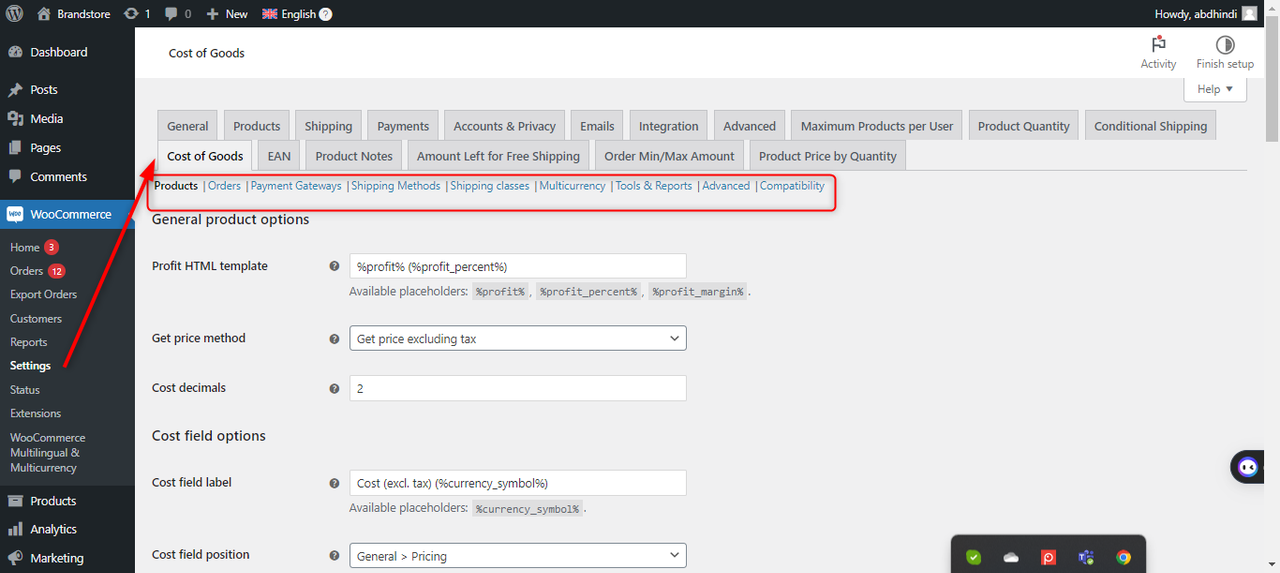
To control the settings of the Cost of Goods for WooCommerce plugin, please navigate to woocommerce ->settings->Cost of Goods tab. All settings for the plugin will appear for you to manage. Please refer to the attached screenshot for reference.
We hope you find this information useful.
Thank you.
Best Regards,
A.Hindi.
 Participant
Hi there,
Thank you for getting in touch with us about the Maximum Products per User for WooCommerce plugin. I hope you are doing well.
To help you resolve this issue, could you please send us the Order number to [email protected] ? This will enable us to look into the matter and provide you with the necessary assistance.
Thank you for your cooperation.
A. Hindi
September 18, 2023 at 9:38 pm in reply to: Incorrect Default Quantity Value On Pages Other Than Product Archive #124331ParticipantHello Gurmetat,
We sincerely apologize for any delay in our response.
We have conducted thorough testing on our end, and it appears that the functionality is working as expected.
In order to further investigate and assist you more effectively, we kindly request access permissions to your website. Please grant us access by sending an email to [email protected].
To ensure the safety of your website data, we recommend taking a backup copy and setting up a staging environment for testing purposes.
Thank you for your understanding and cooperation.
A.Hindi,
-
This reply was modified 3 years, 2 months ago by
September 16, 2023 at 11:37 am in reply to: [Bug] Free Shipping option not showing when plugin is enabled #124227ParticipantHi Monica ,
Check necessary fields for the country/region that must be filled out in order for the shipping options, including free shipping, to appear. Please take a look at the screenshot that was sent to you.
I hope this information was helpful to you.
Thank you!September 12, 2023 at 9:58 pm in reply to: Could not include font definition file: dejavusans #124004ParticipantHi Mark,
We hope you are doing well. We apologize for the inconvenience you are facing with the EAN plugin while Print barcodes.
We have conducted tests on our side and did not encounter the same issue. To troubleshoot, please try selecting a font type other than DejaVu Sans (Unicode) by following these steps:
1. Go to WooCommerce Settings
2. Select EAN
3. Choose Print
4. Scroll to the font option
5. Change the font to a different typeAfter changing the font, please try the process again and let us know the results. If the issue persists, we will need to access your site to further investigate the problem. Kindly send us the permissions for your site via the following email: [email protected]
Thank you for your understanding and cooperation.
September 2, 2023 at 7:23 pm in reply to: [Bug] Free Shipping option not showing when plugin is enabled #122902ParticipantHi Monica
Thank you for your message. We have received permissions for your site from the developer
And we checked the plugin,
But when the Amount Left for Free Shipping for the WooCommerce Pro plugin is deactivated
The options remain the same and the free shipping option does not appear to be, also
I will attach a screenshot showing the differences after activating the plugin and when deactivating it, and I want you to tell me about the missing option(free shipping option)If you can also deactivate the plugin Amount Left for Free Shipping for WooCommerce Pro, and then
Referring to the free shipping option that will appear, I will be gratefulcheck the screenshot in this link : Screenshots
Thanks,
Best Regards,A.Hindi
-
This reply was modified 3 years, 2 months ago by
-
This reply was modified 3 years, 1 month ago by
-
AuthorPosts