To configure a feed’s template in Product XML Feeds Manager for WooCommerce, go to WPFactory > Product XML Feeds and open the feed’s section, for example XML Feed #1. Turn the feed on with Enable/Disable, add an Admin title, and define the XML structure in the XML header, XML item, and XML footer fields using the shortcode picker.
Go to WPFactory > Product XML Feeds (also reachable at WooCommerce > Settings > Product XML Feeds) and open the feed’s section, for example XML Feed #1.
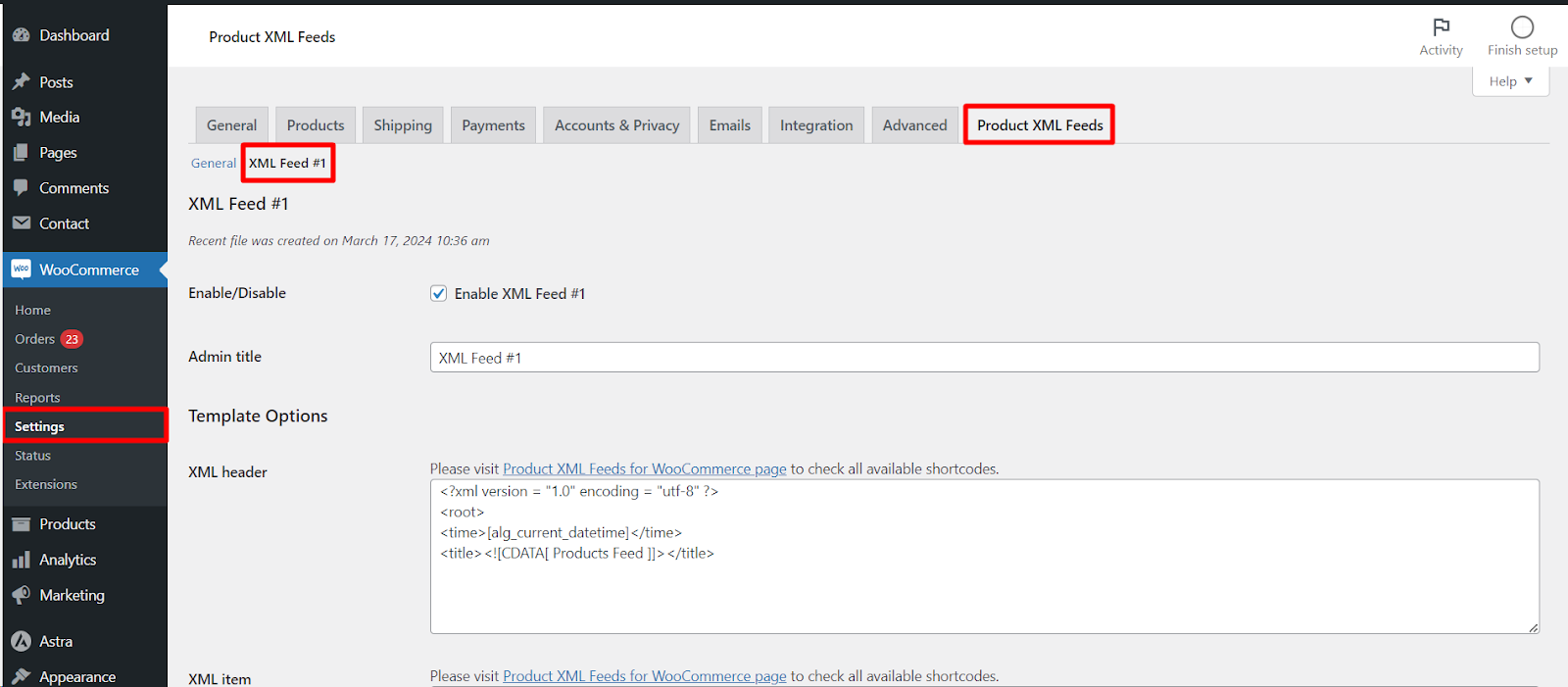
Enable/Disable and Admin title #
- Enable/Disable (
alg_products_xml_enabled_1, default Yes): turns this feed on or off. A disabled feed is not scheduled or generated. - Admin title (
alg_products_xml_feed_title_1): a label shown only in the admin, so you can tell feeds apart (for example “Google Shopping”). It does not appear in the feed file.
Template Options #
These four fields define the XML structure. Click inside any template field to open the built-in shortcode picker and search 50+ product shortcodes.
- XML header (
alg_products_xml_header_1): the opening of the file. The default declares the XML version and a<root>wrapper with a timestamp and title. - XML item (
alg_products_xml_item_1): the block repeated for every product, built from shortcodes such as[alg_product_name],[alg_product_price]and[alg_product_image_url]. - Variation XML item (
alg_products_xml_variation_item_1): a separate block used for variations. It only applies when Variable products is set to Both variable and variations products. - XML footer (
alg_products_xml_footer_1): the closing of the file, by default</root>.
Hide XML tags if empty #
alg_products_xml_tags_if_empty_1 lets you drop tags that would otherwise be empty. Enter the tag names, comma separated (for example stock, sku). When a product has no value for that tag, the plugin removes the empty <stock></stock> pair from the output so the file stays clean.
Create text feed #
Create text feed (alg_products_xml_create_text_feed_1) outputs a plain-text file alongside the XML, using the Text item template. This is a Pro feature: the checkbox is disabled on the free version.
| Setting | Option ID | Default | Free/Pro |
|---|---|---|---|
| Enable/Disable | alg_products_xml_enabled_1 |
Yes | Free |
| Admin title | alg_products_xml_feed_title_1 |
XML Feed #1 | Free |
| Template fields (header, item, variation item, footer) | alg_products_xml_header_1 and related |
Sample template | Free |
| Hide XML tags if empty | alg_products_xml_tags_if_empty_1 |
Empty | Free |
| Create text feed | alg_products_xml_create_text_feed_1 |
No | Pro |
For the full list of shortcodes you can use inside these templates, see the Shortcodes for generating XML fields reference. When you are done, click Save changes.
Get more from your feeds #
Building and editing feed templates is free. Product XML Feeds Manager for WooCommerce Pro adds unlimited feeds, text feeds, and advanced product filtering. See what Pro unlocks.