Convert Currency: General options and automatic rates #
The General options for Convert Currency in Payment Gateway Currency for WooCommerce are at WPFactory > Payment Gateway Currency > Convert Currency > General. They control what gets converted (shipping, coupons, and cart fees, all on by default), when conversion runs through the Convert on setting, AJAX conversion, and how exchange rates are updated automatically.

Where to find it #
Go to WPFactory > Payment Gateway Currency (also reachable at WooCommerce > Settings > Payment Gateway Currency), then open the General sub-tab under Convert Currency.
What to convert #
Each of these is a checkbox, on by default, controlling whether that amount is converted along with product prices.
| Label | Option ID | Default |
|---|---|---|
| Shipping price | alg_wc_pgbc_convert_currency_advanced[shipping] |
Yes |
| Free shipping min amount | alg_wc_pgbc_convert_currency_advanced[shipping_free_min_amount] |
Yes |
| Coupon amounts (fixed cart/product discount only) | alg_wc_pgbc_convert_currency_advanced[coupon] |
Yes |
| Coupon minimum spend | alg_wc_pgbc_convert_currency_advanced[coupon_min_amount] |
Yes |
| Coupon maximum spend | alg_wc_pgbc_convert_currency_advanced[coupon_max_amount] |
Yes |
| Cart fees | alg_wc_pgbc_convert_currency_advanced[cart_fee] |
Yes |
When to convert #
- Convert on (
alg_wc_pgbc_convert_currency_on_checkout, defaultCart and checkout): a selector with three values, Cart and checkout, Checkout only, and After checkout (thank-you page and final order only). This is a single dropdown, not a set of checkboxes. - Convert on AJAX (
alg_wc_pgbc_convert_currency_on_ajax, defaultYes): a separate checkbox that also converts prices in AJAX responses such as the mini-cart. - Convert on languages (
alg_wc_pgbc_convert_currency_on_wpml): shown only when WPML or Polylang is active. Leave empty to convert on all languages.
Automatic Currency Exchange Rates #
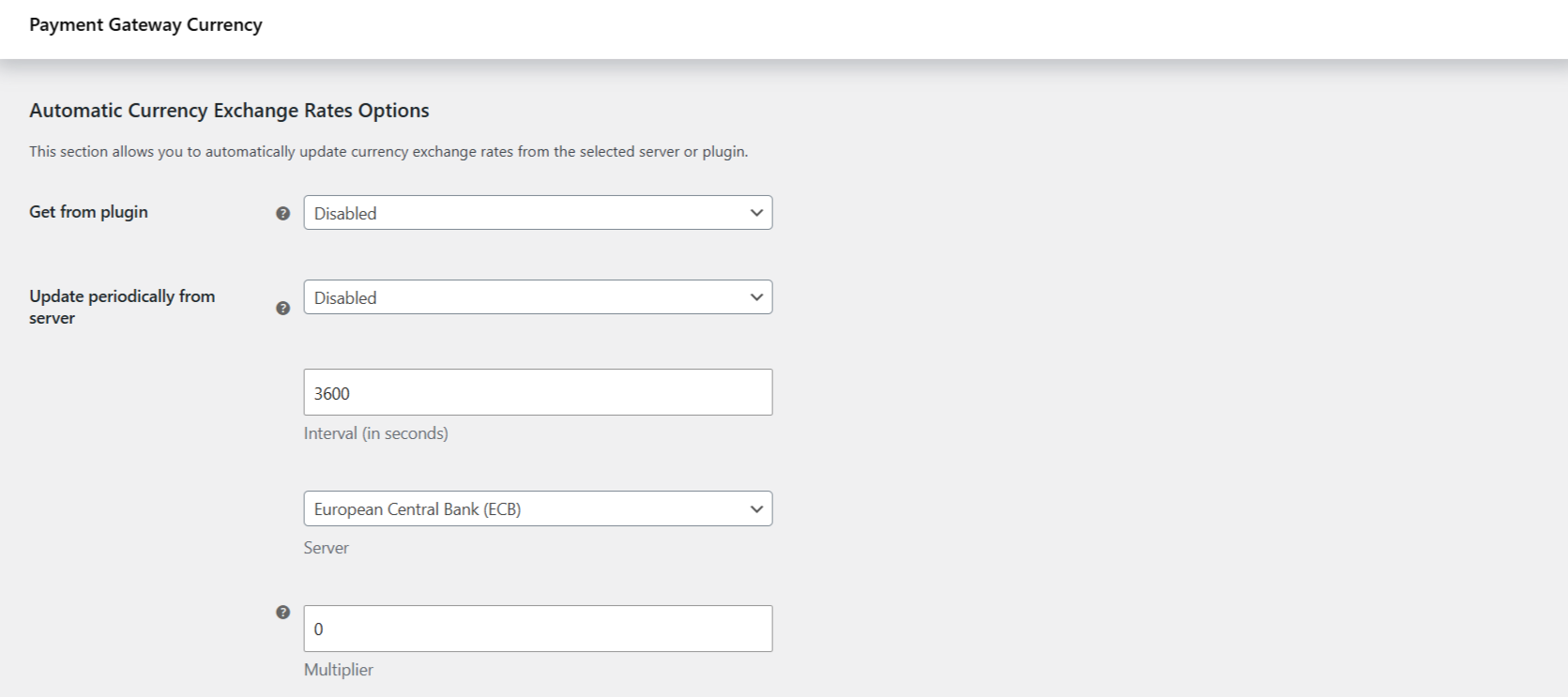
| Label | Option ID | Default |
|---|---|---|
| Get from plugin | alg_wc_pgbc_convert_currency_auto_rates_plugin |
Disabled |
| Update periodically from server | alg_wc_pgbc_convert_currency_auto_rates_cron |
Disabled |
| Interval (in seconds) | alg_wc_pgbc_convert_currency_auto_rates_interval |
3600 |
| Server | alg_wc_pgbc_convert_currency_auto_rates_server |
European Central Bank (ECB) |
| Multiplier | alg_wc_pgbc_convert_currency_rate_multiplier |
0 (ignored) |
| Update all rates now | alg_wc_pgbc_convert_currency_auto_rates_now |
No |
About the Multiplier: it is a plain multiplier applied to each fetched rate, not a percentage. A value of 1.05 multiplies the rate by 1.05. It is ignored when set to 0. If you choose Fixer.io as the server, extra fields appear for your API key and endpoint URL. See Update exchange rates automatically.
Get more control #
These General options are free. Payment Gateway Currency for WooCommerce Pro extends conversion to every payment gateway on your store. See what Pro unlocks.