- How many checks are in each category
- How to read the tables
- Purchasability (10 checks)
- Inventory (7 checks)
- Shipping (7 checks)
- Tax (3 checks)
- Media (8 checks)
- Structure (8 checks)
- Downloads (4 checks)
- Content (11 checks)
- Feed Readiness (6 checks)
- Pricing (6 checks)
- Checks that run once per catalog
- Which products a check runs on
- Turning checks on and off
- Related reading
- Need help?
The catalog health checks in Catalog Health Scanner for WooCommerce Pro are a fixed library of 70 tests, grouped into 10 categories, that every scan runs against your products and variations. This page lists all of them exactly as they ship in version 1.0.0: the label you see in the plugin, the check ID used in filters and exports, the severity, the applicability group, whether an automatic fix exists, and what the finding actually costs you.
Catalog Health Scanner reports what it finds and helps you fix it. It does not decide for you: every check can be switched off, every group can be set to report without scoring, and every individual finding can be ignored on a single product.
How many checks are in each category #
| Category | Category ID | Checks | Applicability |
|---|---|---|---|
| Purchasability | purchasability |
10 | Always applicable |
| Inventory | inventory |
7 | Group inventory |
| Shipping | shipping |
7 | Group shipping |
| Tax | tax |
3 | Group tax |
| Media | media |
8 | Always applicable |
| Structure | structure |
8 | Always applicable |
| Downloads | downloads |
4 | Group downloads |
| Content | content |
11 | 9 always applicable, 2 in their own groups |
| Feed Readiness | feed |
6 | Group feed |
| Pricing | pricing |
6 | 3 always applicable, 3 in the cog group |
| Total | 70 |
How to read the tables #
Severity sets how much a check is worth in the health score. Weights are fixed:
| Severity | Score weight | What it means |
|---|---|---|
| Critical | 4 | A product cannot be sold correctly. One open critical issue caps your total score at 89. |
| High | 2 | Real revenue or data damage, but the product still works. |
| Medium | 1 | Quality and consistency problems that cost conversions over time. |
| Low | 0.5 | Polish. Worth fixing when the rest is clean. |
Applicability group tells you whether a check depends on how your store is configured. Checks marked Always run on every store. All others belong to a group that auto-detect can switch off, or that you can set to Applicable, Report, but do not score, or Not applicable in the settings. See Applicability: why checks are skipped.
Automatic fix is one of three values. One-click means the change is unambiguous and Catalog Health Scanner can apply it on its own. Bulk means you supply the value (a weight, a category, a brand, a cost percentage) and the fix applies it to the selected products. None means the check points you at the products and you edit them yourself. Every fix, of either kind, is previewed before it runs, logged, and reversible inside the undo window. See Fix issues safely.
Purchasability (10 checks) #
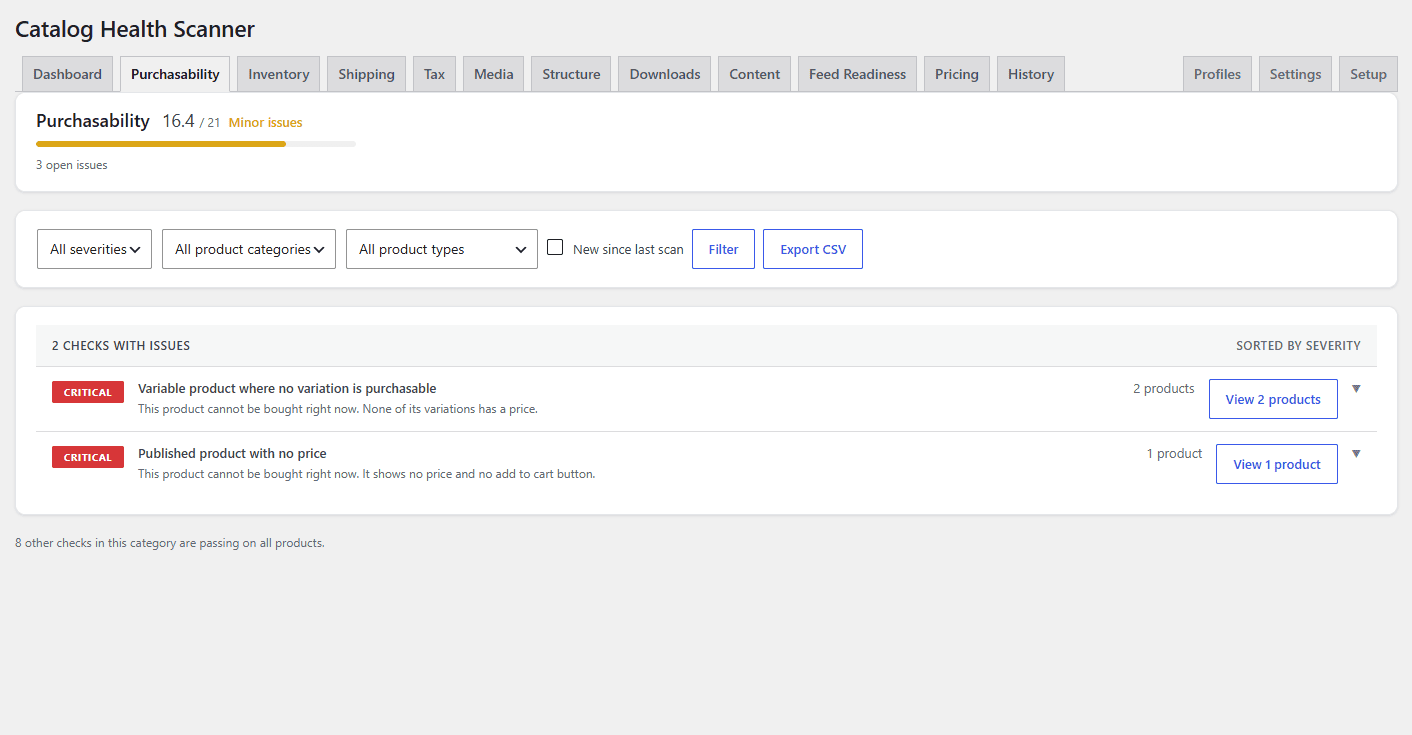
Nothing in this category depends on how your store is configured, so these checks always run and always count. Every finding here means a product is unbuyable or is showing a broken offer.
| Check | Check ID | Severity | Applicability group | Automatic fix | Why it matters |
|---|---|---|---|---|---|
| Published product with no price | no_price |
Critical | Always | None | The product shows no price and no add to cart button, so it cannot be bought at all. |
| Variable product where no variation is purchasable | variable_no_purchasable |
Critical | Always | None | No variation has a price, so nothing on the page can be added to the cart. |
| Variable product where some variations have no price | variation_price_missing |
Critical | Always | None | Customers who select those options see no price and hit a dead end. |
| Sale price equal to or higher than regular price | sale_not_lower |
High | Always | None | The product advertises a discount that is not a discount, which costs trust in every other price. |
| Sale schedule expired but sale price still set | sale_expired |
High | Always | One-click (clear_expired_sale) |
The sale ended but the discounted price is still stored, so you may keep selling at the old sale price. |
| Sale end date earlier than start date | sale_dates_inverted |
High | Always | None | The sale can never run with those dates, so the discount you planned never appears. |
| Product hidden from catalog and search | hidden_from_catalog |
Medium | Always | None | The product is published but customers cannot find it anywhere on the store. |
| Long-term out of stock, published, backorders disabled | out_of_stock_stale |
High | Always | None | A product nobody can buy keeps occupying catalog and search results. The age limit is the oos_age_days threshold. |
| External product with a missing or malformed product URL | external_url_missing |
Critical | Always | None | The buy button leads nowhere, so the product cannot be bought. |
| Grouped product with no purchasable children | grouped_no_children |
Critical | Always | None | The grouped product page is empty or lists nothing that can be added to the cart. |
Inventory (7 checks) #
These checks belong to the inventory applicability group. Auto-detect turns them on when stock management is enabled store-wide.
| Check | Check ID | Severity | Applicability group | Automatic fix | Why it matters |
|---|---|---|---|---|---|
| Missing SKU | sku_missing |
High | inventory |
Bulk (generate_skus) |
Products with no SKU cannot be tracked in inventory systems or matched to supplier data. |
| Duplicate SKU across products or variations | sku_duplicate |
Critical | inventory |
None | Inventory counts are wrong and orders can be fulfilled with the wrong item. |
| Near-duplicate SKU differing only by case or whitespace | sku_near_duplicate |
High | inventory |
None | Some systems treat the two codes as one product and some as two, so counts drift apart. |
| Variations missing SKUs while parent has one | variation_sku_missing |
Medium | inventory |
Bulk (generate_skus) |
Individual variations cannot be told apart in exports, feeds, or picking. |
| Negative stock quantity | negative_stock |
High | inventory |
None | Stock below zero usually means orders were taken that could not be fulfilled. |
| Stock quantity set while stock management is off | stock_qty_unmanaged |
Medium | inventory |
One-click (clear_unmanaged_stock) |
The stored number is ignored by WooCommerce and misleads anyone who reads it. |
| Stock status contradicting stock quantity | stock_status_mismatch |
High | inventory |
One-click (sync_stock_status) |
Products show as in stock with zero units, or out of stock while units are on hand. |
Shipping (7 checks) #
These checks belong to the shipping applicability group. Auto-detect turns them on when an enabled shipping method could depend on weight or dimensions. Flat rate, free shipping, local pickup, and pickup location never do.
| Check | Check ID | Severity | Applicability group | Automatic fix | Why it matters |
|---|---|---|---|---|---|
| Physical product with no weight | weight_missing |
High | shipping |
Bulk (set_weight) |
Weight-based shipping is calculated wrongly, so you overcharge or undercharge on every order. |
| Physical product with no dimensions | dimensions_missing |
Medium | shipping |
None | Carriers that price by size cannot quote this product correctly. |
| Virtual product carrying weight or dimensions | virtual_with_dimensions |
Medium | shipping |
One-click (clear_virtual_dimensions) |
Virtual products are never shipped, so stored sizes only confuse exports and feeds. |
| Downloadable product not marked virtual, so shipping is charged | downloadable_not_virtual |
High | shipping |
None | Customers pay shipping on a file, which invites refund requests. |
| Missing shipping class where classes are in use | shipping_class_missing |
Medium | shipping |
Bulk (assign_shipping_class) |
The product falls through your class-based rules and ships at the wrong rate. |
| Weight or dimension values outside plausible range | weight_implausible |
Medium | shipping |
None | A zero, negative, or absurd weight is nearly always an import error and corrupts every quote. The upper bound is the max_weight threshold. |
| Product referencing a deleted term | shipping_class_deleted |
High | shipping |
One-click (unassign_deleted_shipping_class) |
The product still points at a shipping class, category, or tag whose term was deleted, so class-based rates fall back silently. |
Tax (3 checks) #
These checks belong to the tax applicability group. Auto-detect turns them on when tax is enabled and more than the standard tax class exists.
| Check | Check ID | Severity | Applicability group | Automatic fix | Why it matters |
|---|---|---|---|---|---|
| Product referencing a deleted tax class | tax_class_invalid |
High | tax |
One-click (reset_tax_class) |
The product silently falls back to the standard rate, which may be the wrong tax for it. |
| Tax status set to none | tax_status_none |
Medium | tax |
None | No tax is ever charged on this product. If that is not deliberate, you are under-collecting. |
| Inconsistent tax class within a product category | tax_class_inconsistent |
Low | tax |
Bulk (assign_tax_class) |
A handful of products taxed unlike the rest of their category is usually a mistake rather than a policy. |
Media (8 checks) #
Media checks always run and always count. They cover the images customers, search engines, and feed platforms actually see.
| Check | Check ID | Severity | Applicability group | Automatic fix | Why it matters |
|---|---|---|---|---|---|
| No featured image | image_missing |
High | Always | None | Products without an image convert far worse, and most feed platforms reject them outright. |
| Image record exists but file is missing from the server | image_file_missing |
High | Always | None | Every visitor sees a broken image placeholder on the product page. |
| Gallery images referencing deleted attachments | gallery_deleted_refs |
Medium | Always | One-click (clean_gallery) |
The gallery holds slots pointing at images that no longer exist. |
| Featured image has no alt text | image_alt_missing |
Medium | Always | None | Screen readers, image search, and AI vision models have nothing to read, so the image is invisible to all three. |
| Only the WooCommerce placeholder image | placeholder_image_only |
High | Always | None | Customers see the generic grey placeholder instead of the product. |
| Same featured image reused across many different products | image_reused_across_products |
Low | Always | None | Identical thumbnails make products indistinguishable in the catalog and in feeds. The trigger count is the image_reuse_count threshold. |
| Variations with no image on a product where other variations have one | variation_images_inconsistent |
Low | Always | None | Switching variations makes the image flicker between real photos and the parent fallback. |
| Featured image below minimum usable resolution | image_low_res |
Medium | Always | None | The image pixelates on zoom and fails the minimum size rules of most feed platforms. The limit is the min_image_width threshold. |
Structure (8 checks) #
Structure and taxonomy checks always run and always count. They cover the wiring that holds a catalog together: categories, links, variations, and grouped products.
| Check | Check ID | Severity | Applicability group | Automatic fix | Why it matters |
|---|---|---|---|---|---|
| Product in no category, or only Uncategorized | category_missing |
High | Always | Bulk (assign_category) |
The product is invisible to category browsing and filtered navigation. |
| Cross-sells or upsells pointing at deleted or unpublished products | linked_products_deleted |
Medium | Always | One-click (clean_linked_products) |
Recommendation slots on the product page are silently empty or broken. |
| Orphaned variation with no surviving parent | orphaned_variation |
High | Always | One-click (delete_orphaned_variations) |
Variations that belong to no product still sit in the database and can leak into feeds and search. This is the only fixer that removes anything: it moves the variation to trash, and undo restores it. |
| Variable product with attributes not enabled for variations | attributes_not_for_variation |
High | Always | None | The product has variations but no attribute drives them, so the variation picker is broken or empty. |
| Variation with missing or invalid attribute value | variation_attribute_invalid |
Critical | Always | None | Those variations reference attribute options that no longer exist, so they can never be selected. |
| Variation count not matching possible attribute combinations | variation_count_mismatch |
Medium | Always | None | Customers can select combinations that have no variation behind them. |
| Product assigned to a category that no longer appears in the menu structure | category_not_in_menu |
Low | Always | None | The only route to the product is search, so browsing customers never reach it. |
| Grouped product with deleted or unpublished children | grouped_children_invalid |
High | Always | One-click (clean_grouped_children) |
Part of the grouped product silently disappeared, so the page sells less than intended. |
Downloads (4 checks) #
These checks belong to the downloads applicability group. Auto-detect turns them on when at least one downloadable product exists.
| Check | Check ID | Severity | Applicability group | Automatic fix | Why it matters |
|---|---|---|---|---|---|
| Downloadable product with no files attached | download_no_files |
Critical | downloads |
None | Customers pay and receive nothing, which produces refunds and disputes rather than complaints. |
| Download file missing from the server | download_file_missing |
Critical | downloads |
None | Customers paid and got a broken download link. |
| Download files stored in a publicly guessable location | download_public_location |
High | downloads |
None | Anyone who guesses the URL gets your paid file for free. |
| Download URL returning an error | download_url_error |
Critical | downloads |
None | The remote file behind the download answers with an error, so buyers get nothing after paying. Results are cached for 12 hours per URL. |
Content (11 checks) #
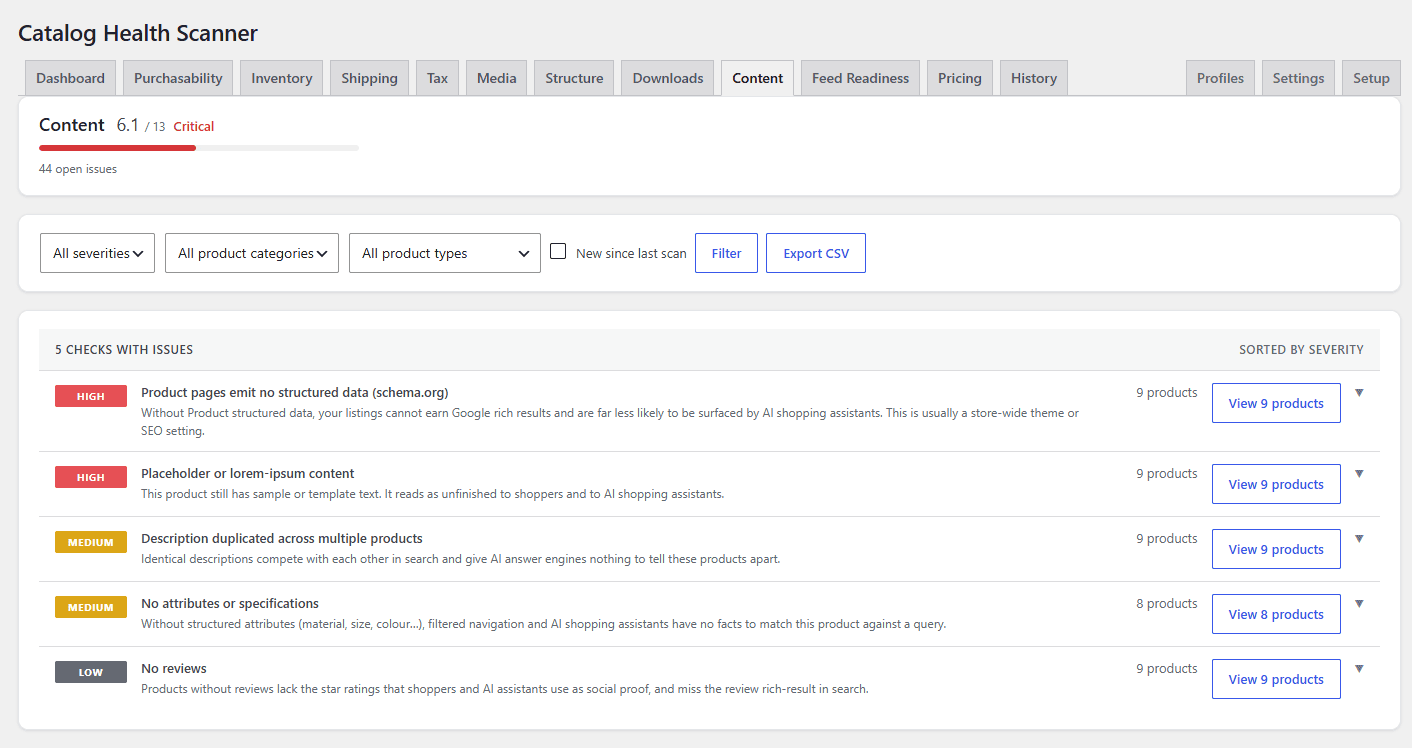
Most content checks always run. Two of them sit in their own applicability groups so you can report them without letting them move your score: reviews and faq.
| Check | Check ID | Severity | Applicability group | Automatic fix | Why it matters |
|---|---|---|---|---|---|
| Missing short description | short_description_missing |
Medium | Always | None | The space next to the price and buy button is empty. |
| Missing or very thin main description | description_thin |
Medium | Always | None | Thin product pages rank poorly and give customers nothing to base a purchase on. The floor is the min_description_chars threshold. |
| Duplicate product titles | title_duplicate |
Medium | Always | None | Identically named products compete with each other in search and confuse customers and staff. |
| Product title containing import artefacts or encoding errors | title_artifacts |
High | Always | One-click (clean_title_artifacts) |
Garbled characters in the title show on the product page, in search results, and in feeds. |
| Product pages emit no structured data (schema.org) | schema_markup_missing |
High | Always | None | Without Product structured data your listings cannot earn rich results and are far less likely to be surfaced by AI shopping assistants. One cached store-level probe decides this for the whole catalog. |
| Placeholder or lorem-ipsum content | content_placeholder |
High | Always | None | Sample or template text left on the page reads as unfinished to shoppers and to AI shopping assistants. |
| Description duplicated across multiple products | description_duplicate |
Medium | Always | None | Identical descriptions compete in search and give AI answer engines nothing to tell the products apart. |
| No attributes or specifications | no_product_attributes |
Medium | Always | None | Filtered navigation and AI shopping assistants have no structured facts to match this product against a query. |
| No reviews | reviews_missing |
Low | reviews |
None | No star rating means no social proof for shoppers or AI assistants, and no review rich result in search. |
| No FAQ / question-and-answer content | faq_missing |
Low | faq |
None | AI answer engines quote FAQ content directly, so products without it are surfaced less often in AI shopping answers. |
| Description containing broken shortcodes or leftover markup | broken_shortcodes |
Medium | Always | None | Raw shortcode text from a removed plugin is printed to customers instead of content. |
Feed Readiness (6 checks) #
These checks belong to the feed applicability group. Auto-detect turns them on when a known product feed plugin is active, or when feed identifier fields are already populated on products.
| Check | Check ID | Severity | Applicability group | Automatic fix | Why it matters |
|---|---|---|---|---|---|
| Missing GTIN, EAN, UPC, or MPN | gtin_missing |
High | feed |
None | Feed platforms reject listings with no product identifier, so the product earns no paid traffic. |
| Missing brand | brand_missing |
High | feed |
Bulk (assign_brand) |
Most feed platforms require a brand, and listings without one are rejected or demoted. |
| Missing product condition | condition_missing |
Medium | feed |
None | Platforms assume “new” when condition is missing, and a wrong assumption can get listings suspended. |
| Missing Google product category mapping | google_category_missing |
Medium | feed |
None | Unmapped products land in the wrong Google Shopping category and reach the wrong buyers. |
| Description exceeding feed platform character limits | feed_description_too_long |
Low | feed |
None | Feed platforms truncate or reject descriptions past their limit. The limit is the max_feed_desc_chars threshold. |
| Title exceeding feed platform character limits | feed_title_too_long |
Medium | feed |
None | Google Shopping truncates titles over 150 characters, cutting off what you wrote. |
Pricing (6 checks) #
The three basic price checks always run. The three cost and margin checks sit in the cog applicability group, which auto-detect turns on when cost of goods data is present on products.
| Check | Check ID | Severity | Applicability group | Automatic fix | Why it matters |
|---|---|---|---|---|---|
| Price of zero on a product not marked as free | price_zero |
High | Always | None | The product sells for nothing, so every order is pure loss unless that is deliberate. |
| Price far outside the category median | price_outside_median |
High | Always | None | A price several times above or below everything comparable is usually a misplaced decimal point. The multiplier is the price_deviation_factor threshold. |
| Price with more decimals than the store currency supports | price_decimals_excess |
Medium | Always | None | The displayed price is rounded, so what customers see is not what they are charged. |
| Cost of goods missing | cog_missing |
Medium | cog |
Bulk (set_cog_percent) |
Without a cost you cannot see margin, so you cannot see which products lose money. |
| Cost of goods higher than selling price | cog_above_price |
Critical | cog |
None | You lose money on every unit sold. |
| Margin below your minimum threshold | margin_below_threshold |
High | cog |
None | The product sells below the margin floor you set with the min_margin_percent threshold. |
Checks that run once per catalog #
Most checks look at one product at a time. Nine of them cannot: duplicates, orphans, and outliers only exist in relation to the rest of the catalog, so they run as a single cross-product pass at the end of a scan. That is why they appear all at once rather than gradually as the progress bar moves, and why their score is measured against the whole product count rather than a per-check counter.
| Check ID | Category | What the pass compares |
|---|---|---|
sku_duplicate |
Inventory | Every SKU on products and variations, looking for exact repeats. |
sku_near_duplicate |
Inventory | The same SKUs after lowercasing and trimming, looking for near matches. |
shipping_class_deleted |
Shipping | Term relationships with no surviving term row. |
tax_class_inconsistent |
Tax | Tax classes within each product category of 10 or more products. |
image_reused_across_products |
Media | Featured image IDs shared by several published products. |
orphaned_variation |
Structure | Variations whose parent product is gone or trashed. |
title_duplicate |
Content | Published product titles after lowercasing and trimming. |
description_duplicate |
Content | Normalized description text, hashed and compared. |
price_outside_median |
Pricing | Each price against the median of every category it belongs to. |
Which products a check runs on #
A scan enumerates published products of the product post type. Within a scan, individual checks narrow further:
- Product type tests.
no_priceandprice_zeroonly run on simple and external products,variable_no_purchasableonly on variable products,grouped_no_childrenonly on grouped products, and so on. A product type the check does not name is skipped by that check and is not counted in its denominator. - Store configuration tests.
shipping_class_missingonly runs when shipping classes exist,brand_missingonly when a brand taxonomy is registered,category_not_in_menuonly when product categories appear in a navigation menu, andmargin_below_thresholdonly when you have set a minimum margin above zero. - Data-in-use tests.
condition_missing,google_category_missing, andfaq_missingonly run once at least one product in the catalog already carries that data, so an empty field is never treated as a store-wide failure.
Custom product types from other plugins (subscriptions, bookings, bundles, and similar) are scanned by every check that does not name a product type, and skipped by the ones that do. Nothing is reported against them by a check that was never designed for them.
Turning checks on and off #
Every check in this library has a tick box under Settings > Individual checks. Unticking one removes it from every scan and from the score everywhere. The check IDs above are the values stored in the wpfchs_disabled_checks option and used by the wpfchs_checks filter, so they are also what you reference in code. See the settings reference and the developer reference.
To silence a check on one product rather than everywhere, use Ignore on the issue instead. Ignored issues count as passing and stay reviewable. See Ignore false positives.
Related reading #
- How the health score is calculated
- Scan profiles, which decide the subset of these checks a scan runs
- Triage issues in the category tabs
- FAQ and troubleshooting
Need help? #
If a check flags something you believe is correct, or you want a check that is not in this library, contact Catalog Health Scanner support with the check ID and an example product ID.