The advanced options in Scheduled & Automatic Order Status Controller for WooCommerce control how status changes are tracked, when rules run and how orders are queried. Every option described here is available in the free version.
Where to find them #
Go to WPFactory > Order Status Rules (also reachable at WooCommerce > Settings > Order Status Rules) and open the Advanced section.
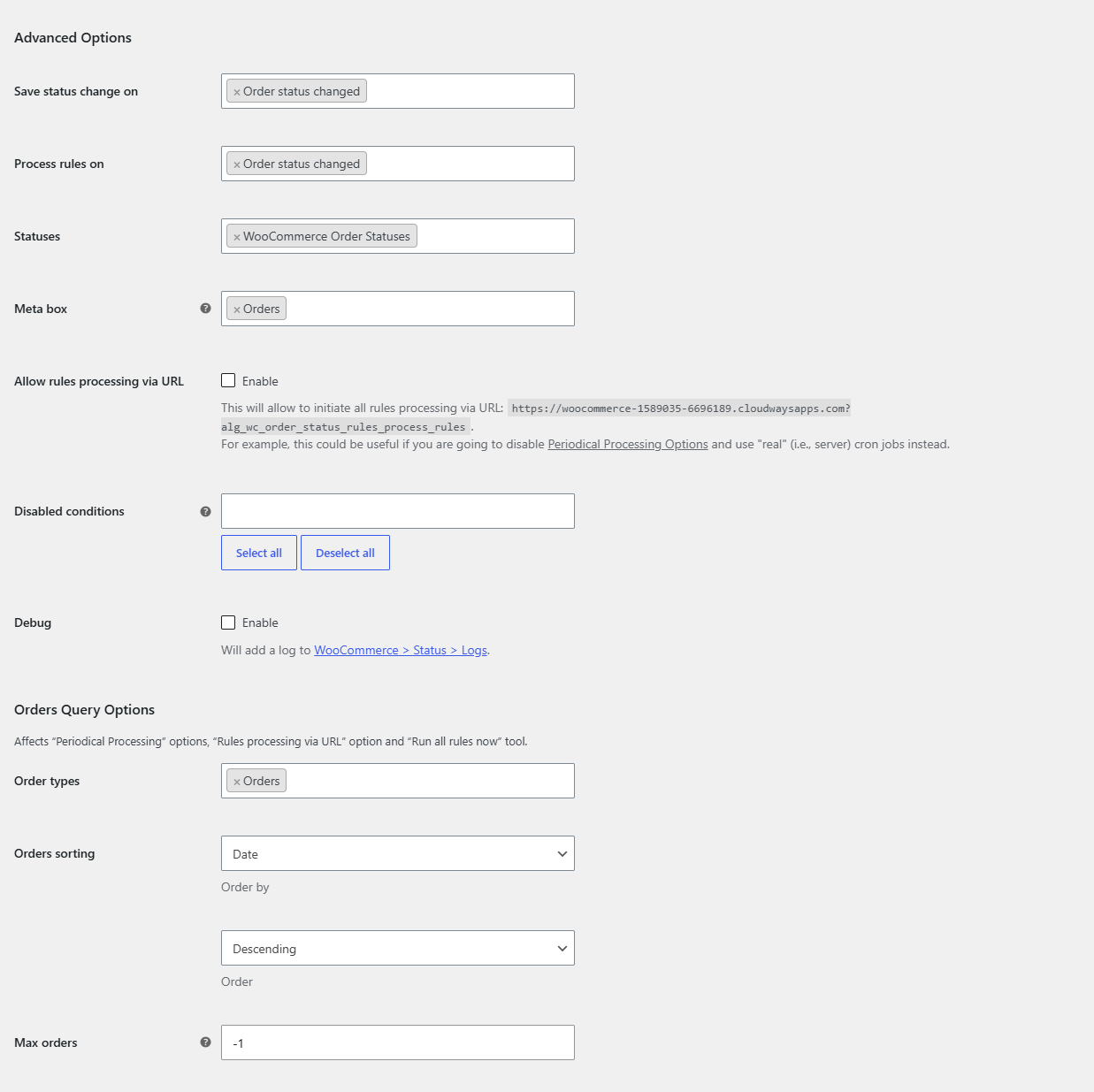
Advanced options #
| Label | Option ID | Default |
|---|---|---|
| Save status change on | alg_wc_order_status_rules_status_change_hooks |
Order status changed |
| Process rules on | alg_wc_order_status_rules_hooks |
Order status changed |
| Statuses | alg_wc_order_status_rules_status_functions |
WooCommerce Order Statuses |
| Meta box | alg_wc_order_status_rules_meta_box_screen |
Orders |
| Allow rules processing via URL | alg_wc_order_status_rules_allow_url |
No |
| Disabled conditions | alg_wc_order_status_rules_disabled_conditions |
(none) |
| Debug | alg_wc_order_status_rules_debug |
No |
- Save status change on: which events are recorded in the order status change history. Choose Order status changed, Subscription status changed, or both. The history is what the time trigger measures from.
- Process rules on: when rules are evaluated. Options are Order status changed, Checkout order processed, “Thank you” (Order received) page, Admin “Edit order” page, Subscription status changed and Admin “Edit subscription” page.
- Statuses: which status list the rule dropdowns draw from: WooCommerce Order Statuses, WooCommerce Subscription Statuses, or both. Subscription statuses require the WooCommerce Subscriptions plugin.
- Meta box: where the “Order Status History” meta box appears, on the Orders and/or Subscriptions edit screen.
- Allow rules processing via URL: exposes a URL that triggers processing of all rules, which is useful with a real server cron job.
- Disabled conditions: hides the selected condition groups from every rule’s settings to keep the screen tidy.
- Debug: writes a processing log to WooCommerce > Status > Logs.
Orders Query options #
These affect periodical processing, URL processing and the Run all rules now tool:
- Order types (
alg_wc_order_status_rules_wc_get_orders_args[type]): Orders and/or Subscriptions. Default Orders. - Orders sorting (
[orderby]/[order]): order by ID, Random, Date or Modified, ascending or descending. Default Date, Descending. - Max orders (
alg_wc_order_status_rules_wc_get_orders_max_orders): maximum orders updated per run. Default-1(all eligible orders).
Order Status History options #
- Empty order status history (
alg_wc_order_status_rules_no_history): what to do when an order has no recorded history yet. Options: Do nothing, Use order date created, Use order date modified. Default Use order date modified. - Non-matching order status (
alg_wc_order_status_rules_non_matching): what to do when the current status does not match the last history record. Options: Do nothing, Use latest record anyway. Default Do nothing.
Periodical Processing options #
Choose how rules run in the background. See the guide on automatic processing for details.
- Use WP cron (
alg_wc_order_status_rules_use_wp_cron, default Yes) with an Interval (alg_wc_order_status_rules_wp_cron_schedule, default Once hourly). - Use Action Scheduler (
alg_wc_order_status_rules_use_action_scheduler, default No) with an Interval (in seconds) (alg_wc_order_status_rules_action_scheduler_interval, default 3600).
Compatibility options #
“Doctreat” theme (alg_wc_order_status_rules_compatibility_doctreat, default No): enable only if you use the “Doctreat” theme by AmentoTech.
Need multiple rules? #
These advanced controls are shared by every rule. To run more than one rule, Order Status Rules Pro removes the single-rule limit. See what Pro unlocks.