MSRP vs Wholesale Price for WooCommerce | When to Use Each & How to Display Both


In WooCommerce, you need both, but for entirely different reasons: MSRP builds perceived value for shoppers, while wholesale pricing drives your profit margin.
WooCommerce does not support MSRP display out of the box, so you need a dedicated plugin to show it automatically next to your selling price.
MSRP vs Wholesale! What do these terms really mean, and how do they affect your WooCommerce store?
If you’re running a store, whether online or physical, understanding the difference between these two pricing strategies is important for profits and customer relationships.
In this article:
We’ll break down what MSRP (Manufacturer’s Suggested Retail Price) and Wholesale Pricing are, how they’re used, and the key differences between them.
You’ll also learn when to use each strategy, how to apply them in your WooCommerce store, and how to display MSRP automatically next to your selling price.
Also:
If you’re a WooCommerce store owner, we’ll show you exactly how to set up MSRP display in your store using a dedicated plugin, step by step. Pricing display pairs well with promotions, such as a WooCommerce BOGO offer.
By the end:
You’ll have the clarity to make smarter pricing decisions and the tools to implement them today.
What is MSRP?
MSRP stands for Manufacturer’s Suggested Retail Price, it’s the price that the manufacturer recommends a product should be sold for in stores.
Think of it as a guideline, not a rule.
Why is MSRP Important?
The MSRP helps everyone, from manufacturers to retailers and customers, stay on the same page about what a product is worth.
For example:
A phone company sets the MSRP of a new smartphone at $1,000. This tells stores, “Here’s the price we think you should sell it for.” Retailers can then decide to sell the phone at the MSRP or offer discounts to attract more buyers.
How Does MSRP Benefit Retail Stores?
1. Consistency Across Stores
MSRP ensures that most stores start with the same price. If the same phone is listed at $1,000 in multiple stores, customers feel confident they’re getting a fair deal.
2. Easier Price Comparisons
Customers can quickly compare deals when the MSRP is visible. If one store offers the phone for $950 instead of $1,000, the savings are clear, which encourages purchases.
3. Builds Product Value
Showing MSRP reminds customers of a product’s full value, even if they’re buying it at a discount, this helps create trust and reinforces the product’s worth.
In short: MSRP is like a roadmap for pricing.
What is Wholesale Pricing?
Wholesale pricing is the cost a retailer pays to buy products in bulk from a manufacturer or supplier. It’s usually much lower than the price customers see in stores because it’s designed for businesses to buy large quantities and still make a profit when they resell the items.
How Does Wholesale Pricing Work?
Let’s say you own a small clothing store. You want to sell t-shirts, so you buy them from a supplier:
- The supplier sells each t-shirt to you for $10 (wholesale price).
- You then sell the t-shirts in your store for $20 (retail price).
The difference between the wholesale price and the retail price is your profit.
Why is Wholesale Pricing Important for Businesses?
1. Helps Stores Make a Profit
Buying products at a lower cost means you can sell them at a higher price and keep the difference as profit.
2. Encourages Bulk Buying
Suppliers usually offer better deals for larger orders. If you order 100 t-shirts instead of 10, the wholesale price might drop to $8 per shirt, increasing your profit margin.
3. Supports Efficient Supply Chains
Wholesale pricing makes it easier for businesses to plan, stock up, and offer competitive prices to their customers.
You may be interested in:
WooCommerce Quantity Based Pricing: Do’s and Don’ts
Key Differences Between MSRP and Wholesale
MSRP and Wholesale Pricing are both important for businesses, but they serve very different purposes. Here’s how they compare:
1. Pricing Structure
MSRP: The price that manufacturers recommend products should sell for in stores. A smartphone might have an MSRP of $1,000, suggesting its value to customers.
Wholesale Pricing: The discounted price retailers pay when buying in bulk from suppliers. A retailer buys the same smartphone for $600 (wholesale price) and sells it at or near the MSRP to make a profit.
2. Target Audience and Use Cases
MSRP: Designed for customers, it shows them what the product is worth and helps them understand if they’re getting a good deal.
Wholesale Pricing: Designed for retailers and businesses, it’s all about helping them buy in bulk at a lower cost to resell at a profit.
3. Profit Margins
MSRP: Helps retailers communicate the product’s value and justify their selling price. The difference between the MSRP and the actual selling price often highlights customer savings.
Wholesale Pricing: Sets the foundation for profit. Retailers use the difference between the wholesale price and the selling price to make money.
Quick Comparison Table
| Aspect | MSRP | Wholesale Pricing |
|---|---|---|
| Purpose | Suggests retail price for customers | Discounted cost for retailers to resell |
| Who sees it | Your shoppers | You (the store owner) |
| Price level | Higher, reflects full product value | Lower, designed for bulk purchases |
| Goal | Build perceived value and trust | Protect your profit margin |
| WooCommerce support | Not built-in, requires a plugin | Partial, requires a wholesale plugin for role-based pricing |
Why Knowing the Difference Matters for Your WooCommerce Store?
Understanding these differences helps you make smarter pricing decisions. If you’re selling products in bulk to other businesses, wholesale pricing is key.
But if you want to communicate value and build trust with retail customers, MSRP is essential, and in WooCommerce, it doesn’t appear automatically. You have to add it.
When to Use MSRP vs Wholesale Pricing?
Choosing between MSRP and Wholesale Pricing depends on the type of business you run and your goals. Both strategies are important but are used in different situations.
When to Use MSRP Pricing?
1. For Retail Sales
If you’re selling directly to customers, MSRP pricing helps you show the value of your products. A WooCommerce store selling electronics can display MSRP: $500, Your Price: $400 to highlight savings and attract customers.
2. During Promotions or Discounts
MSRP is great for showcasing discounts during seasonal sales. Customers see the original price and feel like they’re getting a deal.
When to Use Wholesale Pricing?
1. For Selling in Bulk
Wholesale pricing is ideal if you’re supplying products to other businesses or retailers.
2. To Attract Resellers
Businesses looking to stock their stores need competitive wholesale prices to make a profit. Offering a fair wholesale price makes your products appealing to resellers.
3. For Streamlining Business-to-Business Sales
Wholesale pricing simplifies deals between manufacturers, suppliers, and retailers, ensuring everyone benefits from the transaction.
Blending Both Strategies
Some businesses use both MSRP and wholesale pricing, depending on their audience.
A WooCommerce store might use MSRP for retail customers while offering wholesale pricing for bulk orders to businesses.
A store sells individual coffee makers to retail customers at $100 MSRP, but offers wholesale buyers a price of $70 per unit for orders of 10 or more.
Which setup applies to you?
| Your Store Type | What You Need |
|---|---|
| Selling to end consumers only | MSRP display to show value and savings |
| Selling to businesses/resellers only | Wholesale pricing with role-based rules |
| Selling to both (B2B + B2C) | Both, MSRP for retail pages, wholesale pricing for approved accounts |
How to Display MSRP vs Your Price in WooCommerce
WooCommerce does not include an MSRP field by default. To show customers the suggested retail price alongside your selling price, you need a dedicated plugin.
Here is how to set it up using the MSRP (RRP) Pricing for WooCommerce plugin by WPFactory.
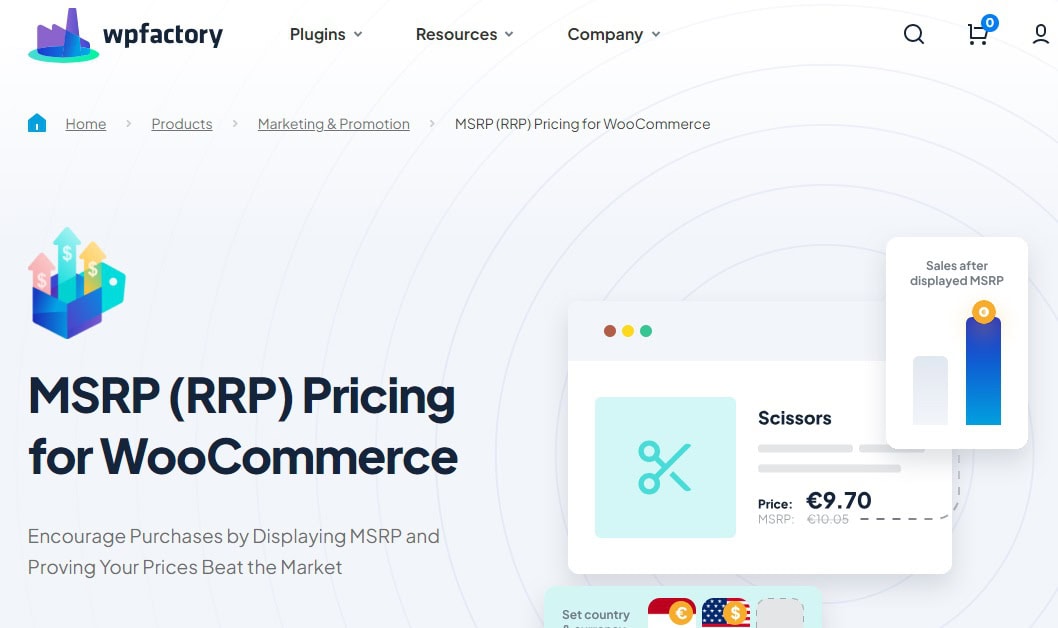
Setup guide: How to Show MSRP (RRP) Prices in WooCommerce walks through the settings step by step.
Step 1, Install the Plugin
Download the MSRP (RRP) Pricing for WooCommerce plugin from your WPFactory account, then upload and activate it from your WordPress dashboard under Plugins > Add New > Upload Plugin.
Step 2, Access the Plugin Settings
Once activated, go to WooCommerce > Settings > MSRP to open the plugin configuration panel.
Step 3, Configure General Display Options
Under General MSRP Options, enable the plugin and configure how the MSRP appears on product pages:
- Display: Choose to always show MSRP, hide it, or show it only when the MSRP is higher than your selling price.
- Position: Set whether MSRP appears before, after, or instead of your standard price.
- Text Format: Apply bold, italic, strikethrough, or underline styling to make the MSRP visually distinct.
- Savings: Use the %you_save% placeholder to automatically show the savings amount (e.g., “Save $20”), or %you_save_percent% to show a percentage.
You can also enable MSRP display on archive pages, search results, and category pages using the Archives Display Options within the same section.
Step 4, Set MSRP Per Product
Go to any product edit page. You will find a new MSRP field inside the product pricing section.
Enter the manufacturer’s suggested retail price there.
For bulk updates, use the Tools section under Admin and Advanced: the “Copy all products prices to MSRP” tool copies your current prices to the MSRP field across your entire catalog at once.
Step 5, Configure Cart Display (Optional)
The same display settings apply to the cart page.
Enable this under Cart Display Options to show MSRP and total savings at checkout, reinforcing the purchase decision at the moment it matters most.
Step 6, Advanced Options (Optional)
For stores selling internationally, the plugin supports country-based and currency-based MSRP variations under the Countries and Currencies sections.
You can set a different MSRP for each country or currency your store serves.
The result.. your product pages show both prices side by side, MSRP: $100 / Your Price: $79, automatically, without manual updates every time a price changes.
Ready to show MSRP in your WooCommerce store?
The MSRP (RRP) Pricing plugin by WPFactory handles the full setup, display position, savings labels, per-product values, and bulk updates, all from one settings panel.
Effortless MSRP Management for WooCommerce Stores
If managing MSRP feels like a challenge or you’re struggling to show the right prices in your WooCommerce store, the MSRP (RRP) Pricing for WooCommerce plugin is here to help.
Think of it as your pricing assistant, making MSRP easy to set up, customize, and manage, no matter the size of your store.
Why This Plugin Stands Out?
1. Flexibility Without Hassle
Want to show the MSRP next to your selling price? Or maybe highlight savings for your customers? This plugin gives you all the tools to do it in just a few clicks.

2. Saves You Time
No need to update each product manually! With bulk editing features, you can apply MSRP to multiple products at once, perfect for large stores.
3. Customizable Display Options
Whether you want the MSRP to appear on the product page, in the add to cart, or during checkout, this plugin lets you decide. You can even tweak the text and style to match your store’s design.

Advantages of Combining MSRP and Wholesale Pricing in WooCommerce
Together, these strategies help you serve different types of buyers while keeping your pricing organized and transparent.
Why Combine MSRP and Wholesale Pricing?
1. Balance Retail and Bulk Sales
Imagine you sell coffee makers. Retail customers see MSRP: $100 and your discounted price of $80, which builds trust and highlights savings.
Meanwhile, wholesale buyers pay $60 each when ordering 10 or more. This setup works for both audiences without creating confusion.
2. Boost Credibility
By displaying MSRP, you show retail customers the product’s full value.
At the same time, wholesale buyers understand the suggested price, which helps them plan their profits when reselling.
3. Streamline Your Pricing Strategy
Instead of juggling different pricing systems, combining MSRP and wholesale pricing creates a unified approach that works for everyone.
It simplifies management while maximizing your store’s potential.
The Results You Can Expect
- Retail customers see clear savings and feel confident in their purchases.
- Wholesale buyers trust your pricing and return for more bulk orders.
- You save time and reduce errors by managing both pricing strategies efficiently in one place.
You may be interested in:
Case Study: How Limitless Transfers Boosted Bulk Sales Using the Price by Quantity Plugin
Common Mistakes WooCommerce Store Owners Make With MSRP
1. Confusing MSRP With the Sale Price
The sale price is a temporary discounted price you set in WooCommerce. MSRP is the manufacturer’s reference price, it doesn’t change when you run a promotion.
Many store owners display only the sale price and assume it communicates value, but without the MSRP as a reference point, customers have no benchmark to measure the savings against.
2. Setting MSRP Once and Never Updating It
If a supplier changes the manufacturer’s suggested price and you don’t update your MSRP, your product pages show inaccurate comparisons.
This erodes trust rather than building it. The bulk update tool in the MSRP plugin lets you refresh MSRP values across your entire catalog quickly.
3. Showing MSRP When It’s Equal to or Lower Than Your Selling Price
Displaying MSRP: $80 next to Your Price: $85 sends the wrong message entirely.
Always configure the plugin to show MSRP only when it is higher than your current price, this is a one-setting fix under Display Options in the plugin: “Only show if the MSRP is higher than the standard price.”
Conclusion
Here’s a quick recap of what we covered:
- MSRP helps show customers the value of your products and builds trust with transparent pricing.
- Wholesale pricing supports bulk sales, ensuring retailers can profit from reselling.
- Key differences include their purpose: MSRP targets retail customers, while wholesale pricing is designed for businesses.
- When to use them depends on your audience, MSRP for retail sales and wholesale for bulk buyers.
- Combining both creates a balanced pricing strategy that serves all customer types.
- WooCommerce does not display MSRP by default, you need the MSRP (RRP) Pricing for WooCommerce plugin to set it up correctly.
- With the right strategy, MSRP vs Wholesale pricing becomes less about choosing one and more about using both to meet your business goals and grow your WooCommerce store.
Start displaying MSRP in your WooCommerce store today
Trusted by store owners across 170,000+ WPFactory installations. Set up in minutes, no code required.
FAQs
What does MSRP mean in wholesale?
In wholesale, MSRP (Manufacturer’s Suggested Retail Price) is the price the manufacturer recommends retailers use when selling the product to customers.
It’s a guideline for retail pricing, not the price paid by wholesalers.
What is an example of MSRP?
A coffee maker might have an MSRP of $100. Retailers display this as the product’s full reference price but may sell it at a discounted price, such as $80, to highlight customer savings.
What is the MSRP in inventory?
In inventory, MSRP represents the recommended selling price for the product. It’s used as a reference point to showcase value and calculate potential profits.
How to calculate MSRP?
Manufacturers typically calculate MSRP by factoring in production costs, distribution expenses, desired profit margin, and market conditions.
Retailers don’t calculate MSRP but follow the one set by the manufacturer.
What is the MSRP of a reseller?
The MSRP of a reseller is the suggested price at which the reseller sells the product to customers.
It’s not the wholesale price but the value displayed to end buyers.
What is the MSRP of a product?
The MSRP of a product is the recommended retail price set by the manufacturer to represent its full value to customers.
It helps standardize pricing across stores.
Does WooCommerce support MSRP display by default?
No. WooCommerce does not include a built-in MSRP field or display option.
To show MSRP alongside your selling price on product pages, cart, and archives, you need a dedicated plugin such as the MSRP (RRP) Pricing for WooCommerce plugin by WPFactory.
Can I show MSRP only when my price is lower than the suggested retail price?
Yes. The plugin includes a conditional display option, “Only show if the MSRP is higher than the standard price”, which prevents the MSRP from appearing in situations where it would confuse or mislead customers.
Can I set different MSRP values for different countries or currencies?
Yes. The Pro version of the plugin includes country-based and currency-based MSRP settings, allowing you to display a different suggested retail price automatically based on the visitor’s location or selected currency.