To restrict WooCommerce customers to buying one unit of a product, tick Sold individually at WPFactory > Quantity Manager > General in Min Max Step Quantity Limits Manager for WooCommerce, or set a maximum quantity of 1. Both are free and suit limited editions and samples. A cart total maximum of 1 allows one item per order.

Option A: Sold individually (removes the quantity box) #
- Go to WPFactory > Quantity Manager (also reachable at WooCommerce > Settings > Product Quantity).
- Open the General section.
- Tick Sold individually (
wpfmmsq_all_sold_individually_enabled) to enable it for all products. - Click Save changes.
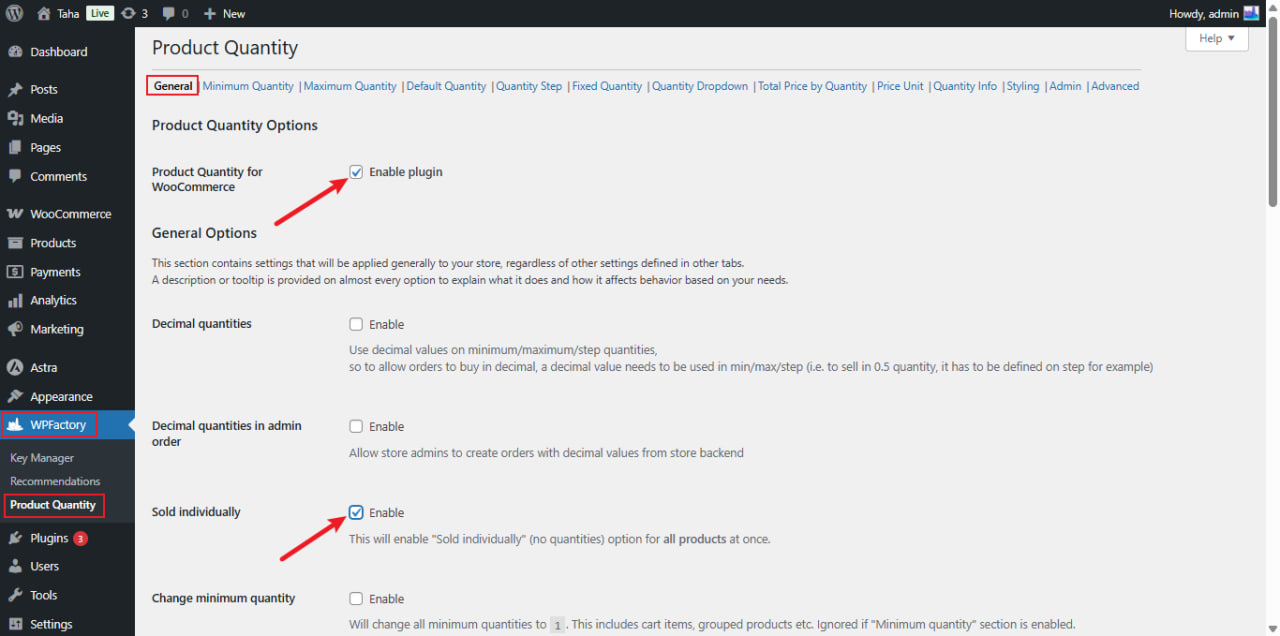
The quantity input disappears and customers can add exactly one unit. For just a few products, use WooCommerce’s own Sold individually checkbox in the product’s Inventory tab instead.
Option B: Maximum quantity of 1 (keeps the box, capped at 1) #
- Open the Maximum Quantity section and tick Maximum quantity.
- Set All products (
wpfmmsq_max_per_item_quantity) to1. - Click Save changes.
To cap only some products, tick Per product in the same section (free) and set Maximum quantity to 1 in the product’s Product Quantity box. For a whole category, use the Pro per-category maximum.
Option C: One item per order #
To let customers buy only one item in total per order, whatever the product, set Maximum Quantity > Cart Total Maximum Quantity Options > Cart total quantity to 1. The cart then accepts a single unit across all products.
Note: the General Enable plugin toggle only switches the plugin on; it does not by itself restrict quantities to 1. Use one of the methods above.
Options reference #
| Label | Section | Option ID | Default | Free/Pro |
|---|---|---|---|---|
| Sold individually | General | wpfmmsq_all_sold_individually_enabled |
No | Free |
| Maximum quantity (enable section) | Maximum Quantity | wpfmmsq_max_section_enabled |
No | Free |
| All products | Maximum Quantity | wpfmmsq_max_per_item_quantity |
0 (off) | Free |
| Per product | Maximum Quantity | wpfmmsq_max_per_item_quantity_per_product |
No | Free |
| Cart total quantity | Maximum Quantity | wpfmmsq_max_cart_total_quantity |
0 (off) | Free |
| Per Category | Maximum Quantity | wpfmmsq_max_per_cat_item_quantity_per_product |
No | Pro |
What the customer sees #
- Sold individually: no quantity box. Trying to add the product a second time gives WooCommerce’s standard “cannot add another” notice.
- Maximum of 1: the box cannot go above 1. If a larger quantity reaches checkout, the order is stopped with the Maximum Quantity Message, by default “Maximum allowed quantity for %product_title% is %max_per_item_quantity%…”.
- Cart total of 1: checkout is stopped with “Maximum allowed order quantity is 1…” when the cart holds more.
To warn on the cart page as well, tick General > Cart notices.
If it does not work #
- Customers still add 2 or more: the Maximum Quantity section is not enabled, only the value was entered.
- A product ignores the limit: it has its own per-product maximum, or
-1in its Maximum quantity field, which disables the maximum for that product. - Customers buy again in a new order: these limits apply per cart and order, not per customer over time.
FAQ #
How do I stop a customer buying the same product again in a later order? #
Quantity Manager limits each order. For limits per customer across orders, use the sibling plugin Maximum Products per User for WooCommerce.
Which option should I choose? #
Choose Sold individually to hide the box, a maximum of 1 to keep it visible, or a cart total of 1 to allow one item per order.
Can I restrict purchases by user role? #
In Pro, Advanced > Role specific applies Quantity Manager’s rules only to the roles you choose. To exempt roles instead, tick Enable Exclude Role Specific and pick them in Exclude Role specific.
Related: How to set a maximum order quantity.
Get more control #
These global controls are free. To restrict just some products to a single unit, set a per-product maximum of 1, which is also free. Min Max Step Quantity Limits Manager for WooCommerce Pro adds per-category limits. See what Pro unlocks.
Need a hand? Our team answers every ticket on the Quantity Manager support forum.