Best 10 Automation Plugins for WooCommerce in 2026

Quick answer: WooCommerce automation plugins fall into three groups: email and marketing automation (AutomateWoo, Klaviyo, Omnisend), no-code workflow tools that connect WooCommerce to other apps (Uncanny Automator, SureTriggers), and plugins that automate store operations such as order status changes and stock updates. Pick based on which tasks take most of your time.
Running a WooCommerce store at scale means a lot of the same tasks, every single day. Abandoned cart recovery, customer emails, pricing updates, inventory notifications, CRM syncing, checkout optimization, once you’re processing hundreds of orders a month, these workflows start eating into time you’d rather spend growing the business.
That’s exactly why so many WooCommerce merchants have turned to automation plugins. The right tools cut admin workload, lift conversion rates, and keep customer communication running smoothly, all without requiring a developer on speed dial or a custom-built system behind the scenes. The strongest options are also built for modern WooCommerce infrastructure: HPOS-compatible, WooCommerce Blocks-ready, and genuinely easy to maintain.
WPFactory has carved out a distinct position here. With 65+ no-code WooCommerce plugins focused on sales optimization and operations automation, the ecosystem is built for merchants who want to move fast without stacking up SaaS subscriptions. The plugins are modular, WooCommerce-native, and designed to keep stores lean, which matters for Core Web Vitals performance as much as it does for your budget.
This guide breaks down the best 10 automation plugins for WooCommerce across workflow flexibility, pricing structure, scalability, integration depth, and real-world business results.
What Are WooCommerce Automation Plugins?
At their core, WooCommerce automation plugins let you replace repetitive manual tasks with predefined workflows built on triggers and conditional actions, all inside WordPress, without touching code.
These plugins can automate:
- Abandoned cart emails
- Dynamic pricing rules
- Customer segmentation
- Inventory notifications
- CRM synchronization
- Order processing workflows
- Checkout optimization
- Automated coupons and upsells
In practice, that means a store can automatically send a discount coupon two hours after cart abandonment, notify staff in Slack when a high-value order lands, trigger personalized upsell emails after checkout, apply role-based pricing for wholesale customers, sync customer data to ActiveCampaign or HubSpot, and push order data to Google Analytics, all without anyone lifting a finger.
Modern no-code automation tools make this possible without custom PHP development, while measurably improving both operational efficiency and conversion rates.
Best WooCommerce Automation Plugins
| Plugin | Main Use Case | No-Code Workflow Builder | HPOS Support | WooCommerce Blocks Support | Integrations | Starting Price | Best For |
|---|---|---|---|---|---|---|---|
| WPFactory Plugin Bundles | Operations + sales automation | Yes | Yes | Yes | 65+ WooCommerce-focused plugins | Bundle pricing | Growing WooCommerce stores |
| AutomateWoo | Marketing automation | Yes | Yes | Partial | WooCommerce-native workflows | ~$99/year | Email workflows |
| Uncanny Automator | Workflow automation | Yes | Yes | Yes | 1,000+ app integrations | Free + Pro | Multi-plugin automations |
| Ottokit | SaaS automation integrations | Yes | Yes | Yes | 300+ integrations | Subscription | Third-party integrations |
| Klaviyo | Email + SMS automation | Yes | N/A | N/A | eCommerce-focused integrations | Usage-based | Retention marketing |
| Booster.io | WooCommerce feature suite | Partial | Partial | Partial | Modular WooCommerce tools | Premium bundle | General store enhancements |
| YITH WooCommerce Plugins | Store enhancement plugins | Partial | Yes | Partial | WooCommerce extensions | Premium plugins | Marketing and promotions |
| WooCommerce.com Plugins | Official WooCommerce extensions | Varies | Yes | Yes | Official ecosystem support | Per-plugin pricing | Official integrations |
| Zapier | External app automation | Yes | N/A | N/A | 6,000+ apps | Usage-based | Cross-platform workflows |
| Make | Visual workflow automation | Advanced | N/A | N/A | Advanced visual automations | Usage-based | Complex automations |
| Bit Flows | AI workflow automation | Yes | Yes | Yes | 346+ platform integrations | $59/year (Free Plan & LTD Available) | Agentic store automation |
Where WPFactory stands apart is in WooCommerce-native operational automation. Rather than routing everything through external SaaS layers, it keeps workflows inside your store — which reduces external API calls and helps preserve Core Web Vitals performance. Compared with Booster.io’s broader feature suite, WPFactory’s modular structure lets merchants activate only what they actually need, keeping things lighter and easier to manage.
Best WooCommerce Plugins for Email and Marketing Automation
1. AutomateWoo

AutomateWoo is one of the most established WooCommerce marketing automation plugins, and for good reason. It handles abandoned cart recovery, follow-up emails, wishlist reminders, dynamic coupon generation, and customer win-back campaigns with a level of WooCommerce-native depth that most third-party platforms can’t match out of the box.
Stores that implement automated recovery sequences and personalized follow-up emails typically recover between 10% and 20% of abandoned carts, a meaningful return for a relatively straightforward setup.
2. Klaviyo
Klaviyo is built for high-volume WooCommerce stores that need more than basic email flows. Its strengths are predictive analytics, customer lifetime value tracking, behavioral segmentation, multi-channel campaigns, and automated product recommendations. Large WooCommerce brands often use Klaviyo to centralize customer retention campaigns across email, SMS, and full customer lifecycle workflows.
3. Bit Flows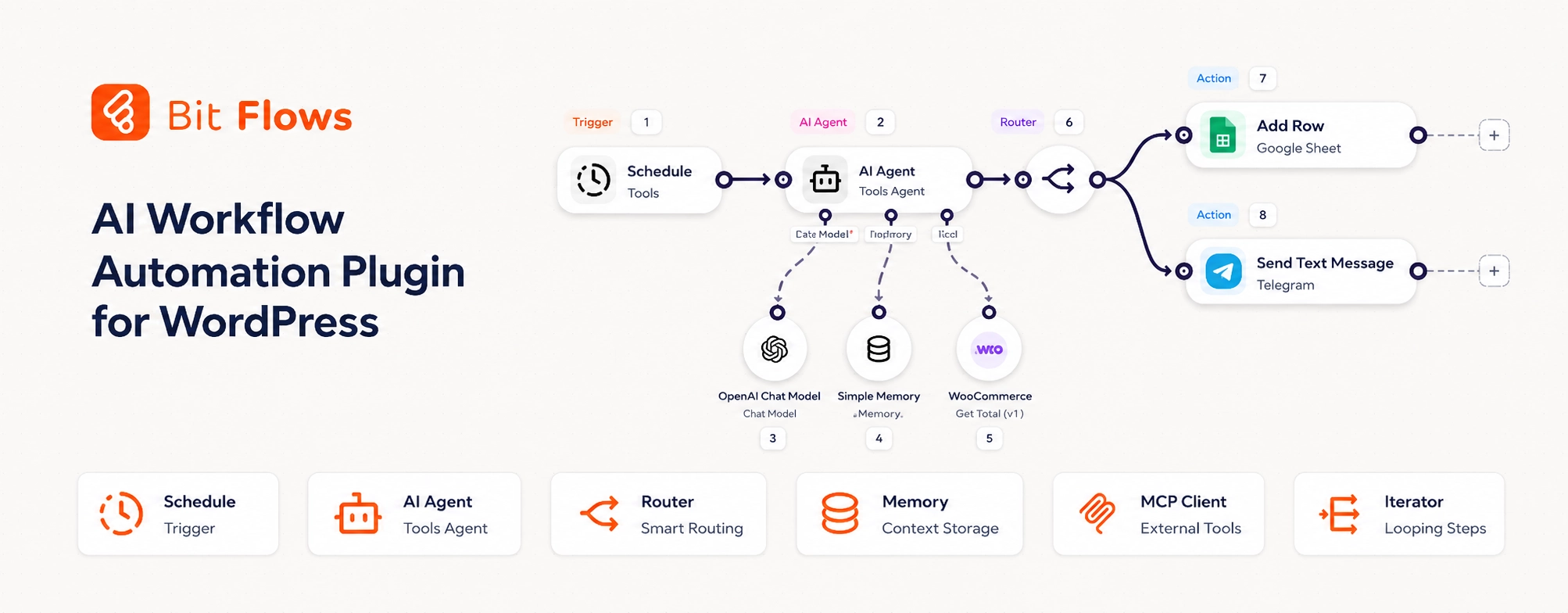
Automate your WooCommerce store without a single line of code. Bit Flows handles order management, customer data, notifications, and many more. The built-in AI Agent of Bit Flows can make decisions, run smart workflows using tools like OpenAI, Gemini, Claude, and more. No task limits, no monthly fees. It’s the most affordable option to automate your WooCommerce store tasks.
4. Omnisend

Omnisend brings email automation, SMS campaigns, and customer segmentation together under one roof. Merchants use it for automated welcome sequences, cart recovery emails, promotional SMS campaigns, and product recommendation automation. Its drag-and-drop workflow builder is particularly well-suited to teams without a dedicated developer.
5. WPFactory Plugins

WPFactory takes a different angle on marketing automation, focusing on the store-side conditions that influence conversion rather than the outbound channel itself. Plugins cover marketing & promotions, store customization, automated order restrictions, and admin & reporting automation.
For smaller stores, these no-code WooCommerce plugins often deliver faster results at a lower ongoing cost than enterprise-level SaaS platforms.
And the best thing about what WPFactory offers is that it gives you all-access plugins with a lifetime license, meaning you can get 65 plugins that help you automate your store for life.
Best No-Code Workflow Automation Plugins for WooCommerce
Uncanny Automator
Uncanny Automator is the go-to for connecting WooCommerce with other WordPress plugins and external apps through trigger-action workflows. Practical examples include enrolling customers in courses after purchase, sending Slack alerts for VIP orders, logging orders in Google Sheets, and triggering CRM actions at checkout. The visual automation builder keeps all of this accessible to store owners who have no interest in writing code. If you would rather pull the data out yourself, see our guide to exporting WooCommerce orders.
SureTriggers
SureTriggers focuses on cloud-based automation between WooCommerce and external SaaS platforms. Popular integrations include Mailchimp, ActiveCampaign, HubSpot, Google Sheets, Telegram, and Stripe. Agencies managing multiple WooCommerce stores find it particularly useful — workflows can be built once and deployed quickly across several client sites.
Zapier and Make
Zapier and Make extend WooCommerce automation well beyond the WordPress ecosystem. Common workflows include invoice generation, ERP synchronization, customer onboarding sequences, shipping notifications, multi-platform reporting dashboards, and automated accounting exports.
The two tools suit different users. Make supports advanced branching logic and visual workflow mapping, making it a better fit for complex automations. Zapier is faster to set up and more beginner-friendly for teams that need quick wins without a steep learning curve.
WooCommerce Automation for Sales Optimization and Customer Retention
The most profitable WooCommerce stores don’t just automate marketing, they automate the entire customer journey, from first purchase to long-term retention.
The workflows that most directly move revenue are post-purchase upsell campaigns, personalized coupon automation, product recommendation emails, subscription renewal reminders, loyalty reward triggers, and abandoned cart recovery. WPFactory’s no-code plugin ecosystem handles all of these natively inside WooCommerce, without loading external scripts that slow down checkout.
Real-world results from stores using these approaches include dynamic pricing workflows lifting average order value by 15%–30%, checkout upsells improving conversion during seasonal campaigns, automated customer segmentation reducing targeting errors, and role-based pricing automations simplifying wholesale management. These aren’t just marketing gains, smoother workflows also reduce friction for support and fulfillment teams.
Operational Automation for WooCommerce Stores
Marketing automation gets most of the attention, but operational automation is often where growing stores find their fastest efficiency gains.
Key workflows worth automating include stock notifications, order status, fraud-prevention rules, shipping workflow automation, ERP synchronization, invoice automation, role–based permissions, and automated tax and pricing logic.
WPFactory admin & reporting plugins are built with operational efficiency in mind. The goal is to handle backend processes cleanly, no complex configuration, no custom PHP development required. For a growing WooCommerce business, automating repetitive admin tasks can realistically save between 5 and 10 hours a week, while reducing fulfillment mistakes and cutting down on support tickets.
HPOS and WooCommerce Blocks Compatibility Explained
As WooCommerce stores scale, two infrastructure elements matter more than most merchants initially expect: HPOS (High-Performance Order Storage) and WooCommerce Blocks.
HPOS improves order query performance significantly at volume. WooCommerce Blocks modernize the checkout experience and are increasingly the default for new store builds. Together, they improve scalability, reduce plugin conflicts, and support the kind of Core Web Vitals performance that affects both UX and search rankings.
The catch is that older automation plugins often still depend on legacy WooCommerce architecture, which can create real performance bottlenecks as a store scales. WPFactory actively maintains HPOS compatibility across its entire plugin ecosystem, so stores stay stable during traffic spikes, seasonal campaigns, and high-order-volume periods without needing to audit every plugin individually.
How to Choose the Right WooCommerce Automation Plugin
The honest answer is that the right plugin depends on your store’s size, workflow complexity, and where your biggest operational pain points are.
Small Stores should prioritize no-code setup, lightweight plugins, affordable pricing, and native WooCommerce integrations. Complexity isn’t your friend at this stage, speed to implementation is.
Medium-Sized Stores benefit most from CRM integrations, customer retention automation, workflow customization, sales funnel optimization, and inventory automation. At this scale, the focus shifts from setup ease to ROI and retention performance.
Agencies and Developers need multi-store scalability, API flexibility, advanced workflow builders, automation templates, and multi-client deployment support. Tools that can be configured once and reused across clients are worth the investment.
If reducing recurring SaaS costs and operational complexity are priorities, WooCommerce-native plugin bundles from WPFactory offer a practical way to handle most workflows without building out a stack of third-party subscriptions.
Why WPFactory Is a Strong WooCommerce Automation Alternative
Most automation platforms lead with marketing. WPFactory leads with the store itself.
Rather than focusing narrowly on email flows or outbound campaigns, WPFactory combines sales optimization, checkout automation, operational workflows, dynamic pricing, role-based controls, customer experience improvements, and inventory logic automation in one modular ecosystem.
With 65+ plugins available, store owners can activate exactly what they need without deploying broad feature sets across an entire site. Compared with Booster.io, this modular approach reduces unnecessary processing overhead and makes maintenance more manageable as stores grow.
WPFactory also maintains a consistent focus on Core Web Vitals optimization, HPOS compatibility, WooCommerce Blocks support, no-code implementation, and plugin bundle cost efficiency, practical priorities for stores that need to scale without scaling their costs at the same rate. Several stores using pricing automation, checkout optimization, and upsell workflows have reported 30%+ sales lift during promotional campaigns.
Practical WooCommerce Automation Setup Example
Here’s how a growing WooCommerce store might build out automation in four practical steps.
Step 1: Optimize Checkout Rules
Use a WPFactory pricing or checkout plugin to create role-based discounts, apply automatic cart conditions, trigger free shipping thresholds, and add checkout upsell conditions. Estimated setup time: 20–30 minutes. Expected outcome: higher average order value and reduced cart abandonment at checkout.
Step 2: Recover Abandoned Carts
Connect WooCommerce with Klaviyo, Omnisend, or AutomateWoo to send reminder emails after one hour, offer dynamic coupons after 24 hours, trigger SMS reminders for VIP customers, and recommend related products automatically. Expected outcome: recovery rates between 10% and 20%, depending on traffic quality and offer timing.
Step 3: Automate CRM Sync
Use Zapier or Make to sync WooCommerce orders with ActiveCampaign, add customers to segmented workflows, trigger onboarding campaigns automatically, and export purchase data into Google Analytics reports. Expected outcome: less manual admin work and more accurate lifecycle marketing automation.
Step 4: Improve Operational Efficiency
Use WPFactory plugins to automate inventory alerts, order restrictions, shipping conditions, customer permissions, and dynamic pricing logic. Expected outcome: fewer support tickets, faster order processing, and more consistent operations during peak periods.
FAQ
What is the best automation plugin for WooCommerce?
The best WooCommerce automation plugin depends on the workflows your store needs most. AutomateWoo is widely used for email marketing automation, while Uncanny Automator supports broader workflow integrations. WPFactory plugins are especially useful for WooCommerce-native sales optimization, pricing automation, and backend operational workflows.
Are WooCommerce automation plugins beginner-friendly?
Most modern WooCommerce automation plugins are designed for non-technical users. Many include drag-and-drop workflow builders, trigger-action systems, and visual configuration dashboards. WPFactory focuses heavily on no-code implementation, helping small businesses launch automation workflows without hiring developers.
Can WooCommerce automation improve conversion rates?
Yes. Automated upsells, abandoned cart recovery campaigns, personalized coupons, and checkout optimization workflows regularly improve conversion performance. Some WooCommerce stores report 15%–30% higher average order value after implementing automation-focused pricing and retention strategies.
Which WooCommerce automation plugins support HPOS?
Several leading plugins now support HPOS, including AutomateWoo, Uncanny Automator, many WPFactory plugins, and official WooCommerce.com extensions. HPOS compatibility improves order processing performance and helps stores scale more efficiently during high-order-volume periods.
Is Zapier necessary for WooCommerce automation?
Not always. WooCommerce-native plugins can handle many workflows internally without relying on external SaaS automation tools. Zapier becomes valuable when connecting WooCommerce to CRMs, accounting systems, spreadsheets, shipping tools, or enterprise platforms.
What is the difference between marketing automation and operational automation?
Marketing automation focuses on customer communication, retention campaigns, and conversion optimization. Operational automation handles backend workflows such as inventory management, order restrictions, ERP synchronization, invoice automation, and shipping logic. Most scaling WooCommerce stores benefit from both categories.
Do WooCommerce automation plugins support WooCommerce Blocks?
Many newer WooCommerce automation plugins now support WooCommerce Blocks, including several WPFactory plugins and official WooCommerce.com extensions. Compatibility matters because WooCommerce Blocks are increasingly the standard for modern checkout and cart experiences.
Are plugin bundles better than individual WooCommerce plugins?
Plugin bundles often reduce costs and simplify compatibility management. WPFactory’s plugin bundles give stores access to multiple WooCommerce automation tools under one ecosystem, which can reduce recurring expenses compared with purchasing separate SaaS subscriptions and standalone plugins.
Final Thoughts
There’s no single best automation plugin for every WooCommerce store, and that’s fine. Some businesses need advanced customer retention automation. Others need pricing workflows, inventory management, or checkout optimization. The stores that see the strongest long-term results tend to combine customer-facing automation with backend operational workflows, rather than treating them as separate concerns.
WPFactory’s ecosystem of 65+ no-code WooCommerce plugins gives store owners, agencies, and developers a flexible, modular toolkit for sales optimization, operations automation, dynamic pricing, customer retention, and checkout performance — without the overhead of expensive custom development or bloated plugin stacks.
If your goal is to simplify workflows, protect Core Web Vitals, and scale without watching costs spiral, explore WPFactory plugin bundles — a practical, purpose-built starting point for the WooCommerce ecosystem.