Conditional Shipping for WooCommerce: Restrict Shipping Options by Anything hides WooCommerce shipping methods that fail conditions you set, such as order amount, city, user role, payment gateway, product, category or date and time. Configure it at WPFactory > Conditional Shipping (also reachable at WooCommerce > Settings > Conditional Shipping).
What it does #
For each condition you enable, you enter a value against each shipping method (Flat rate, Free shipping, Local pickup and so on). At the cart and checkout, Conditional Shipping removes any method whose condition is not met. Methods you leave empty are not affected.
Install and activate #
- Free: go to Plugins > Add New, search for Conditional Shipping for WooCommerce by WPFactory, then install and activate it.
- Pro: download Conditional Shipping for WooCommerce: Restrict Shipping Options by Anything Pro from your WPFactory account, upload the ZIP at Plugins > Add New > Upload Plugin and activate it. WooCommerce must be active.

For more detail, see How to install Conditional Shipping.
First setup #
- Go to WPFactory > Conditional Shipping. On the General section, confirm Enable plugin is ticked (it is on by default).
- Leave Logical operator at AND (the default) for now. It only matters once you use more than one condition.
- Under Available Conditions, tick the condition you need, for example Minimum Order Amount, and save. Every condition is off by default.
- Click the condition’s link to open its section, for example Order Amount. The same Enable condition checkbox appears there.
- Enter a value against each shipping method you want to restrict, for example
50next to Free shipping, and leave the others empty. Save. - Add products to a cart below and above the value to confirm the method hides and shows as expected.

General options #
| Label | What it does | Default | Free/Pro |
|---|---|---|---|
| Logical operator | AND: every enabled condition must pass. OR: any one passing condition is enough. | AND | Free |
| Add products variations | Adds variations to the product list in Require Products and Exclude Products. | On | Free |
| Require all | All cart products must match, instead of at least one (Require Products, Categories, Tags and Shipping Classes only). | Off | Free |
| Cart instead of package | Checks the whole cart instead of the current shipping package for order amount and product-based conditions. | Off | Free |
| Checkout notice | Shown if the chosen method becomes unavailable during checkout. Supports %shipping_method%. |
%shipping_method% is not available. |
Free |
| Use shipping instances | Set conditions per shipping method instance, for example a different Flat rate rule in each zone. | Off | Pro |
| Debug | Writes a log to WooCommerce > Status > Logs. Covers only the Cities and Date/Time conditions. | Off | Free |


More on these options: Conditional Shipping options and general settings, AND vs OR and debug logging.
Main features #
Every condition has a Require and an Exclude version, and each has its own section. All conditions are free.
Order Amount #
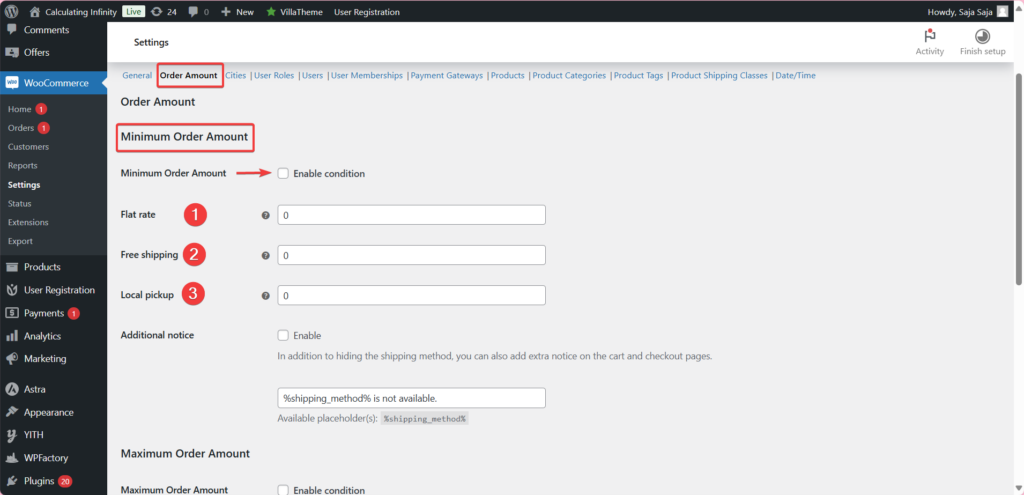
Minimum Order Amount hides a method when the cart total is below the value you enter, and Maximum Order Amount hides it when the total is above. See minimum and maximum order amount shipping rules.
Cities #
Enter city names one per line to allow a method only for those cities (Require Cities) or to hide it for them (Exclude Cities). Matching ignores letter case. See require cities and exclude cities.


User Roles and Users #
Allow or exclude a method by user role (a Guest role covers logged-out visitors, and only the customer’s first role is checked) or by user ID. See shipping rules by user role and shipping rules by user ID.


User Memberships #
Allow or exclude a method by membership plan. This condition works with the WooCommerce Memberships plugin. See membership-based shipping methods.
Payment Gateways #
Show a method only with certain payment methods, or hide it for them. These rules are most reliable on the checkout page, where the selected gateway is known. See conditional shipping with payment gateways and excluding payment gateways.

Products, Categories, Tags and Shipping Classes #
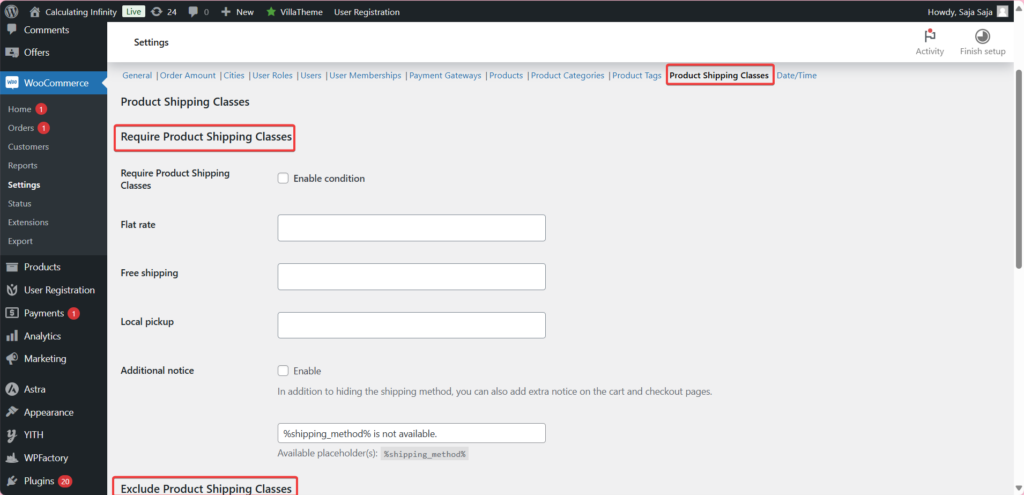
Require or exclude specific products (and variations, when Add products variations is on), whole categories, tags or shipping classes, including a No shipping class option. See the guides for products, categories, tags and shipping classes.


Date/Time #
Enable or hide a method during set hours, days or months. A range is written as from-to with a single hyphen between the two sides, and multiple ranges are separated with a semicolon, for example 00:00:00-14:59:59 for before 3 PM daily. See conditional shipping by date and time.

Cart and checkout notices #
Each condition section has an Additional notice option that shows a message on the cart and checkout pages when a method is hidden. See cart and checkout notices for hidden shipping methods.
Per-instance conditions (Pro) #
With Use shipping instances on, each shipping method instance in each zone gets its own value field. See set shipping conditions per shipping method instance.
Free vs Pro #
| Feature | Free | Pro |
|---|---|---|
| All conditions (order amount, cities, user roles, users, memberships, payment gateways, products, categories, tags, shipping classes, date/time) | Yes | Yes |
| General options, notices and debug log | Yes | Yes |
| Use shipping instances (conditions per method instance and zone) | No | Yes |
FAQ #
I entered a value but the method still shows. Why? #
The condition is probably not enabled. Tick it under Available Conditions on the General section, or tick Enable condition in its own section, and save. See shipping conditions ignored at checkout.
How do I enter several cities? #
One city per line. Commas are not treated as separators.
What happens when I use two conditions on the same method? #
With Logical operator set to AND, the method shows only when both pass. With OR, one passing condition is enough.
Can I set a different rule for the same method in two zones? #
Yes, with the Pro option Use shipping instances. In the free version, a rule applies to the method type in every zone.
Does Debug log every condition? #
No. It currently logs only Require and Exclude Cities and Require and Exclude Date/Time.
Get more control #
Every condition is free. Conditional Shipping for WooCommerce: Restrict Shipping Options by Anything Pro adds the Use shipping instances option, so you can set conditions per shipping method instance inside a specific zone. Get Conditional Shipping Pro.
Need a hand? Our team answers every ticket on the Conditional Shipping support forum.